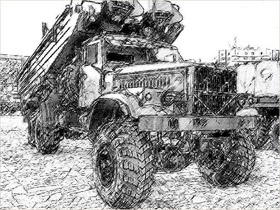
Graphic software for Windows Mac graphic software  
Please enter your email to be kept posted on updates and discounts:
 
  
  Products     Download     Online Store     Tutorial     Support     About Company
en  fr  de  es  pt  it  jp  ru    
 

Tutorial: AKVIS Sketch

Motorshow: a pencil drawing out of a photo


The example author is Alexey Pasko. The example is made by means of Adobe Photoshop CS.


Alexey decided to change one of his photos made on a motorshow into a pencil drawing.
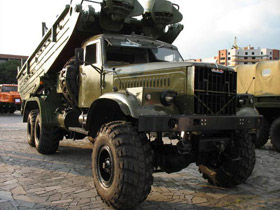
Military machinery - motorshow photo
  • Step 1. First of all we should reveal as many details as possible, because the more detail are on the photo, the more detailed will be the pencil drawing.

    Let's create a background layer copy and call AKVIS Enhancer plug-in on this layer. The plug-in will help us to increase details in the photo's shadows. This can be done by increasing the Shadows parameter to the maximum.
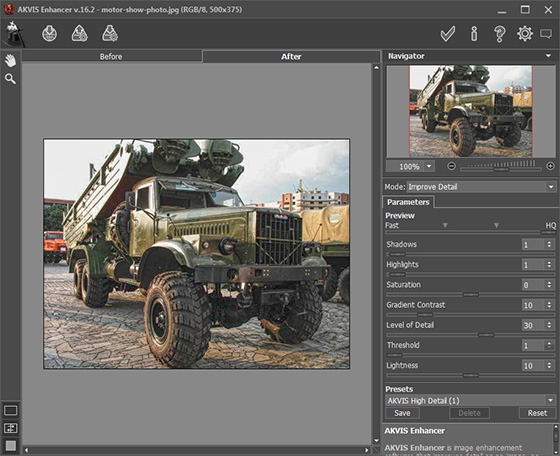
    AKVIS Enhancer window with the parameters

    Now by using Unsharp Mask filter we increase sharpness of the photo to enhance details even more. Apply Unsharp Mask filter with the following settings: Amount - 70%, Radius - 0.5 pixels, Threshold - 0 levels.

    After AKVIS Enhancer correction and application of Unsharp Mask filter the photo looks like this:
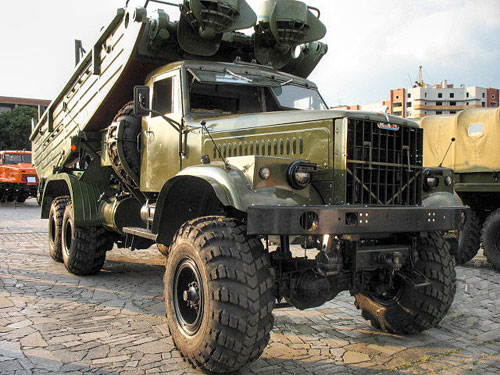
    Photo after application of AKVIS Enhancer and Unsharp Mask
  • Step 2. Lets make a copy of the edited photo layer, just for a case. Being in the new layer call AKVIS Sketch.

    Change settings: decrease Midtones Intensity down to 4 and increase Sharpen up to 70. All other settings remain default.
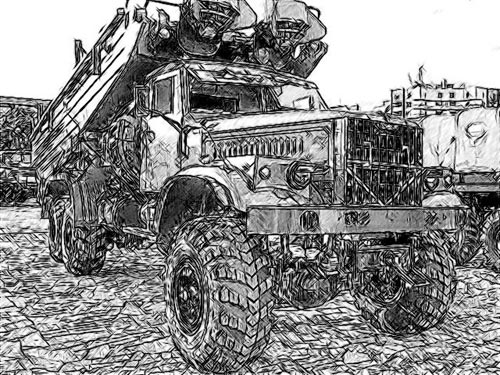
    Pencil drawing

    The square in the photo is tiled and AKVIS Sketch draw it thouroghly. But too many strokes make the drawing dirty and divert attention from the subject. We could of course blur the tiles before applying AKVIS Sketch, but chose another way.

    Apply modifications by pressing Apply the result in the upper right corner of the plug-in window.

  • Step 3. Add a new Levels Adjustment layer with a mask and lighten the tiles and the remaining background.
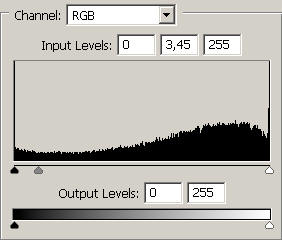
    Levels dialogue window

    There has become fewer strokes, but the sharpness of the tiles is left intact to a large degree.
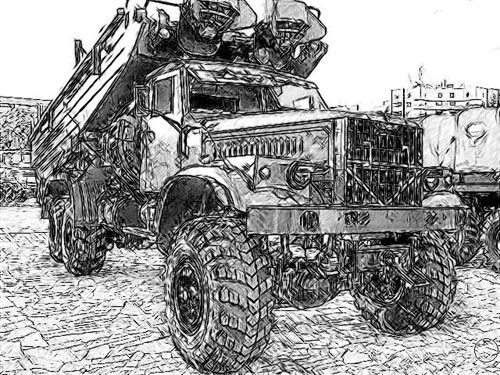
    The drawing after background lightening
  • Step 4. Lets merge the Levels Adjustment layer and the layer containing our drawing into a single upper layer and apply the Photoshop Rough Pastels filter. This is made for the drawing not to be too "slick" and to add paper texture.
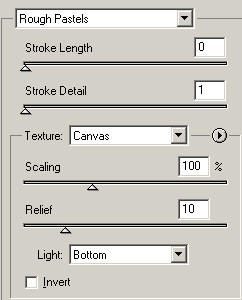
    Rough Pastels filter settings
  • Step 5. The last stroke - a little bit more Levels for better contrast.

    The Layers palette at this stage looks like this:
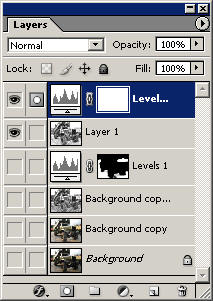
    Layers palette

    And here is the resulted pencil drawing:
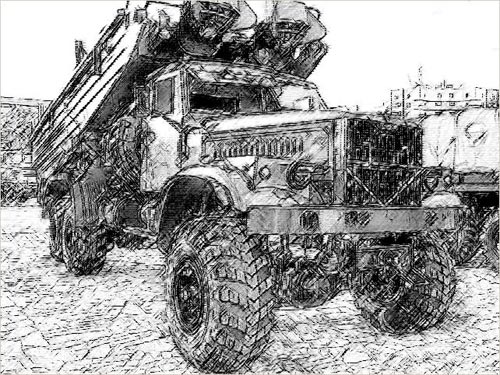
    Pencil drawing on textered paper
 
How It Works How It Works
   — AKVIS Sketch plug-in — AKVIS Sketch plug-in
   — AKVIS Sketch stand-alone — AKVIS Sketch stand-alone
   — Make a Sketch from a Photo — Make a Sketch from a Photo
   — Background Tab — Background Tab
   — Imitate Sketch Drawing on a Canvas — Imitate Sketch Drawing on a Canvas
Examples Examples
   — Pencil Sketch: Let's Draw a Tulip — Pencil Sketch: Let's Draw a Tulip
   — Color Sketch — Color Sketch
   — Graphite Pencil Portrait — Graphite Pencil Portrait
   — Watercolor Drawing — Watercolor Drawing
   — Artistic Processing — Artistic Processing
   — A Painting out of a Photo — A Painting out of a Photo
   — A watercolor portrait from a photo — A watercolor portrait from a photo
   — Winter Dream — Winter Dream
   — Sketch of a Pet — Sketch of a Pet
   — A Little Girl — A Little Girl
   — Westmuir Street in Glasgow — Westmuir Street in Glasgow
   — A woman in a Tub: a real work of art — A woman in a Tub: a real work of art
   — Postcard on a Pencil Drawing — Postcard on a Pencil Drawing
   — Baseball Photo to Color Drawing — Baseball Photo to Color Drawing
   — A Wolf: make a Sketch from a Photo — A Wolf: make a Sketch from a Photo
   — Pastel Drawing Technique — Pastel Drawing Technique
   — Motorshow: a Pencil Drawing — Motorshow: a Pencil Drawing
   — Watercolor of a Wolf — Watercolor of a Wolf
   — A Hand Draws a Hand — A Hand Draws a Hand
   — Transform a Video into a Cartoon — Transform a Video into a Cartoon
   — Convert Vector Drawing to Sketch — Convert Vector Drawing to Sketch
   — Portrait out of a Newspaper Clipping — Portrait out of a Newspaper Clipping
   — Quiet Harbor — Quiet Harbor
   — Sweet Couple — Sweet Couple
   — Black&White Image in Photo Frame — Black&White Image in Photo Frame
   — Dream to Reality — Dream to Reality
   — Christmas Card from a Photo — Christmas Card from a Photo
   — Artist at Work — Artist at Work
   — Romantic Mood Without Photoshop — Romantic Mood Without Photoshop


   Privacy Policy | Site Map | Search | English  | Français  | Deutsch  | Español  | Português  | Italiano  | 日本語  | Pусский  | © 2004-2008, AKVIS Software Inc. All rights reserved.