Graphic software for Windows Mac graphic software
Please enter your email to be kept posted on updates and discounts:
 
  
  Products     Download     Online Store     Tutorial     Support     Company
en  fr  de  es  pt  it  jp  ru    
 

Tutorial: AKVIS Sketch

How it Works


AKVIS Sketch is software for conversion of photos to pencil sketches and watercolor drawings.
It's a wonderful tool for those who have always wanted to draw but didn't know how.

You can also achieve additional effects on the Background tab. Keep a part of the initial image to imitate a blend of the original photo and the drawing, blur some parts of the image.
Personalize your work of art by adding an inscription (a signature or a greeting) to your pencil drawing (on the Text tab).
Besides, the parameters on the Canvas tab allow adding a rough surface to your image, as if it has been drawn on canvas, corrugated paper, brick wall, etc.

Sketch can work independently as a standalone program as well as a plug-in to a photo editor.
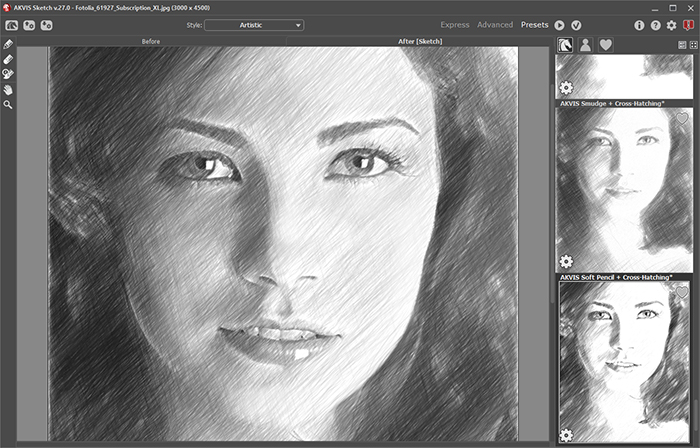
Learn how to create realistic color and B&W drawings that imitate the technique of graphite and color pencil, charcoal and watercolor painting:

 
How It Works How It Works
   — Workspace — Workspace
   — How to Work with the Program — How to Work with the Program
   — Make a Sketch from a Photo — Make a Sketch from a Photo
   — Background Effects — Background Effects
   — Add Text/Signature — Add Text/Signature
   — Imitate Sketch Drawing on a Canvas — Imitate Sketch Drawing on a Canvas
Examples Examples
   — Pencil Sketch: Let's Draw a Tulip — Pencil Sketch: Let's Draw a Tulip
   — Convert a Photo to a Color Sketch — Convert a Photo to a Color Sketch
   — Graphite Pencil Portrait — Graphite Pencil Portrait
   — Watercolor Drawing — Watercolor Drawing
   — Artistic Processing — Artistic Processing
   — A Painting out of a Photo — A Painting out of a Photo
   — A Watercolor Portrait from a Photo — A Watercolor Portrait from a Photo
   — Winter Dream — Winter Dream
   — Pencil Sketch of a Pet — Pencil Sketch of a Pet
   — A woman in a Tub: a Real Work of Art — A woman in a Tub: a Real Work of Art
   — Postcard on a Pencil Drawing — Postcard on a Pencil Drawing
   — Baseball Photo to Color Drawing — Baseball Photo to Color Drawing
   — Make a Sketch from a Wolf Photo — Make a Sketch from a Wolf Photo
   — Pastel Drawing Technique — Pastel Drawing Technique
   — Motorshow: a Pencil Drawing — Motorshow: a Pencil Drawing
   — A Little Girl: B&W Pencil Sketch — A Little Girl: B&W Pencil Sketch
   — Westmuir Street in Glasgow — Westmuir Street in Glasgow
   — Wild Beast of Prey: Watercolor — Wild Beast of Prey: Watercolor
   — Transform a Video into a Cartoon — Transform a Video into a Cartoon
   — A Hand Draws a Hand — A Hand Draws a Hand
   — Convert Vector Drawing to Sketch — Convert Vector Drawing to Sketch
   — Portrait out of a Newspaper Clipping — Portrait out of a Newspaper Clipping
   — Quiet Harbor:  a Watercolor Painting — Quiet Harbor: a Watercolor Painting
   — Sweet Couple: Create a Postcard — Sweet Couple: Create a Postcard
   — Black-and-White Image in Photo Frame — Black-and-White Image in Photo Frame
   — Dream to Reality: How to Blend... — Dream to Reality: How to Blend...
   — Christmas Card from a Photo — Christmas Card from a Photo
   — Artist at Work — Artist at Work
   — Romantic Mood Without Photoshop — Romantic Mood Without Photoshop
   — Stop the Moment! (Sketch&Blur) — Stop the Moment! (Sketch&Blur)
   — Versailles: Traveling to the past — Versailles: Traveling to the past


   Privacy Policy | Site Map | Search | English  |Français  |Deutsch  |Español  |Português  |Italiano  |日本語  |Pусский  | © 2004-2009, AKVIS Software Inc. All rights reserved.
