AKVIS ArtWork 15.1 | Collection of Painting & Drawing Techniques
AKVIS ArtWork is designed to imitate different painting techniques. Create a piece of art out of any digital photo!
AKVIS ArtWork is an ideal solution for your creative expression. Combining advanced technologies with an artistic approach, the program is represented as an impressive creative suite and a perfect virtual artist. The transformation of a picture into a painting happens before your very eyes — you can follow the birth of a work of art in real time!
AKVIS ArtWork includes these painting and drawing styles: Oil, Watercolor, Gouache, Comics, Pen & Ink, Linocut, Stencil, Pastel, and Pointillism; which can be used separately or in combination.
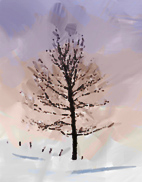
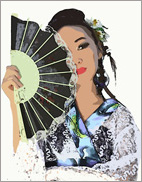
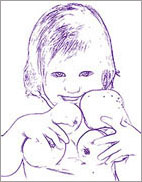
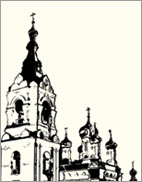
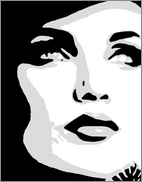
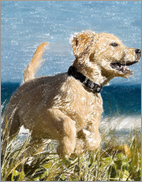
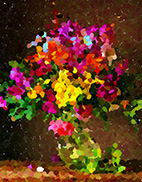
The software offers the most simple and versatile way to add artistic effects to photographs.
Create an oil portrait of your friend, a landscape painting, or a still life picture. Express yourself in new genres!
You can print the final painting on a color printer, frame it or put it into a ready-made photo frame, or even add some real oil strokes to make the painting real. Make a greeting card or a poster, and you have a wonderful present for friends and family.
No brushes or paints are required. Just get ArtWork and unleash your creativity.
Young artists and art teachers can use ArtWork to improve painting skills. Those who generally focus too much on details can first simplify their images using ArtWork, then use the result as a reference to paint their own painting.
Effects & Features:
The Oil technique converts your photographs into oil paintings. The program lays brush strokes naturally using the original photo as a reference. Even with the default settings you can achieve a realistic result coming very close to hand-painted works. Tweak the options, and you can research a variety of oil painting styles. For those in need of more flexibility and having ideas on how the final panting should look, there is a tool called Stroke Direction. This semi-automatic and highly intelligent tool is a real godsend as it gives you full control over the strokes!


The Watercolor style converts a photo into a watercolor painting. Watercolor is one of the most difficult painting techniques and it is hard for a machine to emulate this effect, but ArtWork handles this well. The software lets you create beautiful, airy, and light watercolor paintings which look like realistic paintings.


The Gouache effect lets you create a gouache painting from a photo. It can also make an image look like a tempera picture. Gouache is a versatile painting technique which uses dense intensive colors. Its characteristics are brilliance and opacity. The opacity feature and covering power allow you to create outstanding effects that can not be achieved with the watercolor paints. This technique is widely used in decorative painting and when creating color sketches and drawings.


Next style, the Comics effect, allows you to replicate works of famous comics artists with just a few clicks. This effect reduces the tones of the photo to create an image similar to a poster or a cartoon. You can make a comic strip from your party photos or create an original poster.


The Pen & Ink effect creates ink drawings from digital photos. It is emulating a special technique in which colored inks are applied to paper using a pen - from modern pens to a quill dipped in an inkwell. This style produces graceful images composed of object outlines.


The Linocut effect creates an image in the style of a linocut print. Linocut is a method in which a raised pattern is carved into a piece of linoleum, which is then used with ink to print an image on paper. Linocuts are known for their characteristic expressiveness, strong contrast between black and white, and rich and exuberant strokes. This effect is ideally suited for images of architecture or nature scenes.


The Stencil effect converts an image into a stencil drawing with a high-contrast outline. Stenciling is a technique for reproducing designs by passing ink or paint over holes cut in cardboard, plastic, or metal onto the surface to be decorated. The program allows you to make an expressive monochromatic print. It's possible to add midtone areas and apply a hatching or pop art pattern. Give your photo a dramatic look!


The above listed effects (Oil, Watercolor, Gouache, Comics, Pen & Ink, Linocut, Stencil) are available in all versions of ArtWork: Home, Home Deluxe, and Business. The two other (Pastel and Pointillism) are only available for Home Deluxe and Business licenses.
The Pastel effect, available for Home Deluxe and Business licenses, simulates a special artistic technique which bridges the gap between painting and drawing. The pastel sticks form soft velvety strokes with subtle edges.


The Pointillism effect, available for Home Deluxe and Business licenses, is a style of painting in which small dots of color are applied to create the illusion of form. It was part of the impressionist movement that wanted to make thoughts and feelings visible and opened the gates to modern art. The Pointillism technique is time-consuming and requires considerable skill but using AKVIS ArtWork you can create masterpieces in just one click of a button!


You can combine the ArtWork's effects to create outstanding pictures with different painting and drawing techniques!
Every effect offers ready-to-use AKVIS Presets which help you start working. They can be applied "as is" or can be modified. The program lets you save your favorite photo-to-painting settings as a preset and use them in the future. It's possible to import and export your presets.


The virtual painter will take care of converting a digital picture into a painting, but what else makes a painting look like a work of art? Canvas and the artist's signature! ArtWork offers the choice between a flat background and a rough surface (canvas, paper, etc) that makes the impression even more stunning. You can add a signature or an inscription to the picture with your own font and color.
The software offers Batch Processing support that allows you to create comics from home videos!
Some ArtWork's effects provide Post-Processing Tools for manually retouching a processed image. You can refine the image by removing paint irregularities, add some final touches to your masterpiece.
AKVIS ArtWork is available as a standalone program and as a plugin to a photo editor. The plug-in is compatible with AliveColors, Adobe Photoshop, Corel PaintShop Pro, and other graphics editors. Consult the compatibility page for more details.
The functionality of the program depends on the license type. During the test period you can try all options and choose the license you like.
The software offers a multi-language user interface.
Try all the features of the software during the free 10-day evaluation period.
You do not need to register. Just download the full version and start your Free Trial!
Download the program now to take advantage of its features!
- AKVIS ArtWork 15.1 — Windows 64-bit (Plugin+Standalone)
- AKVIS ArtWork 15.1 — Windows 32-bit (Plugin+Standalone)
- AKVIS ArtWork 15.1 — Mac 64-bit (Standalone)
- AKVIS ArtWork 15.1 — Mac 64-bit (Plugin)
- Installation on Linux 64-bit (Standalone)