A Little Secret: Comics and Pen&Ink


Please enter your email to be kept posted on updates and discounts:
 
 
  Products     Download     Online Store     Tutorial     Support     Company      Customer Room
en  fr  de  es  pt  it  jp  ru    
 

Tutorial: AKVIS ArtWork

A Little Secret


The author of this tutorial is Véronique Talis, of Guadeloupe.

Véronique writes:

"I love to draw in my spare time, but I don't have much talent. I've searched a long time for a program that would not only enable me to express myself, but also bring surprise and delight to my family. AKVIS ArtWork is just what I've been looking for. Now I can make Christmas presents for everyone: something that I can print and present to friends and family."


    Original Image Result

In this tutorial the AKVIS ArtWork plug-in was used with Adobe Photoshop CS3.

  • Step 1. Open an image in Adobe Photoshop.

    Original Image

    Make two copies of the original layer. Do this with the command Layers -> Duplicate Layers.

    Making Copies of the Layer
  • Step 2. Select the first layer copy. Start the AKVIS ArtWork plug-in (Filter -> AKVIS -> ArtWork). Choose Comics from the list of styles. Change the parameters to your liking.
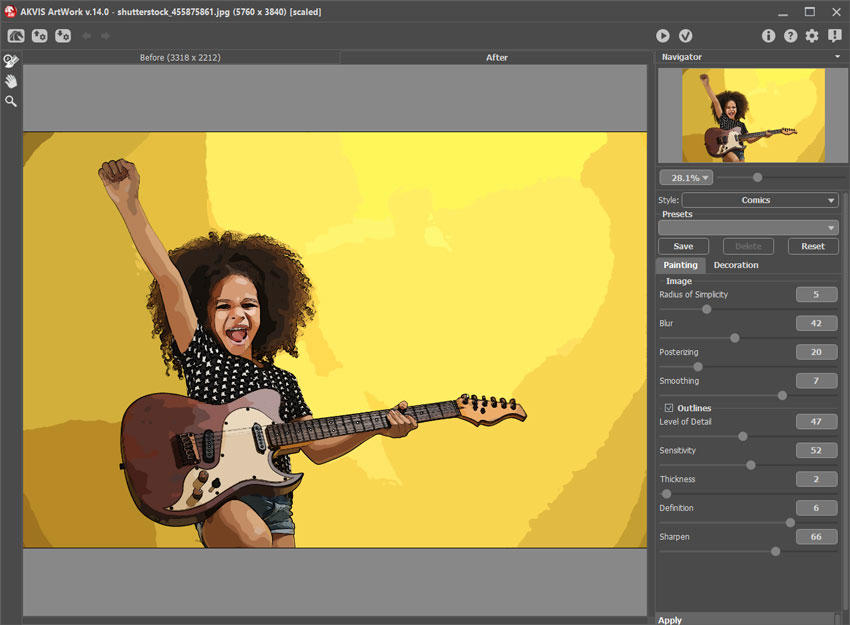
    Comics Style Applied

    Press to start processing and to apply the result and close the plug-in.

  • Step 3. Now work on the second layer copy. Start АKVIS ArtWork again. This time choose Pen and Ink from the list of styles. Set the parameters as you wish or use the default settings. Process the image and apply the result.
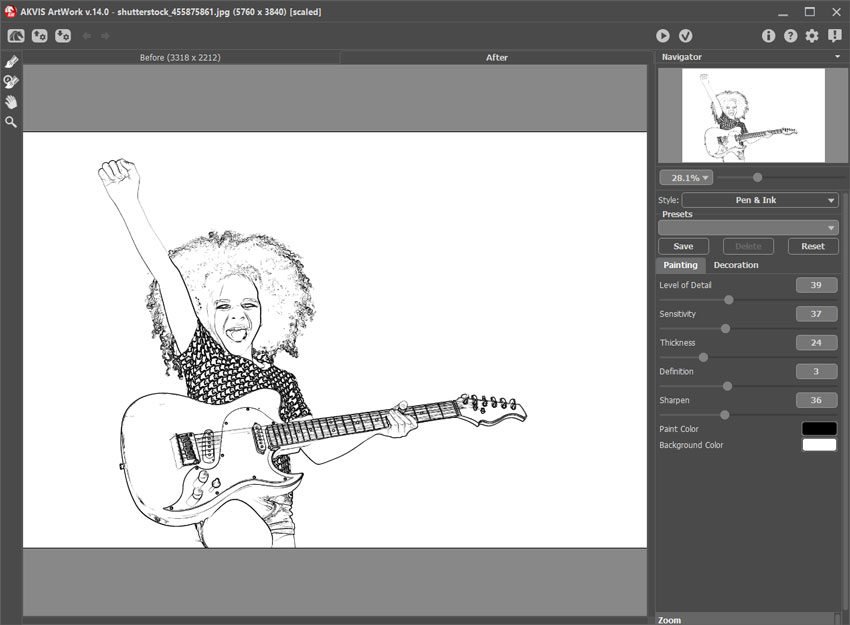
    Pen and Ink Style Applied
  • Step 4. Set the blending mode for the second layer. Go to the Layers palette and choose Overlay from the drop-down list. Next add a layer with an inscription. Choose Text from the toolbar. Change the font, color, and position of the text as you wish.

    Blending Mode

    Merge all of the layers and save the result.

    Result
 
How It Works How It Works
   — Workspace — Workspace
   — How To Use The Program — How To Use The Program
   — Add Text to a Painting — Add Text to a Painting
   — Painting on a Canvas — Painting on a Canvas
   — Working with the Presets — Working with the Presets
   — Preferences — Preferences
   — Batch Processing — Batch Processing
Styles Styles
   — Oil Painting — Oil Painting
   — Watercolor Painting — Watercolor Painting
   — Comics Effect — Comics Effect
   — Pen & Ink — Pen & Ink
   — Linocut — Linocut
   — Pastel Painting — Pastel Painting
Examples Examples
   — Harmony: Oil Painting Portrait — Harmony: Oil Painting Portrait
   — City Canal View: Oil Landscape — City Canal View: Oil Landscape
   — Animated Comic of a Cat: Video to Cartoon — Animated Comic of a Cat: Video to Cartoon
   — Emergency Cow: Make a Poster — Emergency Cow: Make a Poster
   — Greetings from Canary Islands — Greetings from Canary Islands
   — Summer Coloured Green — Summer Coloured Green
   — Casandra's Portrait — Casandra's Portrait
   — ArtWork for Art Students — ArtWork for Art Students
   — Day At The Beach — Day At The Beach
   — ArtWork Oil Gallery — ArtWork Oil Gallery
   — Orchid: an Oil Painting of Flowers — Orchid: an Oil Painting of Flowers
   — Miniature Painting — Miniature Painting
   — Still Life With Peaches — Still Life With Peaches
   — From Flawed Photo To Work Of Art — From Flawed Photo To Work Of Art
   — Antique Collage: Comics Effect — Antique Collage: Comics Effect
   — Baroque Architecture: Linocut — Baroque Architecture: Linocut
   — Ballet Art: Trying ArtWork Styles — Ballet Art: Trying ArtWork Styles
   — Human Flower: Pen & Ink Drawing — Human Flower: Pen & Ink Drawing
   — Oil Painting With a Hand-Drawn Effect — Oil Painting With a Hand-Drawn Effect
   — A Little Secret: Two ArtWork Styles — A Little Secret: Two ArtWork Styles
   — Mythical Horse: Watercolor Picture — Mythical Horse: Watercolor Picture
   — Forest Nymph — Forest Nymph
   — Ballet Dancers: Oil Painting — Ballet Dancers: Oil Painting
   — Portrait of a Lady: Modern Art — Portrait of a Lady: Modern Art
   — Sunset on Lake Garda in Pastel — Sunset on Lake Garda in Pastel
   — Creating  a Semi-Processed Image Effect — Creating a Semi-Processed Image Effect
   — A Holiday In Normandy — A Holiday In Normandy
   — Orange Door: a Comic-Like Painting — Orange Door: a Comic-Like Painting


back to top


   Privacy Policy | Site Map | Search at AKVIS    
   Contact Us | Twitter | Facebook | YouTube Channel    
| English  |Français  |Deutsch  |Español  |Português  |Italiano  |日本語  |Pусский  | © 2004-2012 AKVIS. All rights reserved.