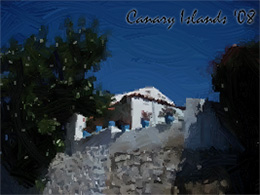
Greetings from Canary Islands. Create a postcard with ArtWork.


Please enter your email to be kept posted on updates and discounts:
 
 
  Products     Download     Online Store     Tutorial     Support     Company      Customer Room
en  fr  de  es  pt  it  jp  ru    
 

Tutorial: AKVIS ArtWork

Greetings from Canary Islands!


This photo was taken on the island of Gran Canaria in March 2008. The author wanted to share her sunny disposition with her friends and send them a self-made postcard. In this tutorial we will show you how easy it is to convert an ordinary photo into a greeting card.

The author used the plugin versions of AKVIS Retoucher and AKVIS ArtWork.

    A view of Canary Islands

    Greetings from Canary Islands

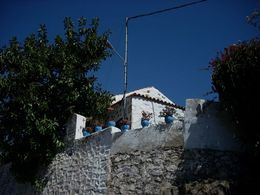
  • Step 1. Open the image in your photo editor (for example, in Adobe Photoshop). The photo composition is good, but the cables and the pole spoil the idyllic view. Before we convert the photo into an oil painting we should get rid of these details. We applied АKVIS Retoucher plugin.
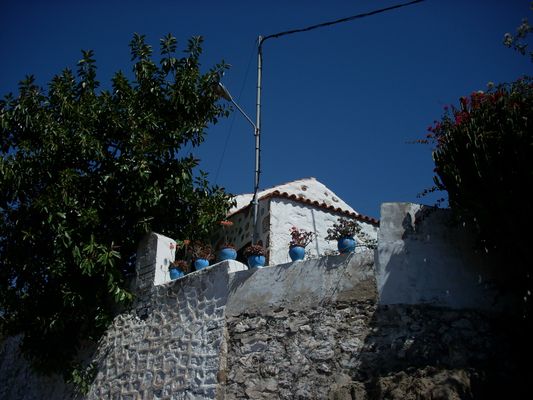
    Original Photo
    Original Photo
  • Step 2. Select the cables and the pole with any selection tool.

    The users of Adobe Photoshop can do it in Quick Mask Mode mode (click on ). To switch between the modes, use the hot-key Q. Activate the Pencil tool and paint over the irrelevant details. The painted zones will be marked red.

    Switch to Standard Mode (the button ). Invert the selection with the command Select -> Inverse.

  • Step 3. Call the АKVIS Retoucher plugin with the command Filter -> AKVIS -> Retoucher. The selected areas will be marked red.
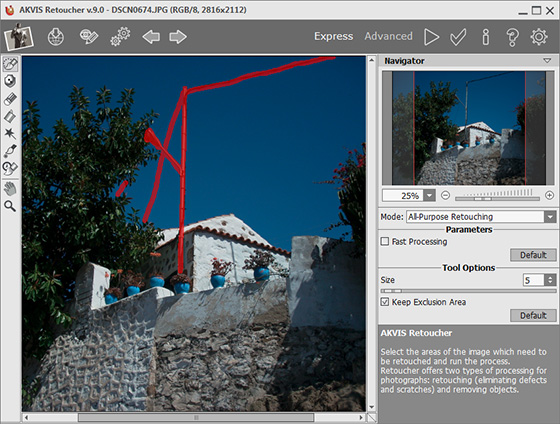
    Remove cables with АKVIS Retoucher
    Workspace of АKVIS Retoucher
  • Step 4. Click on to start image processing. AKVIS Retoucher automatically replaces the red areas with appropriate fragments of the image. When the retouching process is over, click on to apply the changes and close the plugin.
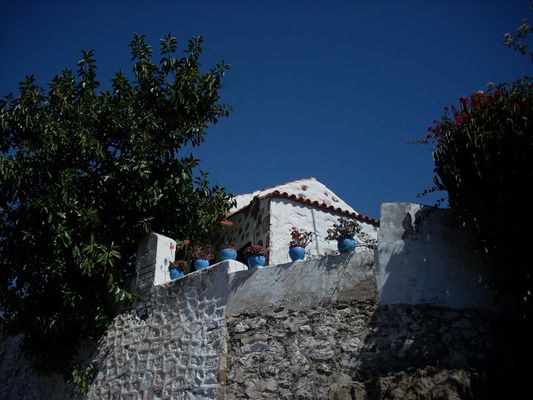
    After Retoucher
    Photo without the cables
  • Step 5. Call Filter -> AKVIS -> ArtWork to open the plugin version of АKVIS ArtWork. You will see the preliminary result in the Preview Window.

    We changed the settings on the Painting tab and added an inscription on the Text tab:

    Simplicity = 7;
    Stroke Curvature = 48;
    Max Stroke Length = 19;
    Stroke Thickness = 9;
    Stroke Intensity = 5.
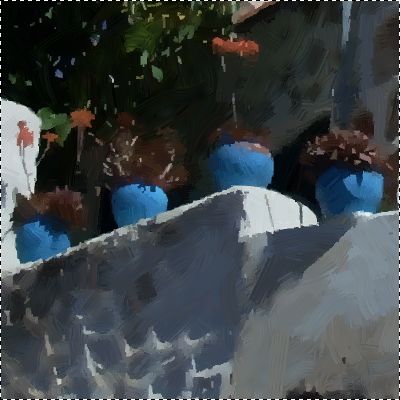
    Fragment (flower pots)
    Fragment (flower pots)
  • Step 6. Start image processing (the button ). The result will be shown in the After tab.
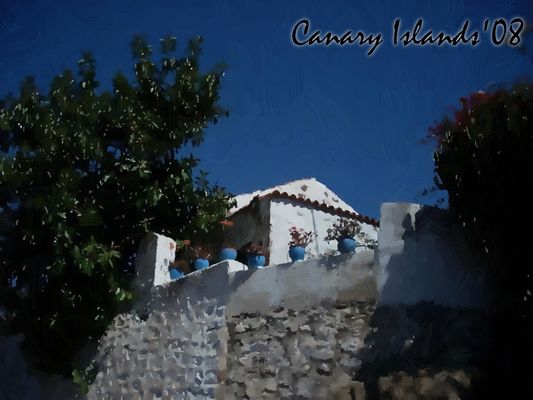
    Photo processed with AKVIS ArtWork
    Photo processed with AKVIS ArtWork
  • Step 7. Click on to apply the changes and close the plugin.


How It Works How It Works
   — Workspace — Workspace
   — How To Use The Program — How To Use The Program
   — Add Text to a Painting — Add Text to a Painting
   — Painting on a Canvas — Painting on a Canvas
   — Working with the Presets — Working with the Presets
   — Preferences — Preferences
   — Batch Processing — Batch Processing
Styles Styles
   — Oil Painting — Oil Painting
   — Watercolor Painting — Watercolor Painting
   — Comics Effect — Comics Effect
   — Pen & Ink — Pen & Ink
   — Linocut — Linocut
   — Pastel Painting — Pastel Painting
Examples Examples
   — Harmony: Oil Painting Portrait — Harmony: Oil Painting Portrait
   — City Canal View: Oil Landscape — City Canal View: Oil Landscape
   — Animated Comic of a Cat: Video to Cartoon — Animated Comic of a Cat: Video to Cartoon
   — Emergency Cow: Make a Poster — Emergency Cow: Make a Poster
   — Greetings from Canary Islands — Greetings from Canary Islands
   — Summer Coloured Green — Summer Coloured Green
   — Casandra's Portrait — Casandra's Portrait
   — ArtWork for Art Students — ArtWork for Art Students
   — Day At The Beach — Day At The Beach
   — ArtWork Oil Gallery — ArtWork Oil Gallery
   — Orchid: an Oil Painting of Flowers — Orchid: an Oil Painting of Flowers
   — Miniature Painting — Miniature Painting
   — Still Life With Peaches — Still Life With Peaches
   — From Flawed Photo To Work Of Art — From Flawed Photo To Work Of Art
   — Antique Collage: Comics Effect — Antique Collage: Comics Effect
   — Baroque Architecture: Linocut — Baroque Architecture: Linocut
   — Ballet Art: Trying ArtWork Styles — Ballet Art: Trying ArtWork Styles
   — Human Flower: Pen & Ink Drawing — Human Flower: Pen & Ink Drawing
   — Oil Painting With a Hand-Drawn Effect — Oil Painting With a Hand-Drawn Effect
   — A Little Secret: Two ArtWork Styles — A Little Secret: Two ArtWork Styles
   — Mythical Horse: Watercolor Picture — Mythical Horse: Watercolor Picture
   — Forest Nymph — Forest Nymph
   — Ballet Dancers — Ballet Dancers
   — Portrait of a Lady: Modern Art — Portrait of a Lady: Modern Art
   — Sunset on Lake Garda in Pastel — Sunset on Lake Garda in Pastel
   — Creating  a Semi-Processed Image Effect — Creating a Semi-Processed Image Effect
   — A Holiday In Normandy — A Holiday In Normandy
   — Orange Door: a Comic-Like Painting — Orange Door: a Comic-Like Painting


back to top


   Privacy Policy | Site Map | Search at AKVIS    
   Contact Us | Twitter | Facebook | YouTube Channel    
| English  |Français  |Deutsch  |Español  |Português  |Italiano  |日本語  |Pусский  | © 2004-2012 AKVIS. All rights reserved.