Installing the Model Loader
The Model Loader lets you to download the AI model required for image stylization in the Generative AI mode. It also includes a local server that enables the operation of the downloaded AI models.
Note: For optimal operation of Generative AI, we recommend a dedicated (not integrated) NVIDIA graphics card with at least 6 GB of memory and up-to-date drivers.
Installation Steps:
- Download the Model Loader from the download page.
- Run the downloaded file and follow the installation wizard prompts.

Installer Window - Once installation is complete, launch the Model Loader.
- In the Models tab, select a model for Inspire AI and click Download Selected.
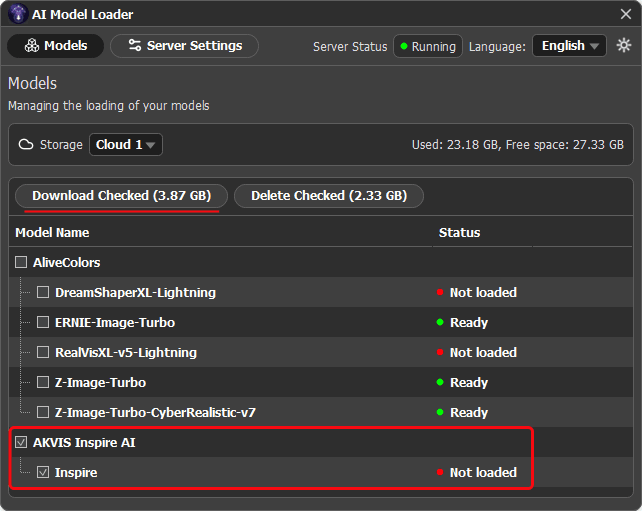
Model Loader: Models Tab - If needed, adjust the parameters in the Server Settings tab and click Apply Settings.
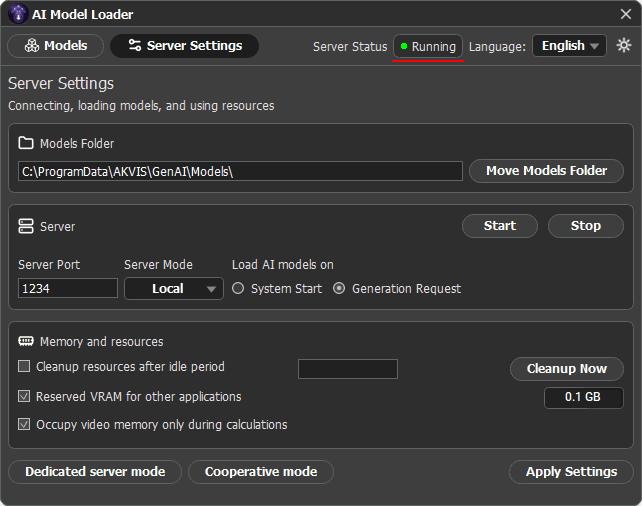
Model Loader: Server Settings Tab - The Generative AI mode is now available in AKVIS Inspire AI.
Inspire AI v. 3.0 - Free 10-day Trial
