Sich selbst zeichnende Hände
Der Autor des Beispiels ist Adriano A. Mayer. Er kommt aus Brasilien - Canoinhas - Santa Catarina.
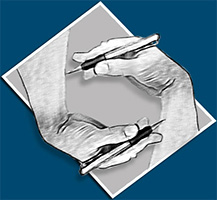
Die Idee stammt von Maurits Cornelis Escher und seiner Zeichnung "Zeichnende Hände" (1948). Auf einem Blatt Papier hält eine gezeichnete Hand einen Bleistift, mit dem sie die Hand zeichnet, die sie selber gezeichnet hat. Adriano A. Mayer wurde von dieser Zeichnung inspiriert und erstellte sein eigenes Kunstwerk anhand des Plugins AKVIS Sketch.
-
Schritt 1. In dem Bildbearbeitungsprogramm erstellen Sie eine neue Datei mit der Größe 600*600 Px und öffnen Sie das Bild zur Bearbeitung.
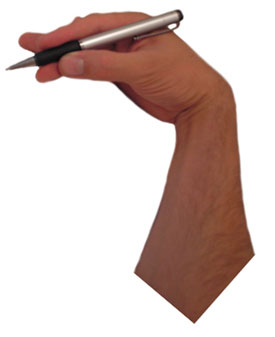
Adriano A. Mayer wählte ein Foto seiner Hand aus.
-
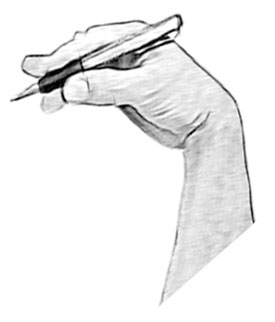
Schritt 2. Konvertieren Sie das Foto in eine Bleistiftzeichnung mithilfe des Plugins AKVIS Sketch. Wählen Sie in dem Hauptmenü den Befehl Filters -> AKVIS -> Sketch.
Passen Sie die Einstellungen an.
Hier sind die Einstellungen des Autors:
Wasserfarbe = 0,
Kohle = 0,
Kolorieren = 0,
Winkel = 45,
Strichbreite = 6,
Min Länge = 5,
Max Länge = 12,
Intensität der Mitteltöne = 3, Schraffierung der Mitteltöne = 51.Klicken Sie auf
 , um den Bildbearbeitungsprozess zu starten. Das bearbeitete Bild wird in dem Register Ergebnis angezeigt.
Wenn Sie mit dem Ergebnis zufrieden sind, klicken Sie auf
 .
.
-
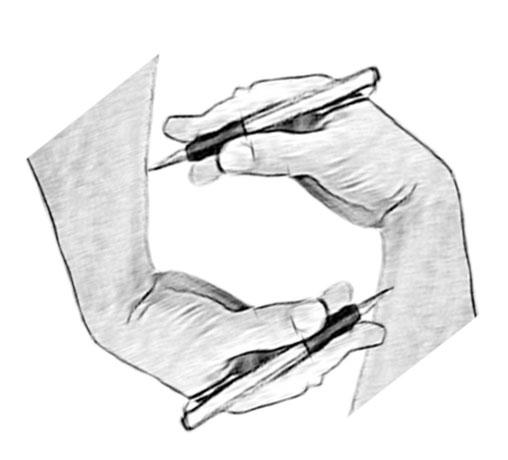
Schritt 3. Erstellen Sie eine Kopie der Ebene und fügen Sie die zweite Hand ein.
Platzieren Sie die Hände so, als ob sie einander zeichnen.
-
Schritt 4. Erstellen Sie einen Hintergrund.
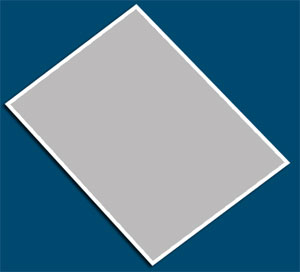
Füllen Sie den Hintergrund mit einer dunklen Farbe, indem Sie das Werkzeug Füllwerkzeug benutzen.
Wählen Sie einen rechteckigen Bereich mit dem Werkzeug Auswahlrechteck aus. Kopieren Sie die Auswahl und fügen Sie sie als neue Ebene ein.
Mit dem Werkzeug Verschieben ändern Sie die Position des Rechtecks und richten Sie es aus. Füllen Sie das Rechteck mit Grau.
Fügen Sie den Schatten dem Rechteck hinzu. Wählen Sie im Menü den Befehl Ebene -> Ebenenstil -> Schlagschatten und passen Sie die Parameter des Schattens an.
Nun wählen Sie Ebene -> Ebenenstil -> Kontur und passen Sie die Einstellungen an.
Mit dem Verschieben-Werkzeug positionieren Sie beide Hände.
-
Schritt 5. Die Hände sehen bis jetzt wie gezeichnet aus. Wollen wir sie "beleben".
Zuerst erstellen Sie die Kopien der Ebenen mit Händen (insgesamt 4 Ebenen).
Fügen Sie den Schatten den unteren Ebenen hinzu: in dem Hauptmenü wählen Sie den Befehl Ebene -> Ebenenstil -> Schlagschatten. Passen Sie die Parameter des Schattens an. Hier sind die Parameter des Autors:
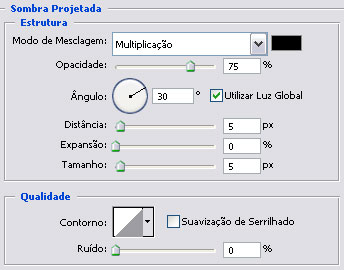
Dann wählen Sie den Befehl Ebene -> Ebenenstil -> Kontur. Passen Sie die Parameter an. Hier sind die Parameter des Autors:
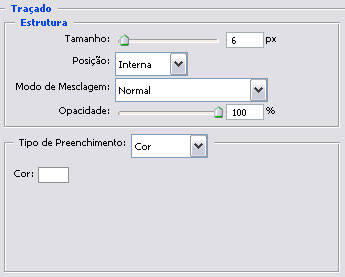
-
Schritt 6. Verleihen Sie den Händen mehr Volumen.
In der Werkzeugpalette wählen Sie das Werkzeug Nachbelichter (O)
 und verdunkeln Sie einige Bereiche in oberen Ebenen wie folgt:
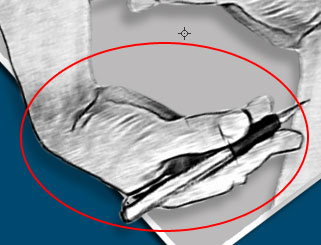
-
Schritt 7. Korrigieren Sie die Beleuchtung und Schatten, um das beste Ergebnis zu erzielen.
Passen Sie die Einstellungen des Schattens für untere Ebenen an und wählen Sie die Lichtquelle. Die Parameter des Autors lauten:
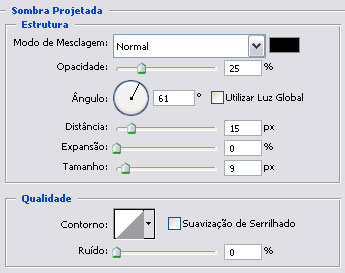
-
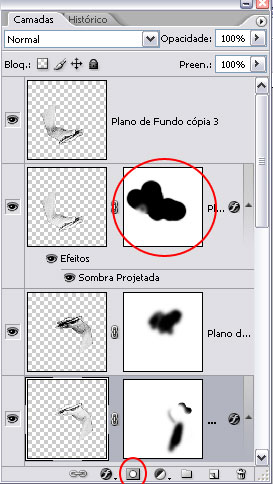
Schritt 8. Erstellen Sie die Ebenenmasken für alle 4 Ebenen: in dem Register Ebenen klicken Sie auf die Schaltfläche Ebenenmaske hinzufügen.
Wählen Sie das Pinsel-Werkzeug in der Werkzeugpalette. Passen Sie die Parameter des Pinsels an. Der Autor wählte einen runden Pinsel mit weichen Kanten.
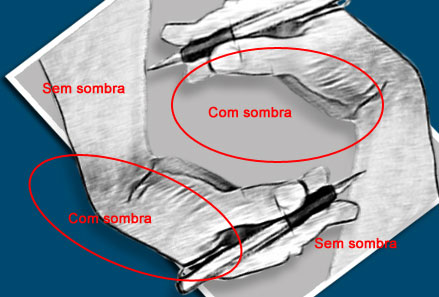
In der Werkzeugpalette drücken Sie auf den Button Vordergrundfarbe einstellen und in dem Farbwähler-Fenster wählen Sie Schwarz. Übermalen Sie die Bereiche wie auf dem unteren Bild angezeigt ist. Dadurch wird das Bild realistischer wirken.
-
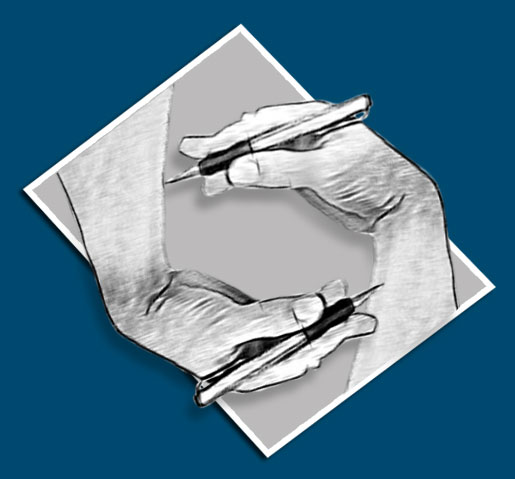
Schritt 9. So sieht das fertige Bild aus:
Sketch v. 28.1 - 10-Tage-Testversion
