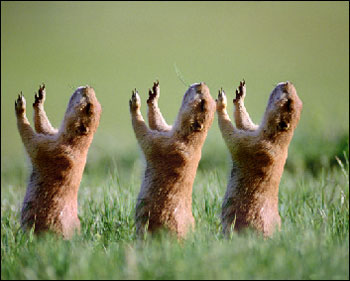
One polecat, two polecats, three...
In order to clone the polecat you should do the following:
- Step 1. Open the original image.

- Step 2. Select the Chameleon Brush and adjust its size. Deactivate the Aligned check box.
- Step 3. Set the source point on the polecat's skin keeping the Alt key (Option in Mac) pressed.
- Step 4. Move the mouse to the right, press the left mouse button and, keeping it pressed, create the first clone.
- Step 5. Then move the cursor to the left of the first polecat and create one more clone in one stroke.