Graphic software for Windows Mac graphic software
Inserisci la tua e-mail per essere informato delle novità:
 
  
  Prodotti     Download     Online Store     Tutorial     Supporto     Chi siamo
en  fr  de  es  pt  it  jp  ru    
 

Tutorial: AKVIS Chameleon

Bird in the sky


The example was made in the old version of the Chameleon plug-in.
Now the technique of using AKVIS Chameleon is different, but the result will be the same.

Consult the article "Blend mode" to get the same result with the new version. In the older versions (before v.5.0) this mode was called Snapshot and applied automatically right after you launch the plugin from the menu Filter.


The author of the tutorial is Gun Legler. You are welcome to see her wonderful works at her Art Gallery.

The photo collage has been created in Jasc Paint Shop Pro 7.

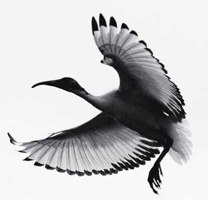
The author combined a color picture and a black and white image.
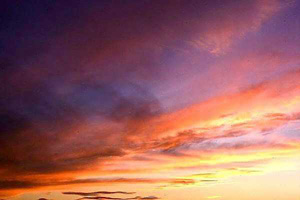
photo of a sunset skyphoto of a bird

First of all we select the background of the black and white image using Magic wand and invert the selection. The idea behind is that it is easier to select a homogeneously colored area than the bird. If we invert the selection, it is the bird that becomes selected. Then we copy the bird by calling the command Edit - Copy.

Take a snapshot of the photo with the sky by selecting the command AKVIS - Chameleon (Take Snapshot) from the menu Effects.

Having taken the snapshot, paste the bird into a new layer of the photo of the sunset sky.
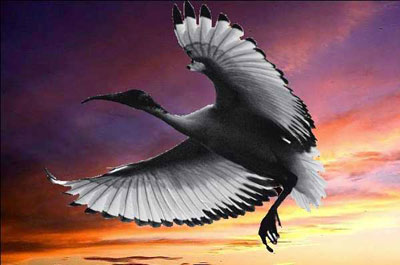
paste the bird into the photo of the sky

Before you start AKVIS Chameleon you should select the bird once again. The easiest way to select the bird is to use the Magic wand and invert the selection. Having selected the bird, merge the layers.

Now you can launch the Chameleon Plugin Effects -> AKVIS Chameleon (Use Snapshot).
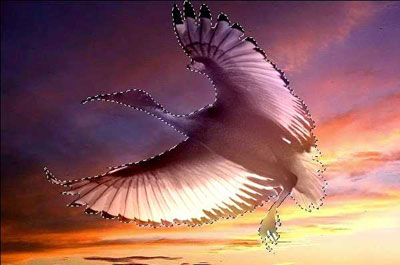
After AKVIS Chameleon Plugin application

The black and white bird became colored. To touch up the photo collage you can reduce the brightness of the bird to -20 and increase the contrast to 15 (Adjust -> Brightness and Contrast).

Now, you can remove the selection and your photo collage is ready.
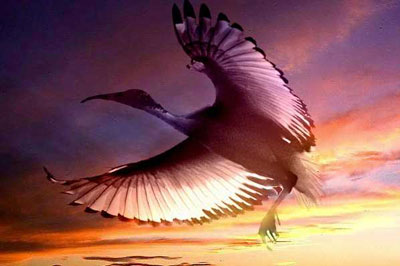
photo collage: Bird in the sky
 
Area di lavoro Area di lavoro
Funzionamento Funzionamento
Modalità Montaggio (Montage) Modalità Montaggio (Montage)
   — Fotocaccia — Fotocaccia
   — Serenata per un gabbiano — Serenata per un gabbiano
Modalità Camaleonte (Chameleon) Modalità Camaleonte (Chameleon)
   — Veleggiare al tramonto — Veleggiare al tramonto
   — Un nuovo sguardo — Un nuovo sguardo
   — Prova un tatuaggio — Prova un tatuaggio
   — L'Olandese volante — L'Olandese volante
   — Il Gatto ed i fiori — Il Gatto ed i fiori
   — L'elefante nella savana — L'elefante nella savana
   — Ricostruzione archeologica — Ricostruzione archeologica
   — Il lago dei cigni — Il lago dei cigni
Modalità Fusione (Blend) Modalità Fusione (Blend)
   — Pittura su legno — Pittura su legno
   — Biglietto di San Valentino — Biglietto di San Valentino
   — Collage d'autunno — Collage d'autunno
   — Una foto fiammeggiante — Una foto fiammeggiante
   — Sostituire il cielo — Sostituire il cielo
   — Sfondo con leopardo — Sfondo con leopardo
Modalità Emersione (Emersion) Modalità Emersione (Emersion)
   — Per gli appassionati di graffiti — Per gli appassionati di graffiti


   Privacy Policy | Mappa del Sito | Cerca nel sito | English  |Français  |Deutsch  |Español  |Português  | Italiano  |日本語  |Pусский  | © 2004-2009, AKVIS Software Inc. Tutti i diritti riservati.