Francobollo dedicato al caffè
Nel 2002 è stato pubblicato in Brasile un francobollo dedicato al caffè, esso raffigurava i chicchi di caffè, una tazzina e la scritta "Caffè brasiliano". Il francobollo aveva anche un delicato aroma di caffè tostato ed è stato progettato da un artista locale Pilotto Vera da Silva.
Ora cercheremo di creare qualcosa di simile con AKVIS Chameleon, pur senza l'aroma del caffè.
Il tutorial è stato creato utilizzando il plugin AKVIS Chameleon in Adobe Photoshop, ma si potrà usare qualsiasi altro editor d'immagini compatibile o avvalersi della versione standalone di Chameleon che non richiede il supporto di alcun programma.
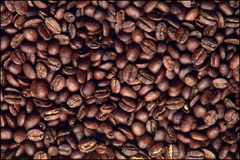
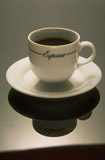

Aprire nel programma le due immagini scelte: i chicchi di caffè ed una tazzina.
Selezionare la tazzina di caffè ed il suo riflesso con qualsiasi strumento di selezione. Ulteriori informazioni sugli strumenti di selezione nei programmi si possono trovare qui: Adobe Photoshop, Corel (Jasc) Paint Shop Pro, Corel Photo-Paint.
Nota: Se si lavora con la versione standalone di AKVIS Chameleon usare le matite del programma per disegnare i contorni blu e rossi. Questi strumenti sono disponibili anche nel plugin e permettono di disegnare o correggere i contorni della selezione, inoltre nel plugin è possibile trasferire la selezione eseguita nell’editor di foto.
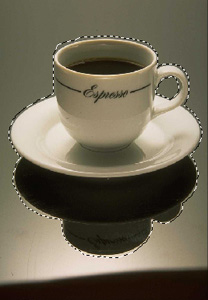
Copiare la selezione lanciando AKVIS -> Chameleon – Grab Fragment dal menu Filtro. Se tutto è stato fatto correttamente verrà visualizzato un messaggio che indica l'avvenuto salvataggio del frammento.
Aprire la foto con i chicchi di caffè e lanciare AKVIS -> Chameleon – Make Collage dal menu Filtro. Nella finestra del plugin verrà visualizzato lo sfondo (i chicchi di caffè) con il frammento (la tazzina).
Selezionare la modalità Camaleonte dal menu a discesa nel Pannello impostazioni.
Avvalersi dell'opzione Opacità per rendere più facile l'inserimento del frammento; rendendolo "trasparente" consente di posizionarlo sullo sfondo con elevata precisione. Tale operazione non pregiudica il risultato finale.
Usare lo strumento Trasforma  per modificare la dimensione, la posizione e l'angolo di rotazione del frammento incollato (la tazzina). Per cambiare la misura mantenendo le proporzioni attivare l'icona
  posizionata nel Pannello impostazioni.
Premere su  per avviare il processo di creazione del collage, l'anteprima dell'immagine apparirà nella scheda Dopo.
Quindi premere su  per applicare il risultato alla fotografia, chiudere il plugin e ritornare all'editor grafico.
Ecco il risultato:
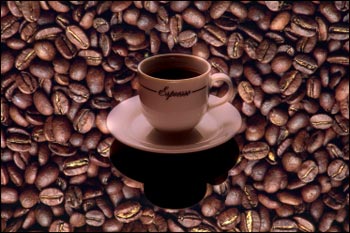
Ora bisogna aggiungere una "cornice francobollo" utilizzando AKVIS ArtSuite.
Eseguire AKVIS ArtSuite, aprire l'immagine del collage, selezionare Cornice classica e poi uno dei modelli in gruppo Francobolli. Oppure caricare il proprio modello utilizzando il commando <Texture utente> nella lista della Libreria. È possibile utilizzare qualsiasi immagine in formato JPEG, BMP, TIFF o PNG che possa adattarsi all'uso, per esempio questa:

Questo è il risultato...
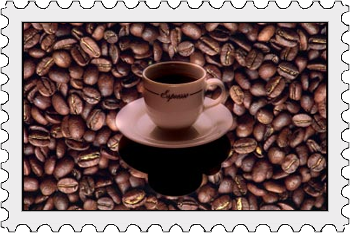
...un vero francobollo dedicato al caffè.
Chameleon v. 12.2 - 10-giorni di prova gratuita
