Scimmia in maschera
L'immaginazione è la più grande invenzione della natura! Essa ci permette di costruire castelli in aria, guidare la vettura sognata o provare l'abbigliamento desiderato, vedere se stessi in un'isola paradisiaca dei tropici…e tutto ciò senza muovere un dito!
Sarebbe interessante raffigurare le cose che noi immaginiamo. Ad esempio quando si avvicina Carnevale ed il ballo in maschera si potrebbe provare il fantasioso vestito trovato in rete.
Nell'esempio che segue la scimmia è intenzionata a provare una maschera carnevalesca.
Il tutorial è stato creato utilizzando il plugin AKVIS Chameleon in Adobe Photoshop, ma si potrà usare qualsiasi altro editor d’immagini compatibile o avvalersi della versione standalone di Chameleon che non richiede il supporto di alcun programma.
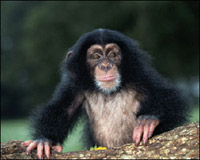
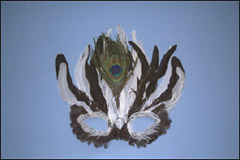
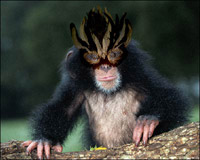
-
Passaggio 1. Aprire la foto con la maschera e selezionarla con qualunque strumento di selezione disponibile, in Photoshop il modo più semplice è utilizzare la modalità Maschera veloce premendo su
 nella Barra degli strumenti o il tasto rapido Q.
- Passaggio 2. Scegliere lo strumento Matita e dipingere la maschera.
-
Passaggio 3. Tornare alla modalità Standard premendo su
 o il tasto rapido Q.
-
Passaggio 4. Invertire la selezione con il comando Selezione -> Inversa o i tasti rapidi Ctrl+Shift+I.
Se si lavora con la versione standalone di AKVIS Chameleon usare le matite del programma per disegnare i contorni blu e rossi. Questi strumenti sono disponibili anche nel plugin e permettono di disegnare o correggere i contorni della selezione, inoltre nel plugin è possibile trasferire la selezione eseguita nell’editor di foto.
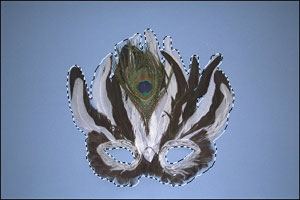
-
Passaggio 5. Copiare la selezione lanciando AKVIS -> Chameleon – Grab Fragment dal menu Filtro.
Se tutto è stato fatto correttamente verrà visualizzato un messaggio che indica l’avvenuto salvataggio del frammento.
-
Passaggio 6. Aprire la foto della scimmia e lanciare AKVIS -> Chameleon – Make Collage dal menu Filtro.
Nella finestra del plugin verrà visualizzato lo sfondo (la scimmia) con il frammento (la maschera).
Selezionare la modalità Camaleonte dal menu a discesa nel Pannello impostazioni.
Avvalersi dell'opzione Opacità per rendere più facile l'inserimento del frammento; rendendolo "trasparente" consente di posizionarlo sullo sfondo con elevata precisione. Tale operazione non pregiudica il risultato finale.
-
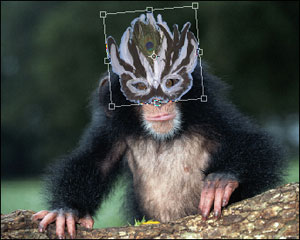
Passaggio 7. Usare lo strumento Trasforma
 per modificare la dimensione, la posizione e l'angolo di rotazione del frammento incollato (la maschera).
Attenzione! Per cambiare la misura mantenendo le proporzioni attivare l'icona
 posizionata nel Pannello impostazioni.
-
Passaggio 8. Premere su
 per avviare il processo di creazione del collage, l'anteprima dell'immagine apparirà nella scheda Dopo.
Quindi premere su
 per applicare il risultato alla fotografia, chiudere il plugin e ritornare all'editor grafico.
Ora la scimmia è pronta a festeggiare ma sembra più un bellicoso capo tribù che una divertente maschera.
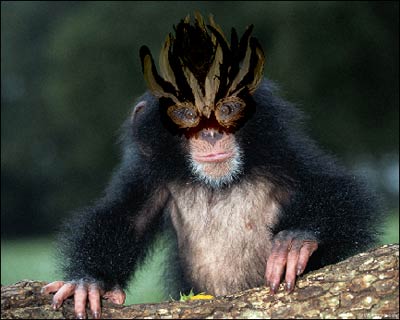
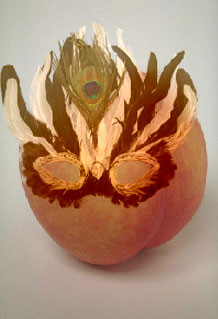
Dopo l'applicazione di AKVIS Chameleon in modalità Camaleonte la maschera ha cambiato colore assumendo la tonalità dell'oggetto su cui è stata applicata, infatti se verrà posizionata su un altro oggetto di colore diverso essa assumerà automaticamente le sue sfumature di colore, adattandosi proprio come un camaleonte.
Chameleon v. 12.1 - 10-giorni di prova gratuita

