A Coffee Postage Stamp
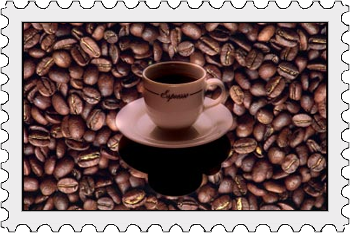
In 2002 a postage stamp dedicated to coffee was issued in Brasil. It had an inscription "Brasil coffee" and showed coffee beans and a coffee cup. The postage stamp also had a delicate aroma of freshly roasted coffee beans. The stamp was disigned by local artist Vera Pilotto da Silva.
Now we will try to create a similar design with AKVIS Chameleon, though without the coffee aroma. Below we have two images: a coffee cup and coffee beans.
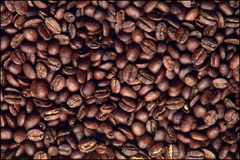
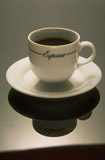

First of all, you should select the cup of coffee with any selection tool of your image editor. Learn more about selection tools of Adobe Photoshop, Photoshop Elements, Corel (Jasc) Paint Shop Pro, Corel Photo-Paint.
Do not forget to select the shadow of the cup as well.
Note: If you work in the standalone version of AKVIS Chameleon just use its pencil tools in the program to draw red and blue outlines. They are available in the plugin version too. With these tools you can draw the contours and edit them. But for the plugin it's possible to transfer the selection from the graphics editor. Here we described how to make it.
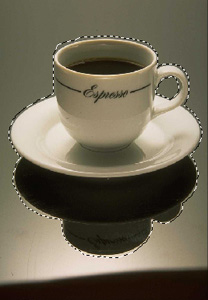
Selection in Image Editor
Having selected the cup of coffee, call AKVIS -> Chameleon – Grab Fragment from the Filter menu. If everything is done correctly you’ll see a message that the selected object is saved into the clipboard.
Open the photo of the coffee beans and call AKVIS -> Chameleon – Make Collage from the Filter menu. The AKVIS Chameleon window will open. This window will contain the coffee bean background and the fragment (cup).
Select Chameleon mode from the drop-down menu in the Settings Panel.
Use the Transform tool  in the plugin to adjust the size and position of the cup.
Press the button  to start the collage creation process. A preview of the image will appear in the After tab. The program adjusts the inserted cup to the color range of the coffee image, like a chameleon adapts to the environment.
Then press  to apply the effect and return to the image editor.
And here is the result:

Now let's add a "postage stamp-like" frame using AKVIS ArtSuite.
Run AKVIS ArtSuite, open the ready collage, select the Classic Frame, and use one of the patterns in Post Stamps group, or load your pattern with the <Custom> command in the Library. You can take any image at the JPEG, BMP, TIFF or PNG format. For example this one:

Here is the result:
Chameleon v. 12.2 - Free 10-day Trial
