Graphic plugins for Windows Mac graphic plugins  
Please enter your email to be kept posted on updates and discounts:
 
  
  Products     Download     Online Store     Tutorial     Support     About Company
en  fr  de  es  pt  it  jp  ru    
 

Tutorial: AKVIS Enhancer

A Siamese cat


The tutorial has been created by Julien Laparre in Paint Shop Pro 9.

Julien Laparre used AKVIS Enhancer to enhance a photo of a Siamese cat.
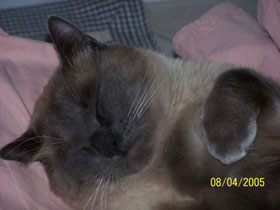
Attention: Julien processed the photo with version 2.0 of Enhancer that had a different algorithm. Version 3.0. of Enhancer allows improving the photo as well.

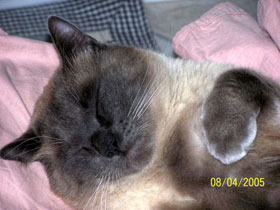
an underexposed photo of a Siamese cat

Apply AKVIS Enhancer to correct the photo.

  • Step 1. Open the image in your photo editor (in this case Paint Shop Pro 9).
  • Step 2. Call the AKVIS Enhancer plugin. For this purpose select the menu item Effects - Plugins - AKVIS - Enhancer in Paint Shop Pro 9.
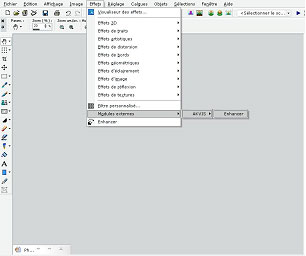
    call the plug-in AKVIS Enhancer

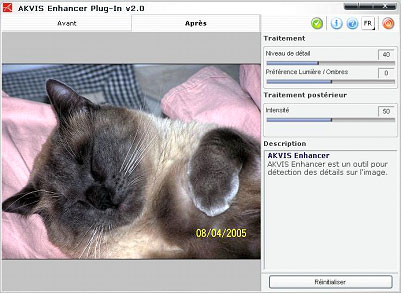
    You will see the program window of AKVIS Enhancer.

    das Programmfenster des Plugins  AKVIS Enhancer

    Leave the default values as they are: Level of detail: 40 / Highlight/Shadow priority: 0/ Intensity: 50.

  • Step 3. When the correction is done, press the button Ok to apply the result to the picture.
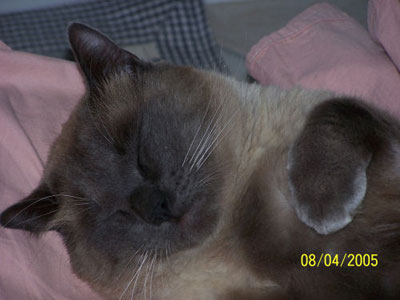
    the underexposed photo of a Siamese cat after the image correction with AKVIS Enhancer
    Before After
 
AKVIS Enhancer Plug-In AKVIS Enhancer Plug-In
   — Workspace — Workspace
   — Enhancer mode — Enhancer mode
   — Focus mode — Focus mode
   — Batch Processing — Batch Processing
AKVIS Enhancer - HDR program AKVIS Enhancer - HDR program
   — Workspace — Workspace
   — Enhancer mode — Enhancer mode
   — Focus mode — Focus mode
   — HDR mode — HDR mode
   — High dynamic range image — High dynamic range image
Examples Examples
   — Dark Picture of a Church — Dark Picture of a Church
   — Tennis-court — Tennis-court
   — In the Street — In the Street
   — A Child in the Garden — A Child in the Garden
   — Archery — Archery
   — Lorry — Lorry
   — Orthodox Chapel — Orthodox Chapel
   — Ancient Town — Ancient Town
   — Increase the Clearness of a Photo — Increase the Clearness of a Photo
   — Orange Tree — Orange Tree
   — Backlight Photo — Backlight Photo
   — Technical Illustration — Technical Illustration
   — Town at Night — Town at Night
   — Underexposed Photo — Underexposed Photo
   — A Kid with a Rattle — A Kid with a Rattle
   — African Kids — African Kids
   — A Siamese Cat — A Siamese Cat
   — Remove Smog from the Photo — Remove Smog from the Photo
   — A Poet and Doves — A Poet and Doves
   — A Black Cat in a Dark Room — A Black Cat in a Dark Room
   — Christmas Market — Christmas Market
   — Exposure Correction — Exposure Correction
   — Correction of a Dark Photo — Correction of a Dark Photo
   — Khan Palace Photo — Khan Palace Photo
   — Street Photo — Street Photo
   — Show Details in Shadows — Show Details in Shadows
   — Neuschwanstein Castle — Neuschwanstein Castle
   — Fun Slides in the Countryside(HDR) — Fun Slides in the Countryside(HDR)
   — An Old Brewery in a New Light (HDR) — An Old Brewery in a New Light (HDR)
   — Highlands scenery (HDR)  — Highlands scenery (HDR)


   Privacy Policy | Site Map | Search | English  | Français  | Deutsch  | Español  | Português  | Italiano  | 日本語  | Pусский  | © 2004-2008, AKVIS LLC. All rights reserved.