Graphic software for Windows Mac graphic software
Please enter your email to be kept posted on updates and discounts:
 
  
  Products     Download     Online Store     Tutorial     Support     Company
en  fr  de  es  pt  it  jp  ru    
 

Tutorial: AKVIS Enhancer

An ancient town


When you visit new places, you take a lot of pictures to show them to your friends and to keep in your memory the wonderful sights you visited. However, your digital camera may fail to render them accurately.

You can apply AKVIS Enhancer to obtain a better result.
Here we use the Enhancer plugin, but you can take the standalone edition with the same parameters.

Follow the instructions:

  • Step 1. Open the photo of an ancient town in your photo editor supporting AKVIS plugins, for example Photoshop (or in the Enhancer program if you use the standalone edition).
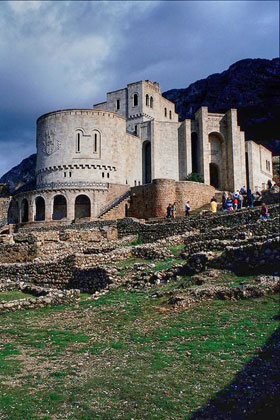
    Photo of an ancient town
  • Step 2. Call the AKVIS Enhancer plugin. To this effect select the command Filter - AKVIS - Enhancer in Adobe Photoshop; the menu item Effects - Plugins- AKVIS - Enhancer if you work with Corel Paint Shop Pro Photo; or Effects - AKVIS - Enhancer if you use Corel Photo-Paint.
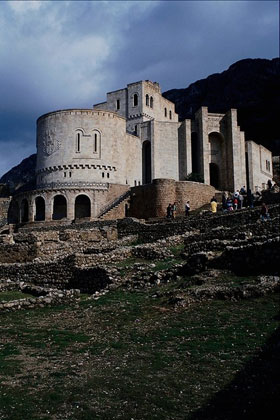
  • Step 3. In this case it will suffice to increase the value of the parameter Shadows to 95 to reveal details in the dark areas.
    Image enhancement
  • Step 4. If you use the plugin, press the button Ok in the Toolbar to apply the result of the photo correction and close the plugin window.

    If you use the standalone edition of AKVIS Enhancer just save the improved photo.
    The original photo of an ancient town Result of the photo correction
    Before After

 
How it works How it works
AKVIS Enhancer Plug-In AKVIS Enhancer Plug-In
   — Workspace — Workspace
   — Enhancer mode — Enhancer mode
   — Focus mode — Focus mode
   — Batch Processing — Batch Processing
AKVIS Enhancer Stand-alone  (+HDR) AKVIS Enhancer Stand-alone (+HDR)
   — Workspace — Workspace
   — Enhancer mode — Enhancer mode
   — Focus mode — Focus mode
   — HDR mode — HDR mode
   — High dynamic range image — High dynamic range image
   — Post Processing — Post Processing
Examples Examples
   — In the Street — In the Street
   — A Child in the Garden — A Child in the Garden
   — Highlands scenery (HDR)  — Highlands scenery (HDR)
   — Lorry — Lorry
   — Neuschwanstein Castle — Neuschwanstein Castle
   — Ancient Town — Ancient Town
   — Fun Slides in the Countryside(HDR) — Fun Slides in the Countryside(HDR)
   — Increase the Clearness of a Photo — Increase the Clearness of a Photo
   — Dark Picture of a Church — Dark Picture of a Church
   — Tennis-court — Tennis-court
   — Archery — Archery
   — Orthodox Chapel — Orthodox Chapel
   — Orange Tree — Orange Tree
   — Backlight Photo — Backlight Photo
   — Technical Illustration — Technical Illustration
   — Town at Night — Town at Night
   — Underexposed Photo — Underexposed Photo
   — A Kid with a Rattle — A Kid with a Rattle
   — African Kids — African Kids
   — A Siamese Cat — A Siamese Cat
   — Remove Smog from the Photo — Remove Smog from the Photo
   — A Poet and Doves — A Poet and Doves
   — A Black Cat in a Dark Room — A Black Cat in a Dark Room
   — Christmas Market — Christmas Market
   — Exposure Correction — Exposure Correction
   — Correction of a Dark Photo — Correction of a Dark Photo
   — Khan Palace Photo — Khan Palace Photo
   — Street Photo — Street Photo
   — Show Details in Shadows — Show Details in Shadows
   — An Old Brewery in a New Light (HDR) — An Old Brewery in a New Light (HDR)
   — The Golden Pavilion — The Golden Pavilion
   — An Ominous Way — An Ominous Way


   Privacy Policy | Site Map | Search | English  |Français  |Deutsch  |Español  |Português  |Italiano  |日本語  |Pусский  | © 2004-2009, AKVIS Software Inc. All rights reserved.