Crystal Clear: Improve Images in Prepress Mode


Please enter your email to be kept posted on updates and discounts:
 
 
  Products     Download     Online Store     Tutorial     Support     Company      Customer Room
en  fr  de  es  pt  it  jp  ru    
 

Tutorial: AKVIS Enhancer

Crystal Clear


When you look at your photo, you think it's clear, but try processing it with AKVIS Enhancer in Prepress mode and you'll see what the definition of clarity truly is!

In this tutorial, we'll process a photo of ice cubes. It already looks good, but does not evoke the feeling of seeing ice cubes through a frosty glass.
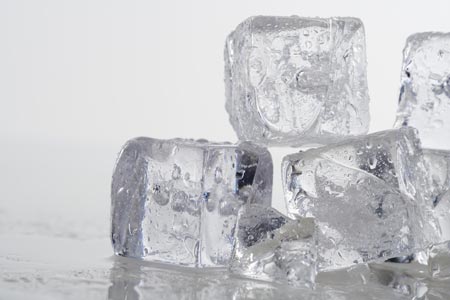
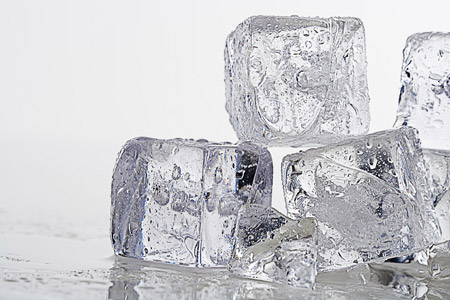
    Original Image Result
    Original Image Result
    Click on the image to see a larger version in a new window
  • Step 1. Open the image to be processed in AKVIS Enhancer. Choose Prepress from the list of modes.
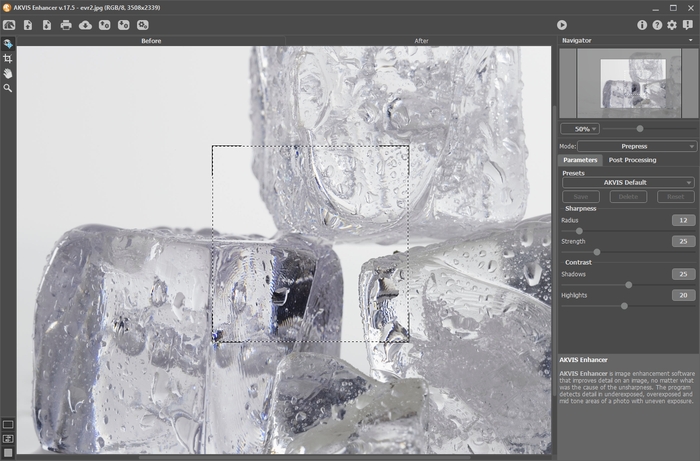
    AKVIS Enhancer Workspace
  • Step 2. The Preview Window shows the result of the image processed using the default settings. The image looks clearer, but the settings should be adjusted further to achieve a better result. Change the settings to match those in the image below.
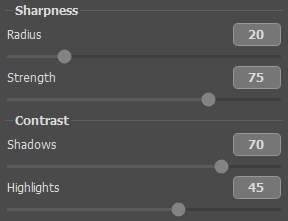
    Settings Panel
  • Step 3. All that's left to do is to click on to apply the settings to the entire image.

    The details in the resulting image are clearer as can be seen in the small droplets of water on the ice cubes. The ice cubes look so natural that you could almost reach out and touch them!

    Final Result
    Final Result
    Click on the image to see a larger version in a new window
 
How It Works How It Works
   — Workspace — Workspace
   — Working With The Program — Working With The Program
   — Improve Detail — Improve Detail
   — Prepress Processing — Prepress Processing
   — Tone Correction — Tone Correction
   — Comparison of Modes — Comparison of Modes
   — Post Processing — Post Processing
   — Batch Processing — Batch Processing
   — Preferences — Preferences
Examples Examples
   — In the Street — In the Street
   — A Child in the Garden — A Child in the Garden
   — Neuschwanstein Castle — Neuschwanstein Castle
   — See the Lorry in Detail — See the Lorry in Detail
   — Ancient Town — Ancient Town
   — Increase the Clearness of a Photo — Increase the Clearness of a Photo
   — Dark Picture of a Church — Dark Picture of a Church
   — Tennis-Court — Tennis-Court
   — Backlight Photo — Backlight Photo
   — Archery — Archery
   — Orange Tree — Orange Tree
   — Technical Illustration — Technical Illustration
   — Remove Smog from the Photo — Remove Smog from the Photo
   — Town at Night — Town at Night
   — Underexposed Photo — Underexposed Photo
   — A Kid with a Rattle — A Kid with a Rattle
   — Poet and Doves — Poet and Doves
   — A Black Cat in a Dark Room — A Black Cat in a Dark Room
   — African Kids — African Kids
   — Christmas Market — Christmas Market
   — Exposure Correction — Exposure Correction
   — Correction of a Dark Photo — Correction of a Dark Photo
   — Khan Palace Photo — Khan Palace Photo
   — Photo Correction: Lightening — Photo Correction: Lightening
   — Show Details in Shadows — Show Details in Shadows
   — The Golden Pavilion — The Golden Pavilion
   — An Ominous Way: Strengthen the Effect  — An Ominous Way: Strengthen the Effect
   — Crystal Clear: Prepress Mode — Crystal Clear: Prepress Mode
   — Fresh Strawberries: Tone Correction — Fresh Strawberries: Tone Correction
   — Perfect Lighting: Bringing Out Detail — Perfect Lighting: Bringing Out Detail


back to top


   Privacy Policy | Site Map | Search at AKVIS    
   Contact Us | Twitter | Facebook | YouTube Channel    
| English  |Français  |Deutsch  |Español  |Português  |Italiano  |日本語  |Pусский  | © 2004-2012 AKVIS. All rights reserved.
