Graphic software for Windows Mac graphic software  
AKVIS ニュースの購読を申し込むには, 電子メールアドレスを入力してください。
 
  
  プログラム     ダウンロード     サイバーショップ     チュートリアル     サポート     会社情報
en  fr  de  es  pt  it  jp  ru    
 

チュートリアル: AKVIS Enhancer

A Siamese cat


あいにく, このページは英語にだけ使用可能です。日本語のバージョンは遠からず出ります。


The tutorial has been created by Julien Laparre in Paint Shop Pro 9.

Julien Laparre used AKVIS Enhancer to enhance a photo of a Siamese cat.

Attention: Julien processed the photo with version 2.0 of Enhancer that had a different algorithm. Version 3.0. of Enhancer allows improving the photo as well.

an underexposed photo of a Siamese cat

Apply AKVIS Enhancer to correct the photo.

  • Step 1. Open the image in your photo editor (in this case Paint Shop Pro 9).
  • Step 2. Call the AKVIS Enhancer plugin. For this purpose select the menu item Effects - Plugins - AKVIS - Enhancer in Paint Shop Pro 9.
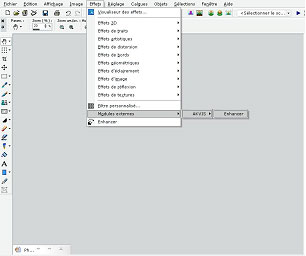
    call the plug-in AKVIS Enhancer

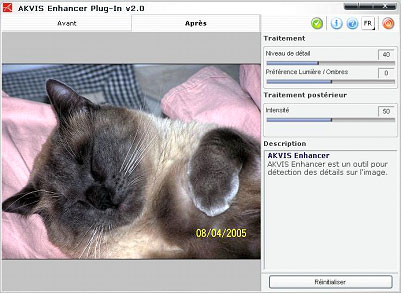
    You will see the program window of AKVIS Enhancer.

    das Programmfenster des Plugins  AKVIS Enhancer

    Leave the default values as they are: Level of detail: 40 / Highlight/Shadow priority: 0/ Intensity: 50.

  • Step 3. When the correction is done, press the button Ok to apply the result to the picture.
    the underexposed photo of a Siamese cat after the image correction with AKVIS Enhancer
    Before After
 
AKVIS Enhancer プラグイン AKVIS Enhancer プラグイン
   — ワークスペース — ワークスペース
   — Enhancerモード
 — Enhancerモード
   — フォーカス モード
 — フォーカス モード
   — バッチ処理 — バッチ処理
AKVIS Enhancer - HDR AKVIS Enhancer - HDR
   — ワークスペース — ワークスペース
   — Enhancerモード
 — Enhancerモード
   — フォーカス モード — フォーカス モード
   — 連続した写真の処理(HDRモード) — 連続した写真の処理(HDRモード)
   — HDRIとは? — HDRIとは?
操作例 操作例
   — 教会 — 教会
   — 街路 — 街路
   — 庭で遊ぶ子供 — 庭で遊ぶ子供
   — 大型トラック — 大型トラック
   — 古代都市 — 古代都市
   — シカ — シカ
   — 高地の風景(HDR) — 高地の風景(HDR)


   プライバシー | サイトマップ | Web サイトの検索 | English  | Français  | Deutsch  | Español  | Português  | Italiano  | 日本語  | Pусский  | © 2004-2008, AKVIS Software Inc. All rights reserved.