Using AKVIS Frame Packs: How to Install, Activate, Delete Packs
The AKVIS frame packs can only be used with AKVIS ArtSuite Standalone, not with the Plugin version. The plugin cannot use such templates, since the image size will be changed.
You can also download the AKVIS Frames program and use it free of charge with the frame packs.

A free set of frames (visible as Default Pack in Library) is included in AKVIS ArtSuite. Also, you can download additional themed frame packs designed for specific topics, for example, seasons, hobbies, special event sets like Christmas, Wedding, Valentine, Communion, Halloween... and many others.
To order a themed frame pack you can go to the frame pack page, where you will see all available frame packs. Each pack is fully represented in thumbnails. You can see all of the picture frame collections you would be interested in. Therefore, you won't be buying a "pig in a poke", but rather the frames that you need.
How to Install a Frame Pack Using The Frame Packs Manager
Follow the instructions:
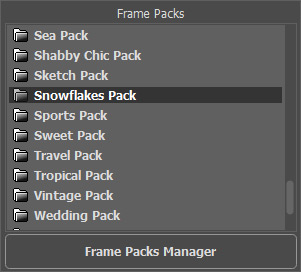
- Step 1. Select in the drop-down list: Frames - Hand Painted Frame.
Open the Frame Packs Manager by clicking the button of the same name.
- Step 2. Select a frame pack and click the Download button at the bottom of the window. Wait until the pack is loaded.
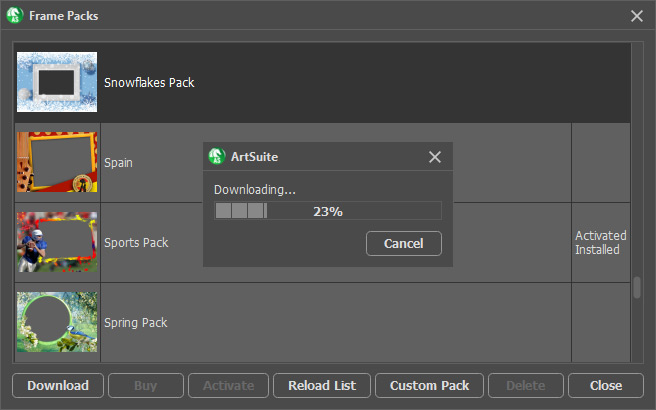
- Step 3. Loaded frames will be accessible only after activation. To get a license key, select a pack and click the Buy button or use the link on the pack's page. An online store page will open in the browser, where you can purchase a license for the selected pack. You will get a license key for the pack by email within minutes.
- Step 4. Click the Activate button at the bottom of the Frame Pack Manager. In the opened activation window, enter your name and the serial number (key) for the pack.
Attention! To activate a frame pack, use the pack's serial number, not the program's number! Each pack should be activated with its unique key.
Choose an activation method — by direct connection to the activation server or by email. We recommend registering by direct connection since it is more convenient. To register using this method, your computer must be connected to the Internet.
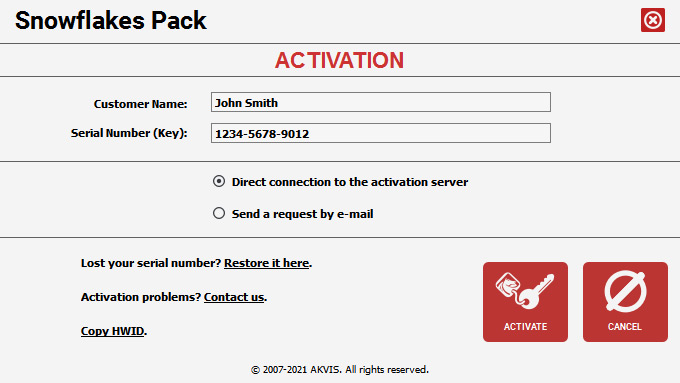
- Step 5. Click ACTIVATE.
Registration is complete! Now all the frame templates in this pack are available for use.
Note: You can also install the frame pack by downloading the archive. Then copy the downloaded .zip file (do not unzip it!) to a folder selected in ArtSuite’s Preferences.
By default, this is the AKVIS folder in Users Shared Documents. Where you can find this folder:
in Windows: C:\Users\Public\Documents\AKVIS
in Mac: /Users/Shared/AKVIS.You can choose another folder in the Preferences!
How to Delete a Frame Pack in AKVIS ArtSuite
You can delete both AKVIS and custom frame packs.
- Step 1. Open the Frame Packs Manager.
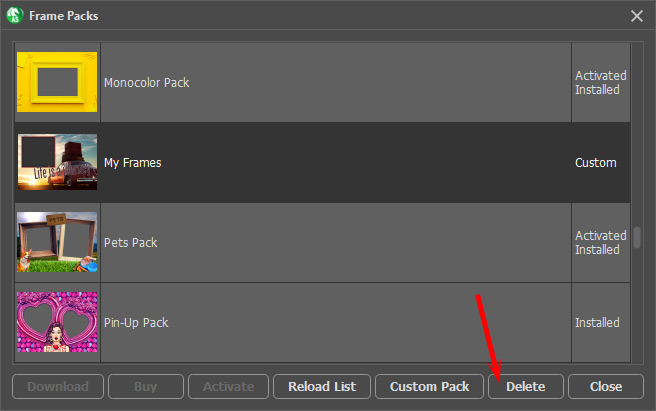
- Step 2. Choose the frame pack in the list and click Delete.
ArtSuite v. 21.1 - Free 10-day Trial

- Step 5. Click ACTIVATE.