フレームパックのインストールト登録
AKVIS フレームパックは、AKVIS ArtSuite スタンドアロン版でのみ使用できます (プラグイン版では使用できません)。プラグイン版でフレームパックを使用できないのは、画像のサイズが変更されてしまうからです。 フレームパックを使用するには、無料の AKVIS Frames プログラムをダウンロードして使用するといいでしょう。

無料のフレーム一式 (ライブラリ内にデフォルトパックとして表示) が AKVIS ArtSuite に含まれています。その他に、追加のテーマ別フレームパック (結婚式、旅行などのテーマ) をダウンロードすることもできます。
フレームパックを注文するには、フレームパックの一覧が表示されるフレームパック ページを開きます。それぞれのパック内のすべてのフレームがサムネイルで表示されます。
購入後、支払いが完了すると、メールでフレームパックへのリンクが .zipファイルで送られます。メールには登録に必要なライセンス番号も記載されています。
フレームパックをインストールする方法
- ステップ 1: フレームパックをダウンロードします。
- ステップ 2: .zip ファイルを展開せずにコピーし、ArtSuiteの環境設定で指定したフォルダーに移動させます。
デフォルトのままであれば、共有ドキュメントの[AKVIS]フォルダーに設定されています。
共有ドキュメントの[AKVIS]フォルダーを探す方法Windows 11/10/8.1/8/7 の場合:Users\Public\Documents\AKVIS
Mac の場合:Users/Shared/AKVIS環境設定で別のフォルダーを設定することもできます!
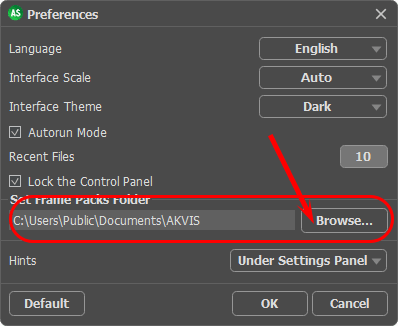
注意:ファイルは絶対展開しないでください。ユーザーが行うのは、フォルダーにコピーするだけです。ArtSuite でのみ動作します。
.zip は ArtSuite によって読み込まれ、ライブラリに表示されます。ZIPファイルを解凍してしまうと、高解像度のフレームが保護されているため、画像ではなくサムネイルしか表示されません。
新しいパックがライブラリに表示されない場合、ArtSuite を再起動してください。
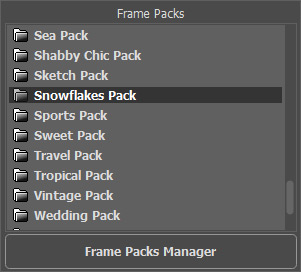
- ステップ 3: 設定パネルで、[フレーム] > [手作りフレーム]を選択します。

- ステップ 4: 読み込まれたフレームパックが一覧で表示され、その下にフレームのサムネイルが表示されます。
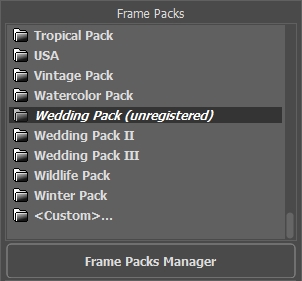
デフォルトパック: これらのフレームはプログラムにすでに含まれています (セットアップ ファイルに含まれています)。ArtSuite に含まれているデフォルトのフレームに加え、追加の無料フレームが 30種類 (無料パック) がダウンロードできます。デフォルトパックも無料パックも使用には登録が必要ありません。
購入したフレームパックは、ライセンス番号 (アクティベーションキー) を使って登録する必要があります。未登録の場合、上の画像にあるように、「未登録」マークが表示されます。登録しないとフレームをプログラム内で使用することはできません。
フレームパックを登録する方法
フレームは、登録後に利用できるようになります。それぞれのパックは、ライセンス番号を使って登録する必要があります。
- ステップ 1: フレームパック マネージャーを開きます。
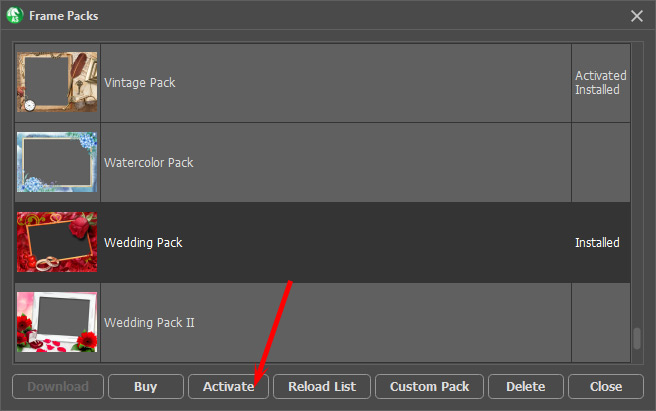
- ステップ 2: リスト内のフレームパックを選択し、[登録]をクリックします。
- ステップ 3: 登録ウィンドウで、名前とパック購入後に受け取ったシリアル番号 (アクティベーションキー) を入力します。
アクティベーション方法、アクティベーション サーバーへの直接接続または電子メールのいずれかを選択します。直接接続を利用して登録を行う方が安全かつ迅速に処理が行えますので、弊社ではその方法を推奨しています。この方法で登録する場合は、インターネット接続が必要になります。
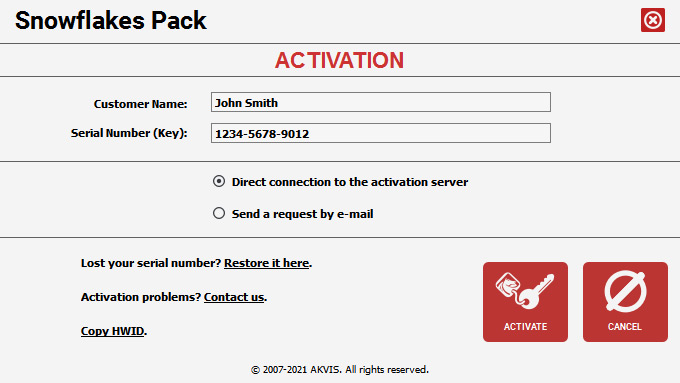
- ステップ 4: [登録]ボタンをクリックします。
これで登録は完了です。パック名の後ろに表示されていた[未登録]の文字が消えます。すべてのパックについて、この作業を行います。これで、すべてのフレームを使用できるます!
AKVIS ArtSuite のフレームパックを削除する方法
AKVIS が作成したフレームパック、ユーザーによるカスタムフレームパックのどちらも削除できます。
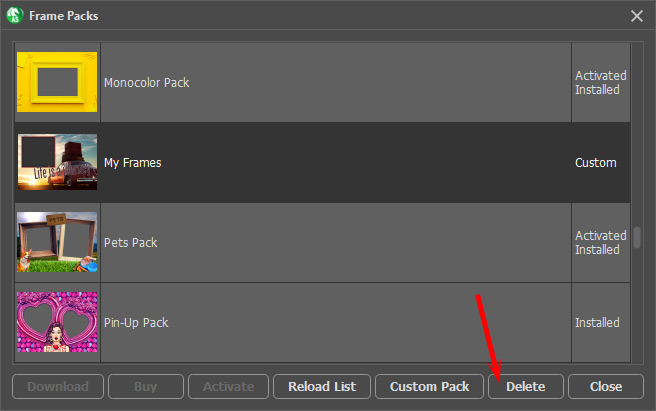
- ステップ 1: フレームパック マネージャーを開きます。
- ステップ 2: リスト内のフレームパックを選択し、[削除]をクリックします。
ArtSuite v. 21.1 - 10日間の評価期間
