Workspace of the Program
AKVIS Enhancer can work independently as a standalone program or as a plug-in to a photo editor.
Standalone is an independent program. You can run it in the usual way.
Plugin is an add-on for graphics editors, for example for Photoshop, AliveColors, and other compatible programs. To call the plugin, select it from filters of your image editing program.
The AKVIS Enhancer workspace looks like this:
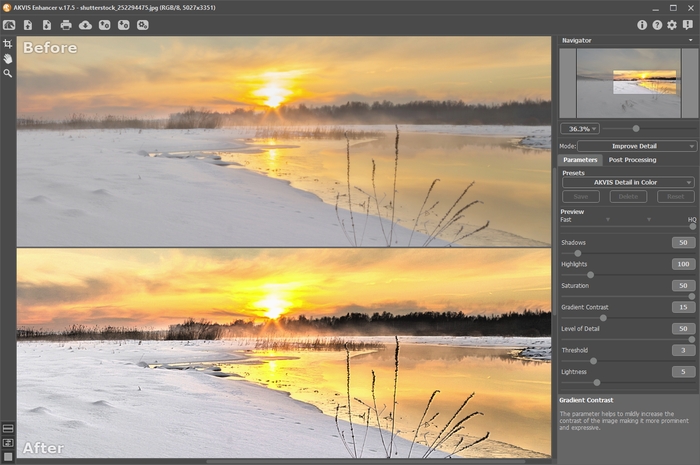
AKVIS Enhancer Workspace, After tab
The left part of the program’s window is taken by the Image Window with two tabs: Before and After. In the Before tab the original image is shown, while in the After tab you can see the processed image. You can switch between the windows by clicking on a tab with the left mouse button.
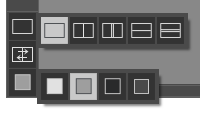
You can select how Image Window and Before/After tabs will be shown by adjusting the Image View Modes in the bottom part of the left panel.
The Control Panel contains the following controls:
- The button
 opens the home page of AKVIS Enhancer.
- The button
 (only in the standalone version) opens image for processing. The hot-keys are Ctrl+O on Windows, ⌘+O on Mac.
Right-click this button to display the list of recent files. You can change the number of recent documents in the program’s Preferences.
- The button
 (only in the standalone version) saves image to the disk. The hot-keys are Ctrl+S on Windows, ⌘+S on Mac.
- The button
 (only in the standalone) opens the Print dialog to print the result. The hot-keys are Ctrl+P on Windows, ⌘+P on Mac.
- The button
 imports a list of presets (from the .enhancer file).
- The button
 exports presets (user settings for the image processing). You can save any number of presets to a separate file with the ending .enhancer.
- The button
 (only in the standalone version) opens the Batch Processing dialog to automatically process a series of images.
- The button
 starts image processing of the entire image (in the Prepress and Tone Correction modes).
- The button
 (only in the plugin version) applies the result to the image and closes the plugin's window.
- The button
 calls information about the program and opens the registration window.
- The button
 calls the Help files. The hot-key is F1.
- The button
 calls the Preferences dialog box for changing the program’s options.
- The Button
 opens a window showing the latest news about Enhancer.
Тo the left of the Image Window there is the Toolbar with these tools:
- The button
 (in the Prepress and Tone Correction modes) switches on/off the preview window.
- The button
 (only in the standalone version) activates the Crop tool which allows cutting off unwanted areas in the image.
- The button
 activates the Hand tool which allows you to scroll the image when it does not fit within Image Window at the desired scale. To use it click the button, bring the cursor over the image, and while keeping the left mouse button pressed move in the desired direction.
Double-clicking on the tool's icon
on the Toolbar makes the image fit the Image Window.
- The button
 activates the Zoom tool, which changes the image's scale. To zoom in, left-click in the image. To zoom out, left-click with Alt in the image. Press Z to quickly access the tool.
Double-clicking on the tool's icon
on the Toolbar makes the image scale to 100% (actual size).
And below, there are three buttons which control how the Image Window looks like.
You can navigate and scale the image using the Navigator. The frame in the Navigator surrounds the area of the image which is visible in the Image Window; the area outside of the frame will be shaded. The frame can be dragged, thereby changing the visible portion of the image. To move the frame, place the cursor within it, left click the mouse, and then drag.
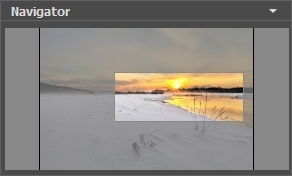
To scroll the image in the Image Window you can press the spacebar on the keyboard and drag the image with the left mouse button. Use the scroll wheel of the mouse to move the image up/down, by keeping the Ctrl key pressed – to the left/to the right, by keeping the Alt key pressed − scale the image. Right-click the scroll bar to activate the quick navigation menu.
Use the slider to scale the image. When you move the slider to the right, the image scale increases. When you move the slider to the left, the image scale reduces.
You can also change the image scale by entering a new coefficient into the scale field. The fall-down menu shows some frequently used coefficients.
You can use hot-keys to change the image scale + and Ctrl++ (⌘++ in Mac) to increase the image scale and - and Ctrl+- (⌘+- in Mac) to reduce the scale.
Below the Navigator is the Settings Panel where you can choose the image enhancement Mode and adjust its settings.
In the Presets field you can save favorite settings as a preset to use them in the future. When you launch the program, it uses the settings of the last used preset.
Under the Settings Panel you can see Hints for the parameters and buttons when you hover over them with the cursor. You can choose where the hints will be shown or hide them in the program's Preferences.
Enhancer v. 17.8 - Free 10-day Trial
