Graphic software for Windows Mac graphic software
Please enter your email to be kept posted on updates and discounts:
 
  
  Products     Download     Online Store     Tutorial     Support     Company
en  fr  de  es  pt  it  jp  ru    
 

Tutorial: AKVIS Retoucher

Ukrainian family


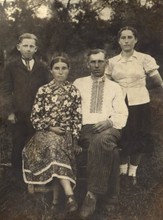
This example of photo restoration was sent to us by Dmitry Pendlishak. Dmitry used Adobe Photoshop and AKVIS plug-ins Retoucher + Stamp to restore the following photo from his family archives.
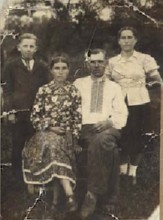
Original image Result

Here is what Dmitry says about the photo: "This is a photo of my grand-parents from the dad's side. It was taken in the village Nizhniya Yablonka, West Ukraine. I can not give the exact date. It must be somewhere in the end of 1950s".
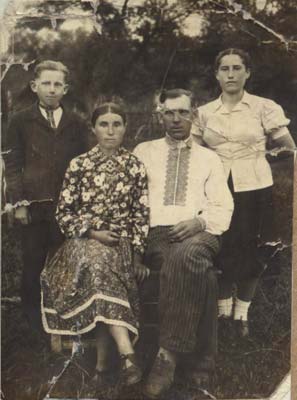
Ukrainian family

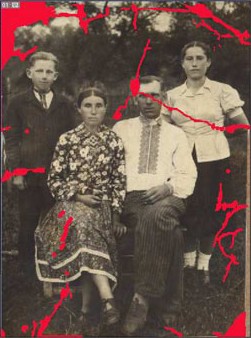
First of all, Dmitry painted over the scratches and creases with red using the Brush tool of Adobe Photoshop.

Paint over the scratches

Then he applied Magic Wand to select all the defects painted in step 1.

Select the image fragments highlighted in red

Then he called AKVIS Retoucher (Filter-> AKVIS -> Retoucher) and pressed the button Start in the dialog box to start the restoration process.

AKVIS Retoucher dialog box

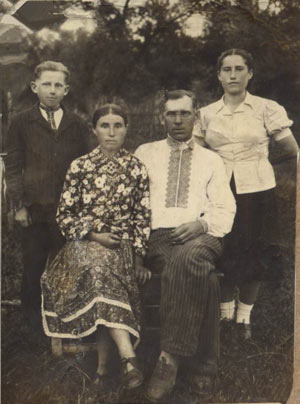
After the restoration with AKVIS Retoucher he got the following image.

After AKVIS Retoucher

Dmitry used AKVIS Stamp to touch up the image. For example, to restore the left upper corner of the photo he duplicated a fragment on the right to replace the damaged section.

damaged section before cloning...after cloning

Besides, he used AKVIS Stamp to restore the lacking part of the image on the right and to get rid of the minor defects.

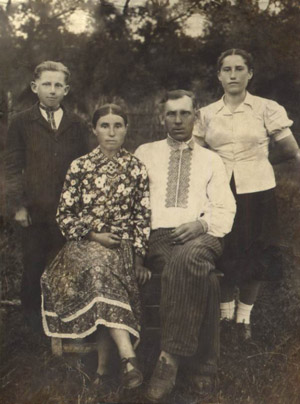
As a result he got the following photo.

Image after AKVIS Stamp
 
How It Works How It Works
   — Using The Plugin To Restore Photos — Using The Plugin To Restore Photos
Examples Examples
   — Old Photo from Photoshop Samples — Old Photo from Photoshop Samples
   — Baby Photo Restoration — Baby Photo Restoration
   — Removing the Date Stamp — Removing the Date Stamp
   — Badly Damaged Photo — Badly Damaged Photo
   — Restoring a Picture — Restoring a Picture
   — Restoration of an Old Family Photo — Restoration of an Old Family Photo
   — Portrait of a Child — Portrait of a Child
   — Gypsy Photo Restoration — Gypsy Photo Restoration
   — A Sunny Smile — A Sunny Smile
   — Torn Photo Restoration — Torn Photo Restoration
   — Restoration of a Boy's Photo — Restoration of a Boy's Photo
   — A Happy Kid — A Happy Kid
   — Black and White Photo — Black and White Photo
   — Video Editing — Video Editing
   — For the Mother's Day — For the Mother's Day
   — Ukrainian Family — Ukrainian Family
   — Prepress Processing (for Printing) — Prepress Processing (for Printing)
   — Retouching Photos in 7 Steps — Retouching Photos in 7 Steps
   — A Daguerreotype — A Daguerreotype
   — Remove an Unwanted Area in PSP9 — Remove an Unwanted Area in PSP9
   — Lioness in a Cage (remove rods) — Lioness in a Cage (remove rods)
   — Retouching a Wedding Photo — Retouching a Wedding Photo
   — Saint-Petersburg Views — Saint-Petersburg Views
   — Remove Stains from Grandpa Photo — Remove Stains from Grandpa Photo
   — New Life of an Old Photo — New Life of an Old Photo
   — Retouching and Coloring — Retouching and Coloring
   — Lasting Memories — Lasting Memories
   — Beautiful New Image — Beautiful New Image
   — Removing Unwanted Details — Removing Unwanted Details


   Privacy Policy | Site Map | Search | English  |Français  |Deutsch  |Español  |Português  |Italiano  |日本語  |Pусский  | © 2004-2009, AKVIS Software Inc. All rights reserved.