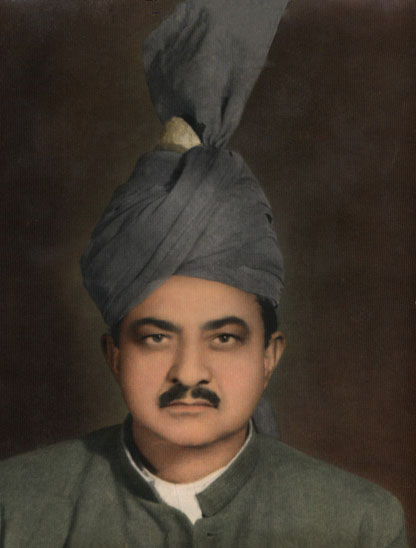
Removing Stains from a Grandfather's Photo
The tutorial was created by Afaq Saeed. He wrote:
"The most powerful tool for removing scratches, creases, stains, and removing dust is the AKVIS Retoucher plug-in. I found it on the internet while searching for an effective tool for removing scratches from photos. I downloaded the trial version of AKVIS Retoucher. It was very useful and it helped me very much in removing defects from my grandfather's picture."
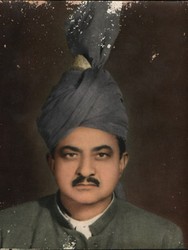
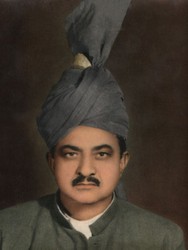
The author describes below the process he used to restore the photo:
At first I tried to remove all spots in Adobe Photoshop using the Healing Brush and then the Cloning Stamp, but I was not happy with the result, so I decided to use AKVIS Retoucher.
- Step 1. First I opened the picture of my grandfather in AKVIS Retoucher and used the Selection Brush
 to mark all spots on the photo, even the smallest ones.
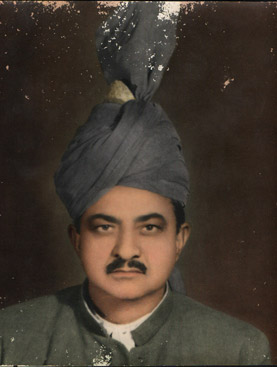
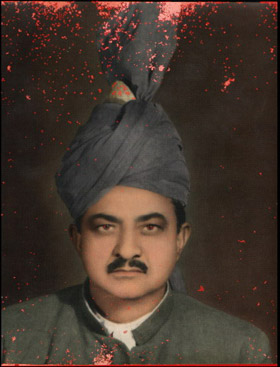
- Step 2. Then I pressed
 to begin the retouching process. The areas highlighted in red begin to disappear, and are replaced by the restored parts of the photo.
- Step 3. Then I just had to retouch a few areas with the Chameleon Brush
 , and it was done.
I am very happy that I was able to restore this photo so quickly and easily.
Retoucher v. 12.2 - Free 10-day Trial
