Retouching a Grandfather's Photo with AKVIS Retoucher Plug-in


Entrar seu e-mail para subscrição em novidades.
 
 
  Produtos     Download     Online Store     Tutorial     Suporte     Quem Somos      Conta de usuário
en  fr  de  es  pt  it  jp  ru    
 

Tutorial: AKVIS Retoucher

Removes stains from the grandfather's photo


Neste momento algumas páginas estão disponíveis somente em Inglês e em Espanhol.
Você pode obter uma licença para qualquer programa AKVIS, se traduzir os arquivos do nosso acervo
para o Português (do espanhol ou do inglês) para saber mais escreva para o team@akvis.com

The tutorial was created by Afaq Saeed.


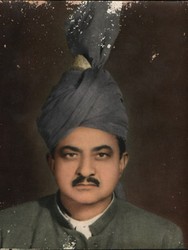
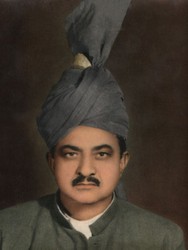
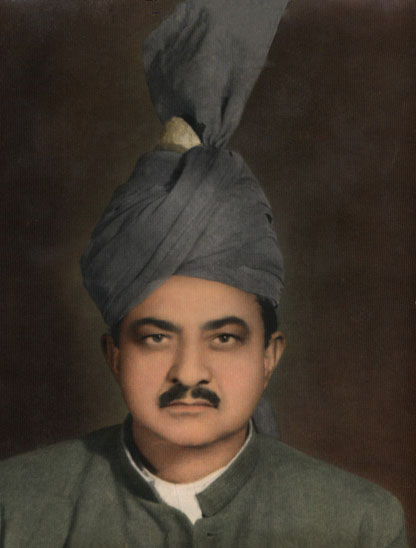
The most powerful tool for removing scratches, creases, stains, and removing dust is the AKVIS Retoucher plug-in. I found it on the internet while searching for an effective tool for removing scratches from photos. I downloaded the trial version of AKVIS Retoucher. It was very useful and it helped me very much in removing defects from my grandfather's picture.

    Original image Result

The author describes below the process he used to restore the photo.

At first I tried to remove all of the spot in Adobe Photoshop using the Healing Brush and then the Cloning Stamp, but I was not happy with the result, so I decided to use AKVIS Retoucher.

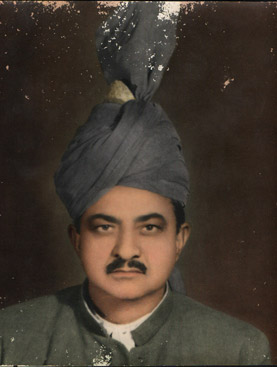
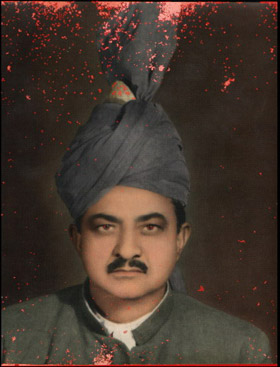
  • Step 1. First I opened the picture of my grandfather in AKVIS Retoucher and used the Selection Brush to mark all spots on the photo, even the smallest ones.
    Grandfather's Photo, Needs Restoration Defects Selected
  • Step 2. Then I pressed to begin the retouching process. The areas highlighted in red begin to disappear, and are replaced by the retored parts of the photo.
  • Step 3. Thne I just had to retouch a few areas with the Chameleon Brush , and I was done. I am very happy that I was able to restore this photo so quickly and easily.
    Retouched Portait of Grandfather
 
Como funciona Como funciona
   — Área de trabalho — Área de trabalho
   — Utilizando o programa — Utilizando o programa
   — Barra de ferramentas — Barra de ferramentas
   — Parâmetros — Parâmetros
   — Opções — Opções
Exemplos Exemplos
   — Removendo objetos grandes — Removendo objetos grandes
   — A Fotografia velha duma família — A Fotografia velha duma família
   — Leoa em uma jaula: remova as barras — Leoa em uma jaula: remova as barras
   — Retocar uma foto — Retocar uma foto
   — Processamento para pré-impressão — Processamento para pré-impressão
   — A Foto dum menino — A Foto dum menino
   — Reparação duma foto de ciganos — Reparação duma foto de ciganos
   — Foto muito danificada — Foto muito danificada
   — Family archives restoration — Family archives restoration
   — Reparação da foto dos meninos — Reparação da foto dos meninos
   — Foto velha — Foto velha
   — Uma Foto do bebé — Uma Foto do bebé
   — Uma fotografia em preto e branco — Uma fotografia em preto e branco
   — Removendo tatuagens — Removendo tatuagens
   — Construido bordas em imagens — Construido bordas em imagens


No começo da página


   Política de privacidade | Mapa do Site | Pesquisar na site    
   Contacte-nos | Twitter | Facebook | YouTube Channel    
| English  |Français  |Deutsch  |Español  | Português  |Italiano  |日本語  |Pусский  | © 2004-2012 AKVIS. Todos os direitos reservados.