Tutorial for AKVIS Retoucher. Restore a black and white photo.


Entrar seu e-mail para subscrição em novidades.
 
 
  Produtos     Download     Online Store     Tutorial     Suporte     Quem Somos      Conta de usuário
en  fr  de  es  pt  it  jp  ru    
 

Tutorial: AKVIS Retoucher

Black and White Photo


Neste momento algumas páginas estão disponíveis somente em Inglês e em Espanhol.
Você pode obter uma licença para qualquer programa AKVIS, se traduzir os arquivos do nosso acervo
para o Português (do espanhol ou do inglês) para saber mais escreva para o team@akvis.com

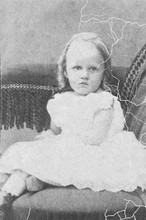
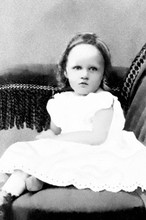
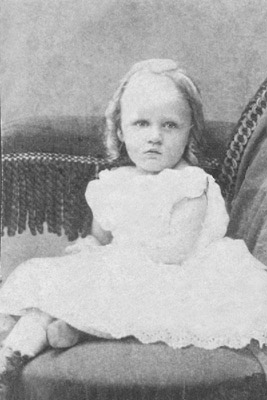
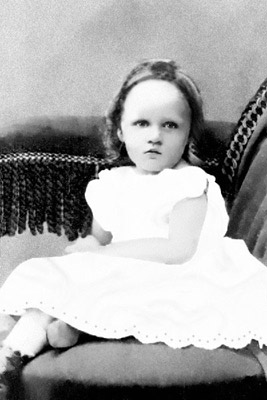
This example of photo restoration has been sent by Laval Yan.

Original image Result

Laval Yan applied AKVIS Retoucher at the initial step of retouching to remove scratches from a black and white photo. At the second step of the photo restoration he used AKVIS MultiBrush retouching tools.

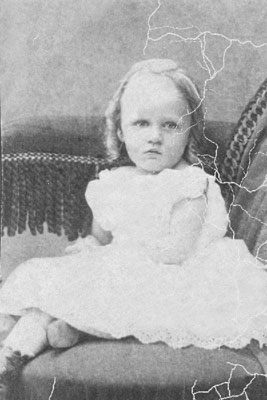
Black and white photo

Let's look into the initial stage of the photo restoration in detail.

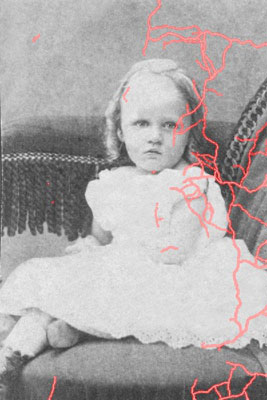
To remove the scratches with AKVIS Retoucher, you should define the area for retouching, i.e. select all the defects of the black and white photo. Activate the Selection Brush to paint over the scratches.

Selection

Press the button to start the process of photo restoration.

When AKVIS Retoucher is through with its job, click on the button to save the result of the photo restoration. After the first step we obtain a photo with no scratches:

After AKVIS Retoucher

At the second step of the photo restoration we use AKVIS MultiBrush retouching tools. To remove small defects you can apply Stamp , to darken some parts of the image you can use Darken , to brighten some fragments you can use Lighten , to blur some areas activate Blur .

Black and white photo after photo restoration
 
Como funciona Como funciona
   — Área de trabalho — Área de trabalho
   — Utilizando o programa — Utilizando o programa
   — Barra de ferramentas — Barra de ferramentas
   — Parâmetros — Parâmetros
   — Opções — Opções
Exemplos Exemplos
   — Removendo objetos grandes — Removendo objetos grandes
   — A Fotografia velha duma família — A Fotografia velha duma família
   — Leoa em uma jaula: remova as barras — Leoa em uma jaula: remova as barras
   — Retocar uma foto — Retocar uma foto
   — Processamento para pré-impressão — Processamento para pré-impressão
   — A Foto dum menino — A Foto dum menino
   — Reparação duma foto de ciganos — Reparação duma foto de ciganos
   — Foto muito danificada — Foto muito danificada
   — Family archives restoration — Family archives restoration
   — Reparação da foto dos meninos — Reparação da foto dos meninos
   — Foto velha — Foto velha
   — Uma Foto do bebé — Uma Foto do bebé
   — Uma fotografia em preto e branco — Uma fotografia em preto e branco
   — Removendo tatuagens — Removendo tatuagens
   — Construido bordas em imagens — Construido bordas em imagens


No começo da página


   Política de privacidade | Mapa do Site | Pesquisar na site    
   Contacte-nos | Twitter | Facebook | YouTube Channel    
| English  |Français  |Deutsch  |Español  | Português  |Italiano  |日本語  |Pусский  | © 2004-2012 AKVIS. Todos os direitos reservados.