Removing Dust, Stains and Scratches from a Child's Portrait


Please enter your email to be kept posted on updates and discounts:
 
 
  Products     Download     Online Store     Tutorial     Support     Company      Customer Room
en  fr  de  es  pt  it  jp  ru    
 

Tutorial: AKVIS Retoucher

Portrait of a Child


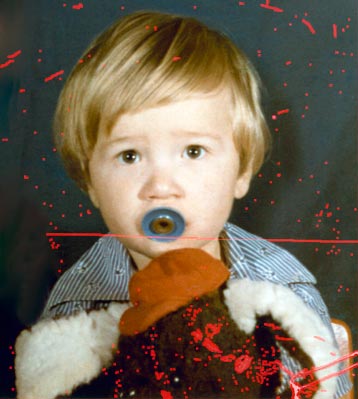
To reconstruct this color photograph, we'll need to remove a scratch that runs across almost the entire image, some minor defects on the background, a blue spot on the toy, and some creases on the lower right corner.

Let's see how Retoucher handled these tasks.

    Original image Result
  • Step 1. Open the image in AKVIS Retoucher. Here is the original, scanned from a color photo:
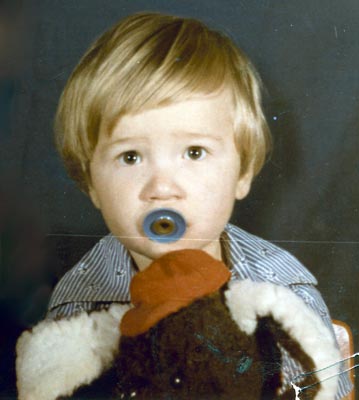
    Portrait of a child
  • Step 2. Select the defects, using the Selection Brush in AKVIS Retoucher.

    Selecting Areas to Restore
  • Step 3. Start automatic processing by pressing . Retoucher will restore the selected areas. After the photo retoucing process is complete, the photograph will look like this:
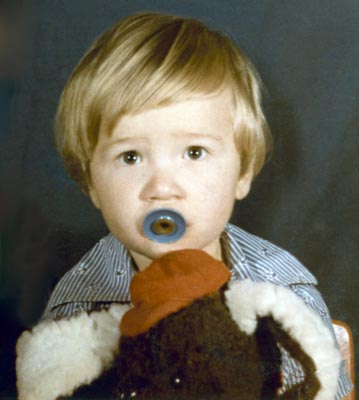
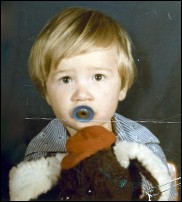
    Retouched Portrait of a Child
 
How It Works How It Works
   — Workspace — Workspace
   — How To Use The Program — How To Use The Program
   — Toolbar — Toolbar
   — Parameters — Parameters
   — Preferences — Preferences
Examples Examples
   — Removing Large Objects — Removing Large Objects
   — Restoration of an Old Family Photo — Restoration of an Old Family Photo
   — Lioness in a Cage: Removing Rods — Lioness in a Cage: Removing Rods
   — Restoring a Picture of a Boy — Restoring a Picture of a Boy
   — Prepress Processing — Prepress Processing
   — A Daguerreotype — A Daguerreotype
   — Portrait of a Child — Portrait of a Child
   — Historical Photo: a Gypsy Band — Historical Photo: a Gypsy Band
   — Badly Damaged Photo — Badly Damaged Photo
   — Remove Stains from Grandpa Photo — Remove Stains from Grandpa Photo
   — For the Mother's Day — For the Mother's Day
   — Restoration of a Boy's Photo — Restoration of a Boy's Photo
   — Retouching Photos in 7 Steps — Retouching Photos in 7 Steps
   — Old Photo from Photoshop Samples — Old Photo from Photoshop Samples
   — Ukrainian Family — Ukrainian Family
   — Baby Photo Restoration — Baby Photo Restoration
   — Black and White Photo — Black and White Photo
   — Removing Unwanted Details — Removing Unwanted Details
   — Removing Tattoos — Removing Tattoos
   — Building Up Images' Borders — Building Up Images' Borders
   — Repairing An Old Torn Illustration — Repairing An Old Torn Illustration


back to top


   Privacy Policy | Site Map | Search at AKVIS    
   Contact Us | Twitter | Facebook | YouTube Channel    
| English  |Français  |Deutsch  |Español  |Português  |Italiano  |日本語  |Pусский  | © 2004-2012 AKVIS. All rights reserved.