Old Family Photo Restoration: Using AKVIS Retoucher


Please enter your email to be kept posted on updates and discounts:
 
 
  Products     Download     Online Store     Tutorial     Support     Company      Customer Room
en  fr  de  es  pt  it  jp  ru    
 

Tutorial: AKVIS Retoucher

Restoration of an old family photo


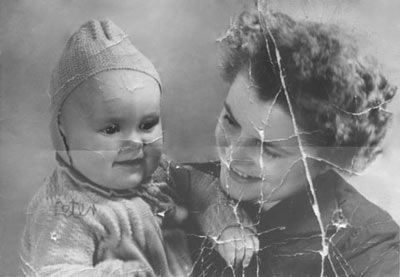
Take a look at the old scanned photo and the result of restoration in AKVIS Retoucher.
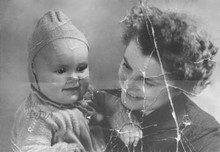
    Original image Result

This old photo is considerably damaged. We will restore this photo in two stages. At the first stage we will apply automatic processing in AKVIS Retoucher that will perform the preliminary work of removing most scratches and making big scratches less visible. At the second stage we will retouch the remaining defects with the post-processing retouching tools.

    Old family black and white photo

  • Selection of the damaged area

    First of all, we should paint over all scratches and the inscription on the child's shoulder using the Selection Brush in AKVIS Retoucher.

    We do not paint over the fold line that crosses the photo as it goes across the faces of the mother and child and it can be retouched better manually.
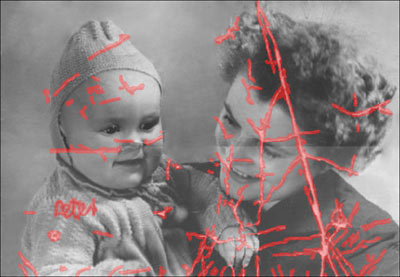
    Selection in Retoucher
  •  

  • Automatic restoration

    Press the button to start the photo restoration process. The program reconstructs selected parts of a photo by using information from surrounding areas.

    When Retoucher is through with its job, the photo will look like this:
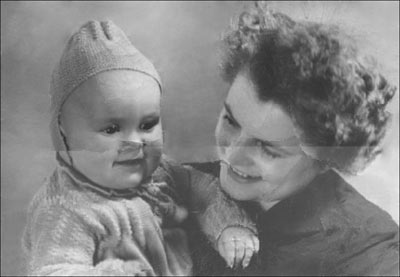
    Result of Retoucher restoration
  •  

  • Retouching tools

    Now you can proceed to the second stage of restoration and retouch minor defects with the post-processing tools: Clone Stamp and Chameleon Brush . Both are available only in Home Deluxe and Business versions of Retoucher.

    Alternatively, you can remove small defects using AKVIS MiltiBrush which offers these and some other useful retouching tools.
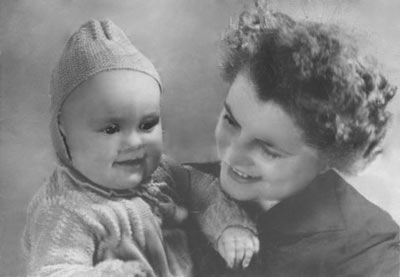
  • Retouching result
The original picture is taken from the School of Art, Design and Art History site — art.sdsu.edu .
 
How It Works How It Works
   — Workspace — Workspace
   — How To Use The Program — How To Use The Program
   — Toolbar — Toolbar
   — Parameters — Parameters
   — Preferences — Preferences
Examples Examples
   — Removing Large Objects — Removing Large Objects
   — Restoration of an Old Family Photo — Restoration of an Old Family Photo
   — Lioness in a Cage: Removing Rods — Lioness in a Cage: Removing Rods
   — Restoring a Picture of a Boy — Restoring a Picture of a Boy
   — Prepress Processing — Prepress Processing
   — A Daguerreotype — A Daguerreotype
   — Portrait of a Child — Portrait of a Child
   — Historical Photo: a Gypsy Band — Historical Photo: a Gypsy Band
   — Badly Damaged Photo — Badly Damaged Photo
   — Remove Stains from Grandpa Photo — Remove Stains from Grandpa Photo
   — For the Mother's Day — For the Mother's Day
   — Restoration of a Boy's Photo — Restoration of a Boy's Photo
   — Retouching Photos in 7 Steps — Retouching Photos in 7 Steps
   — Old Photo from Photoshop Samples — Old Photo from Photoshop Samples
   — Ukrainian Family — Ukrainian Family
   — Baby Photo Restoration — Baby Photo Restoration
   — Black and White Photo — Black and White Photo
   — Removing Unwanted Details — Removing Unwanted Details
   — Removing Tattoos — Removing Tattoos
   — Building Up Images' Borders — Building Up Images' Borders
   — Repairing An Old Torn Illustration — Repairing An Old Torn Illustration
   — Ladies' Man: Removing Lipstick Stains — Ladies' Man: Removing Lipstick Stains


back to top


   Privacy Policy | Site Map | Search at AKVIS    
   Contact Us | Twitter | Facebook | YouTube Channel    
| English  |Français  |Deutsch  |Español  |Português  |Italiano  |日本語  |Pусский  | © 2004-2012 AKVIS. All rights reserved.