Graphic plugins for Windows Mac graphic plugins  
Please enter your email to be kept posted on updates and discounts:
 
  
  Products     Download     Online Store     Tutorial     Support     About Company
en  fr  de  es  pt  it  jp  ru    
 

Tutorial: AKVIS Retoucher

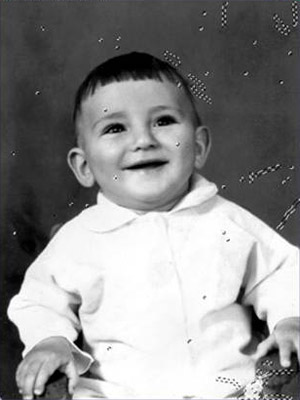
A happy kid


The following example of old photo restoration have been created by Yuriy Karanfil.

Follow the instruction to restore the photo of the kid:

  • Step 1. Open the photo in Adobe Photoshop.
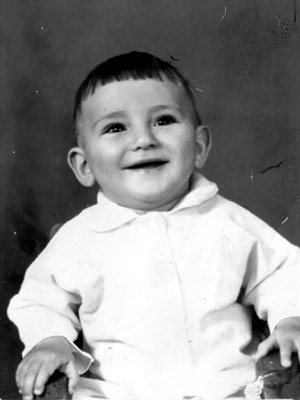
    photo of a smiling boy
  • Step 2. Press the key Q to switch to Quick mask.
  • Step 3. Select the Pencil or Brush tool from the Toolbar and paint over the defects.
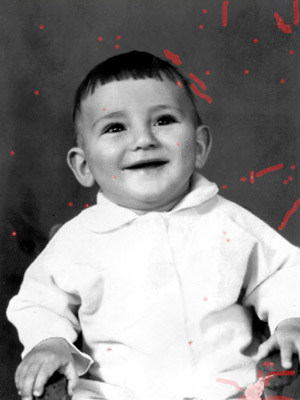
    select defects in Quick mask
  • Step 4. Switch back to the Standard mode (Q) and invert the selection pressing the key combination Shift+Ctrl+I.
    Select defects
  • Step 5. Select the command AKVIS Retoucher from the menu item Filter to start the program.
    Start AKVIS Retoucher
  • Step 6. Press the button Go in the program window to launch the restoration process.
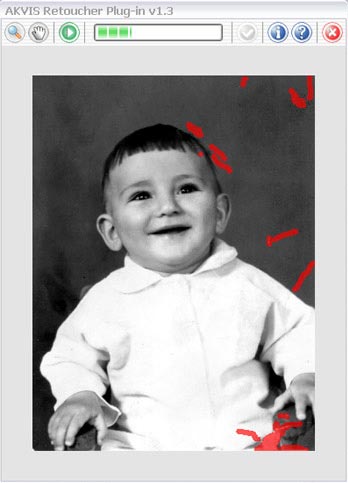
    AKVIS Retoucher program window
  • Step 7. When the restoration process is over, press the button Ok to apply the result.
    photo of the kid after restoration
 
How It Works How It Works
Old Photo from Photoshop Samples Old Photo from Photoshop Samples
Baby Photo Restoration Baby Photo Restoration
Removing the Date Stamp Removing the Date Stamp
Badly Damaged Photo Badly Damaged Photo
Restoring a Picture (Retoucher + Stamp) Restoring a Picture (Retoucher + Stamp)
Restoration of an Old Family Photo Restoration of an Old Family Photo
Portrait of a Child Portrait of a Child
Gypsy Photo Restoration Gypsy Photo Restoration
A Sunny Smile A Sunny Smile
Torn Photo Restoration Torn Photo Restoration
Restoration of a Boy's Photo Restoration of a Boy's Photo
A Happy Kid A Happy Kid
Black and White Photo Black and White Photo
Video Editing Video Editing
For the Mother's Day For the Mother's Day
Ukrainian Family Ukrainian Family
Prepress Processing (for Printing) Prepress Processing (for Printing)
Retouching Photos in 7 Steps Retouching Photos in 7 Steps
A Daguerreotype A Daguerreotype
Remove an Unwanted Area in PSP9 Remove an Unwanted Area in PSP9
Lioness in a Cage (remove rods) Lioness in a Cage (remove rods)
Saint-Petersburg Views Saint-Petersburg Views
Remove Stains from Grandfather's Photo Remove Stains from Grandfather's Photo
Retouching and Coloring Retouching and Coloring


   Privacy Policy | Site Map | Search | English  | Français  | Deutsch  | Español  | Português  | Italiano  | 日本語  | Pусский  | © 2004-2008, AKVIS LLC. All rights reserved.