A pencil sketch: self-portrait
The tutorial has been created by Alexander V. Sidorenko.
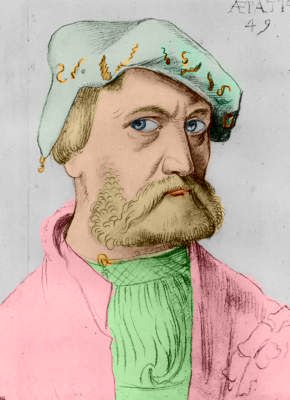
Alexander applied AKVIS Coloriage to colorize a self-portrait of German artist Hans Baldung, drawn in 1534, at the age of 49 years.
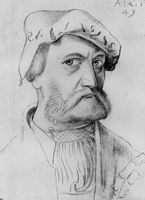
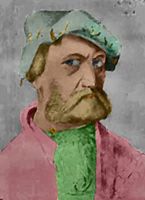
Here the plugin version of Coloriage was used, but you can take the standalone edition and use the same tools as in the plugin.
Alexander Sidorenko wrote about the tutorial the following:
"I admire the paintings of medieval artists; I have a collection of images representing the world masterpieces. In the tutorial to the plug-in AKVIS Coloriage I saw the example Colorizing an anime image and decided to apply the technique to the old masterpieces. I'm not an artist, and the colors might be not quite well chosen, so accept it as is and judge yourself."
To colorize the photo Alexander did the following:
-
Step 1. He opened the pencil sketch in a photo editor.
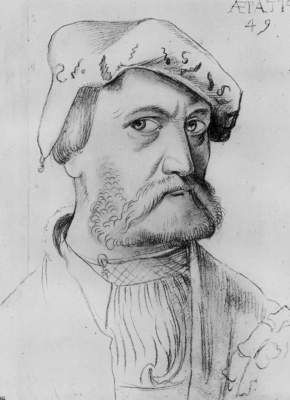
- Step 2. He called the plug-in AKVIS Coloriage by selecting the command AKVIS - Coloriage from the menu item Filter.
-
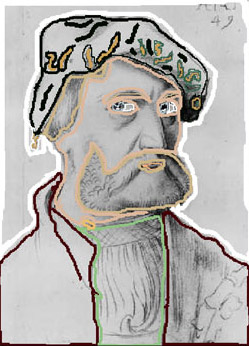
Step 3. In the plug-in's window he used the Pencil tool
 to assign a color to every object by drawing an outline within it. Consult the basic tutorial to learn how to draw strokes efficiently.
-
Step 4. He pressed the button
 and the colorized photo appeared in the After tab.
-
Step 5. He pressed the button
 to apply the colorization result and close the plug-in.
-
Step 6. Now we have a colorized portrait, but can continue editing the photo.
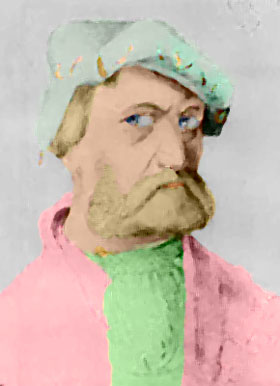
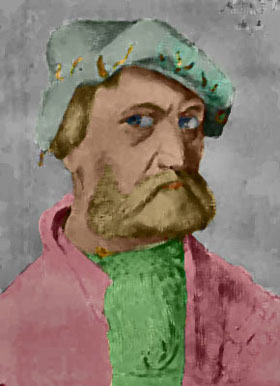
Alexander offered to imitate oil painting and applied the filter Artistic - Paint Daubs (Photoshop) with the following settings: Wide Blurry, Brush Size = 3 and Sharpness = 1. Then he darkened the photo with the command Shadows/Highlights.
Alternatively, it's possible to add an oil painting effect to the image using AKVIS ArtWork. Available as plugin and standalone program, ArtWork offers different painting techniques.
Here is the result made by Alexander:
Coloriage AI v. 15.7 - Free 10-day Trial
