Graphic software for Windows Mac graphic software
Please enter your email to be kept posted on updates and discounts:
 
  
  Products     Download     Online Store     Tutorial     Support     Company
en  fr  de  es  pt  it  jp  ru    
 

Tutorial: AKVIS Coloriage

Coloring old black and white drawings


The author of the tutorial is Gordon Sisson. His first article about Coloriage, "Love Story", about restoring the old photo of a beautiful woman, has already published on our web-site.

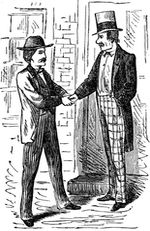
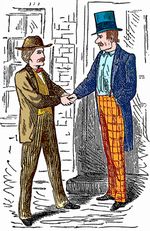
    Original image Colorized image

Now Mr. Sisson shares his experience again. He writes:

"Another interesting task easily accomplished with the help of Coloriage is coloring an ancient (or old) black and white drawing. I often find just the right illustration in my clip art collection or sometimes in an old book. But I want it in color or at least part of it in color.

Blessing: Coloriage 4.0 is silken smooth as you zoom in and out and traverse the area. The ability to set the size of the brush is marvellous, allowing much more precise marking for a finer result and less touch up.

  • Step 1. Clean up any blemishes or distracting marks in the illustration. Make it as perfect a B & W illustration as you can. Make sure the contrast, sharpness and clarity are uniform throughout.
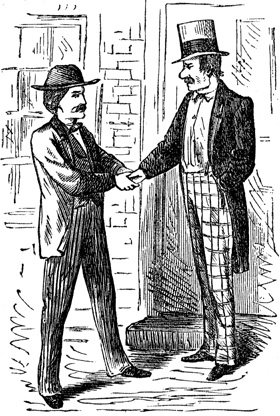
    an old black and white drawing
  • Step 2. You will have sharply clear demarcations of tone which are easy and you will have areas where the tones between parts are quite similar and therefore more difficult.

    Start by using the Keep-Color brush to preserve everything you do not wish to color.

    Carefully outline each element with your chosen color being sure there are no unwanted gaps. Where there is no demarcation between tones, you should outline each color as precisely as you can. Also, the original may have lines separating the sleeve from the jacket for example. Cover that line with the Keep-Color brush and put a line of your chosen color closely beside each side of the line.
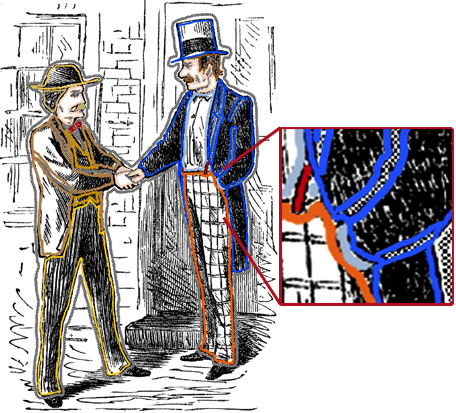
    put lines in Coloriage
  • Step 3. Press the run button (green arrow) Start and be amazed when your B & W illustration pops into color just as you ordered.

    Press the green check mark Apply, the AKVIS window closes and the changes are applied to your original graphic. Save your new image immediately."
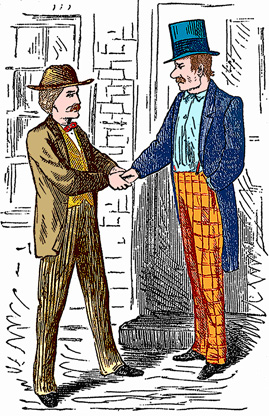
    colorized drawing
 
How It Works How It Works
   — Workspace — Workspace
   — How To Use The Program — How To Use The Program
   — Colorization Tips — Colorization Tips
   — Load strokes from file (*.strokes) — Load strokes from file (*.strokes)
Examples Examples
   — An Old Postcard — An Old Postcard
   — Changing Color of the Car Body — Changing Color of the Car Body
   — Colorizing a Black and White Photo — Colorizing a Black and White Photo
   — Selective desaturation — Selective desaturation
   — A romantic photo — A romantic photo
   — Color correction — Color correction
   — Colorizing a portrait — Colorizing a portrait
   — A technique of reiterative colorization — A technique of reiterative colorization
   — A present for the Mother's Day — A present for the Mother's Day
   — Canadian Settlers — Canadian Settlers
   — Add color to the photo of a child — Add color to the photo of a child
   — Interior design — Interior design
   — Colorize a family portrait — Colorize a family portrait
   — Change the color of clothes — Change the color of clothes
   — Colorize a group photo — Colorize a group photo
   — Creating a colorful background — Creating a colorful background
   — Colorize your memories — Colorize your memories
   — Paint your house — Paint your house
   — Raise spirits — Raise spirits
   — Partial coloring of B&W photos — Partial coloring of B&W photos
   — Expressive cat eyes — Expressive cat eyes
   — A portrait of a geisha — A portrait of a geisha
   — Colorize a bas-relief — Colorize a bas-relief
   — Photo colouring tricks — Photo colouring tricks
   — An old postcard with a Geisha — An old postcard with a Geisha
   — Touching up a colorized photo — Touching up a colorized photo
   — An anime girl — An anime girl
   — Colorize a photo for a collage — Colorize a photo for a collage
   — A Flower Show — A Flower Show
   — A pencil sketch: self-portrait — A pencil sketch: self-portrait
   — Creating a Christmas Postcard — Creating a Christmas Postcard
   — Love Story — Love Story
   — Desktop Wallpaper with a Pet — Desktop Wallpaper with a Pet
   — Colourize a Photo in Paint Shop Pro — Colourize a Photo in Paint Shop Pro
   — How to get a nice sepia photo — How to get a nice sepia photo
   — A Castle in Scotland — A Castle in Scotland
   — How to achieve a natural colorization — How to achieve a natural colorization
   — Christmas Card: B&W to Color — Christmas Card: B&W to Color
   — Movie Star Ayshwarya Ray — Movie Star Ayshwarya Ray
   — Coloring old black and white drawing — Coloring old black and white drawing
   — Flower meadow — Flower meadow
   — Children’s Photo — Children’s Photo
   — Beautiful Nataly (three plugins) — Beautiful Nataly (three plugins)
   — A Gift For The Wife — A Gift For The Wife
   — Medieval Engraving — Medieval Engraving


   Privacy Policy | Site Map | Search | English  |Français  |Deutsch  |Español  |Português  |Italiano  |日本語  |Pусский  | © 2004-2009, AKVIS Software Inc. All rights reserved.