Colorize a photo from one of our tutorials using half-finished jobs


Please enter your email to be kept posted on updates and discounts:
 
 
  Products     Download     Online Store     Tutorial     Support     Company      Customer Room
en  fr  de  es  pt  it  jp  ru    
 

Tutorial: AKVIS Coloriage

Try to colorize a photo from the tutorial (using .strokes file)


While coloring an image in the program AKVIS Coloriage, periodically save your strokes to a file, so that you do not have to repeat your work from the beginning, if for some reason you are interrupted.
To save strokes, click on and in the Save strokes dialog window choose a folder and file name. Later you can load the strokes from this file and continue working with the image.

In case of some unexpected event (such as a power loss, etc.) the program will autosave strokes (during image processing) to the file autosave.strokes.

Saving strokes is also a way to share your tips for using the program with others.

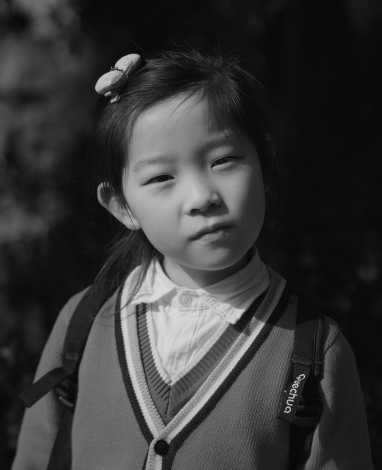
We offer you a photo to colorize from one of our tutorials using half-finished jobs.

  • Step 1. Download an archive that contains the original image and a file with strokes and unpack it.
  • Step 2. Open the original image from the unpacked archive.
    Open the original image from the unpacked archive
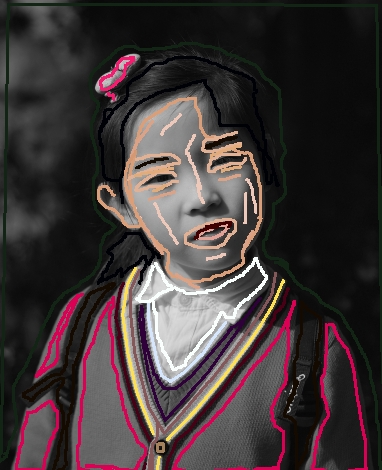
  • Step 3. Press the button . In the Open dialog box find the unpacked folder and select the file with the extension strokes, then press the button Open.
    Load the strokes in Coloriage
  • Step 4. Press the button and the result of the colorization will be shown in the After tab.
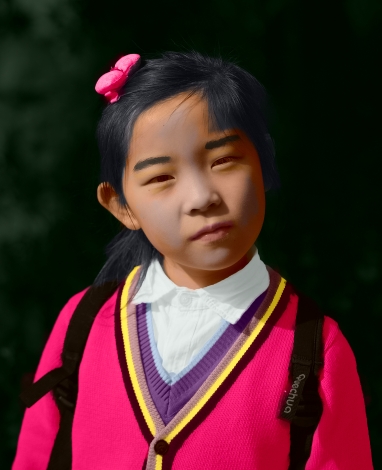
    Colorization result
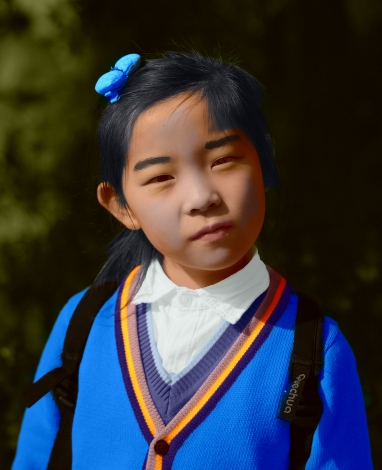
  • Step 5. You can change the colors of the image. For this purpose go to the Before tab and use the Tube or the Magic Tube to change the color of the strokes. The Tube changes the color of one stroke, the Magic Tube changes the color of all strokes having one color.
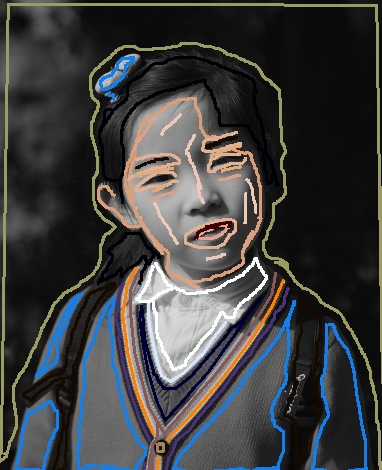
    Change the color of the strokes
    Press the button again.
    New result of colorization

Attention! The strokes in the archive correspond to the dimensions of the initial image (width x height). If you change the dimensions of the original image, the file with the strokes will not fit the image.


Download these archives:


How It Works How It Works
   — Workspace — Workspace
   — How To Use The Program — How To Use The Program
   — Select Colors — Select Colors
   — Colorization Tips — Colorization Tips
   — Load Strokes From File (*.strokes) — Load Strokes From File (*.strokes)
   — Preferences — Preferences
Examples Examples
   — Adding Color To An Old Postcard — Adding Color To An Old Postcard
   — Changing Color of Your Car — Changing Color of Your Car
   — Selective Desaturation — Selective Desaturation
   — Selective Colorization of B&W Photos — Selective Colorization of B&W Photos
   — Make White Whiter — Make White Whiter
   — Photo Coloring Tricks — Photo Coloring Tricks
   — Colorizing a Black and White Photo — Colorizing a Black and White Photo
   — Colorizing a Portrait of a Gentleman — Colorizing a Portrait of a Gentleman
   — Technique of Reiterative Colorization — Technique of Reiterative Colorization
   — Colorize Your Memories — Colorize Your Memories
   — A Present for the Mother's Day — A Present for the Mother's Day
   — Color Correction of a Portrait — Color Correction of a Portrait
   — Canadian Settlers — Canadian Settlers
   — Add Color to the Photo of a Child — Add Color to the Photo of a Child
   — Color Options for Interior Design — Color Options for Interior Design
   — Colorize a Family Portrait — Colorize a Family Portrait
   — Change the Color of Clothes — Change the Color of Clothes
   — Colorize a Group Photo — Colorize a Group Photo
   — Creating a Colorful Background — Creating a Colorful Background
   — Paint Your House — Paint Your House
   — Raise Spirits — Raise Spirits
   — Expressive Cat Eyes — Expressive Cat Eyes
   — A Portrait of a Geisha — A Portrait of a Geisha
   — Colorize a Bas-Relief — Colorize a Bas-Relief
   — An Old Postcard with a Geisha — An Old Postcard with a Geisha
   — Touching Up a Colorized Photo — Touching Up a Colorized Photo
   — Colorizing an Anime Girl — Colorizing an Anime Girl
   — Colorize a Photo for a Collage — Colorize a Photo for a Collage
   — A Flower Show — A Flower Show
   — A Pencil Sketch: Self-Portrait — A Pencil Sketch: Self-Portrait
   — Creating a Christmas Postcard — Creating a Christmas Postcard
   — Love Story — Love Story
   — Desktop Wallpaper with a Pet — Desktop Wallpaper with a Pet
   — Colorize a Photo in Paint Shop Pro — Colorize a Photo in Paint Shop Pro
   — How to Get a Nice Sepia Photo — How to Get a Nice Sepia Photo
   — A Castle in Scotland — A Castle in Scotland
   — How to Achieve a Natural Colorization — How to Achieve a Natural Colorization
   — Christmas Card: B&W to Color — Christmas Card: B&W to Color
   — Movie Star Ayshwarya Ray — Movie Star Ayshwarya Ray
   — Adding Detail and Color a Drawing — Adding Detail and Color a Drawing
   — Coloring Old Black-And-White Drawing — Coloring Old Black-And-White Drawing
   — Flower Meadow — Flower Meadow
   — Children’s Photo — Children’s Photo
   — Medieval Engraving — Medieval Engraving
   — Wedding Album — Wedding Album
   — Full Dress Uniform — Full Dress Uniform
   — A Lovely French Couple — A Lovely French Couple
   — Simple Approach for Coloring Pictures — Simple Approach for Coloring Pictures


back to top


   Privacy Policy | Site Map | Search at AKVIS    
   Contact Us | Twitter | Facebook | YouTube Channel    
| English  |Français  |Deutsch  |Español  |Português  |Italiano  |日本語  |Pусский  | © 2004-2012 AKVIS. All rights reserved.