Graphic software for Windows Mac graphic software
Please enter your email to be kept posted on updates and discounts:
 
  
  Products     Download     Online Store     Tutorial     Support     Company
en  fr  de  es  pt  it  jp  ru    
 

Tutorial: AKVIS Coloriage

Raise spirits


Raise spirits by adding color to dull things and you will see the world changing.

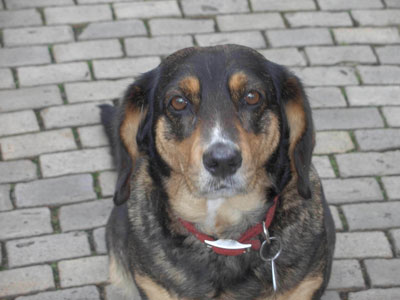
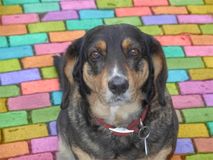
Here we have a photo of a nice dog from Dresden sent to us by Victor Novikov. The dog is charming, but the background is a bit dull. We will turn the pavement into a bright mosaic.

    Original image Colorized image
  • Step 1. Open the photo of a dog in your photo editing software.
  • a photo of a dog
  • Step 2. Call the AKVIS Coloriage plug-in. For this purpose in Adobe Photoshop select the menu item Filter – AKVIS – Coloriage; in Corel PHOTO-PAINT - select the menu item Effects – AKVIS – Coloriage.
  • Step 3. To make a color mosaic of this pavement we use the Pencil tool and assign a color for every cobble. It is also possible to draw outlines with one color and then use the Tube tool to colorize every cobble in the color you like.
  • Step 4. Use the Keep-Color Pencil to draw an outline within the dog so that the dog keeps its colors and does not take on the colors of the pavement.
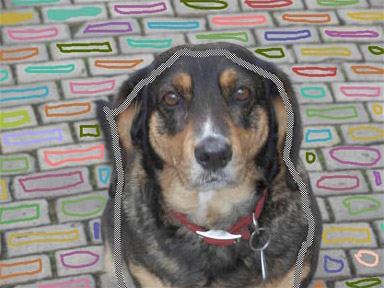
    Assign a color for every cobble of the pavement
  • Step 5. Press the button Colorize and the dull pavement will turn into a colorful background.
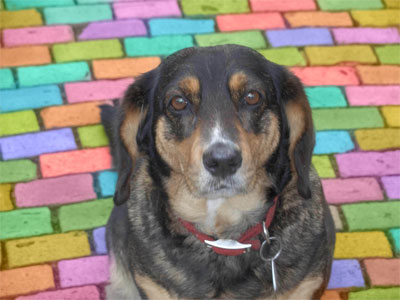
    A colorful mosaic instead of a dull pavement width=
  • Step 6. Press the button Apply the colorization in the Toolbar to apply the colorization result and close the plug-in window.
    A colorful mosaic instead of a dull pavement
 
How It Works How It Works
   — Workspace — Workspace
   — How To Use The Program — How To Use The Program
   — Colorization Tips — Colorization Tips
   — Load strokes from file (*.strokes) — Load strokes from file (*.strokes)
Examples Examples
   — An Old Postcard — An Old Postcard
   — Changing Color of the Car Body — Changing Color of the Car Body
   — Colorizing a Black and White Photo — Colorizing a Black and White Photo
   — Selective desaturation — Selective desaturation
   — A romantic photo — A romantic photo
   — Color correction — Color correction
   — Colorizing a portrait — Colorizing a portrait
   — A technique of reiterative colorization — A technique of reiterative colorization
   — A present for the Mother's Day — A present for the Mother's Day
   — Canadian Settlers — Canadian Settlers
   — Add color to the photo of a child — Add color to the photo of a child
   — Interior design — Interior design
   — Colorize a family portrait — Colorize a family portrait
   — Change the color of clothes — Change the color of clothes
   — Colorize a group photo — Colorize a group photo
   — Creating a colorful background — Creating a colorful background
   — Colorize your memories — Colorize your memories
   — Paint your house — Paint your house
   — Raise spirits — Raise spirits
   — Partial coloring of B&W photos — Partial coloring of B&W photos
   — Expressive cat eyes — Expressive cat eyes
   — A portrait of a geisha — A portrait of a geisha
   — Colorize a bas-relief — Colorize a bas-relief
   — Photo colouring tricks — Photo colouring tricks
   — An old postcard with a Geisha — An old postcard with a Geisha
   — Touching up a colorized photo — Touching up a colorized photo
   — An anime girl — An anime girl
   — Colorize a photo for a collage — Colorize a photo for a collage
   — A Flower Show — A Flower Show
   — A pencil sketch: self-portrait — A pencil sketch: self-portrait
   — Creating a Christmas Postcard — Creating a Christmas Postcard
   — Love Story — Love Story
   — Desktop Wallpaper with a Pet — Desktop Wallpaper with a Pet
   — Colourize a Photo in Paint Shop Pro — Colourize a Photo in Paint Shop Pro
   — How to get a nice sepia photo — How to get a nice sepia photo
   — A Castle in Scotland — A Castle in Scotland
   — How to achieve a natural colorization — How to achieve a natural colorization
   — Christmas Card: B&W to Color — Christmas Card: B&W to Color
   — Movie Star Ayshwarya Ray — Movie Star Ayshwarya Ray
   — Coloring old black and white drawing — Coloring old black and white drawing
   — Flower meadow — Flower meadow
   — Children’s Photo — Children’s Photo
   — Beautiful Nataly (three plugins) — Beautiful Nataly (three plugins)
   — A Gift For The Wife — A Gift For The Wife
   — Medieval Engraving — Medieval Engraving


   Privacy Policy | Site Map | Search | English  |Français  |Deutsch  |Español  |Português  |Italiano  |日本語  |Pусский  | © 2004-2009, AKVIS Software Inc. All rights reserved.