Wedding Album: From Retro To Today


Please enter your email to be kept posted on updates and discounts:
 
 
  Products     Download     Online Store     Tutorial     Support     Company      Customer Room
en  fr  de  es  pt  it  jp  ru    
 

Tutorial: AKVIS Coloriage

Wedding Album: From Retro To Today


The author of this tutorial is Sergey Siman.

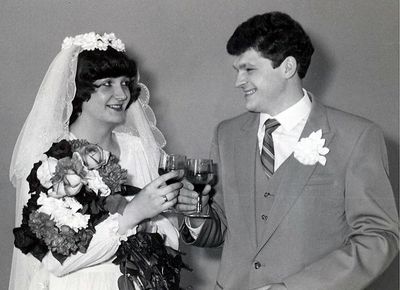
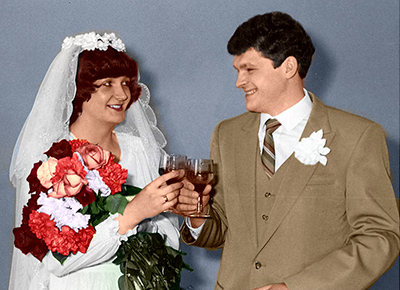
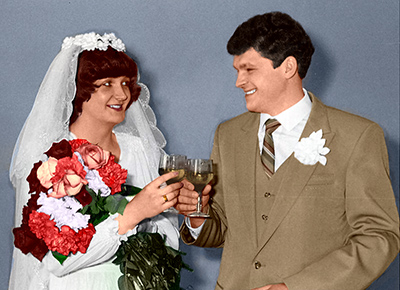
This photograph was taken in April, 1982. At that time, color photography (except color slides) was not so common. It is very pleasant to revive memories from one's youth, to once again recreate the atmosphere of joy and happiness in all of its colors. According to the author, using AKVIS Coloriage saved a lot of time and yielded an excellent result. The hardest part was remembering the original colors of the clothes and accessories.
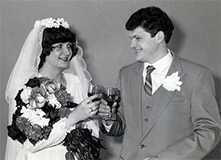
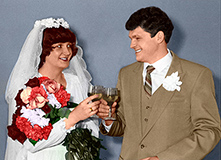
    Original Image Result After Coloration

Follow these steps:

  • Step 1. Start the standalone version of AKVIS Coloriage and open the image (using the button).
    Чёрно-белая свадебная фотография
    Black And White Wedding Photograph
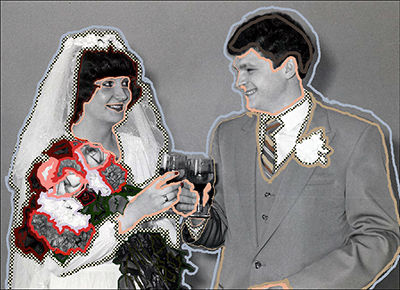
  • Step 2. Use the Pencil tool to draw color strokes around the boundaries of objects. Colors for various elements can be chosen from the Color Library. To prevent some areas from being colorized (the dress, veil, collar) use the Keep Color Pencil (Keep Color Pencil) tool.
    Setting the colors of objects using color strokes
    Marking Color Stokes
  • Step 3. Press the button to process the image.
    Colorization Result
    Colorization Result
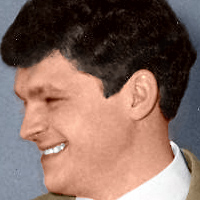
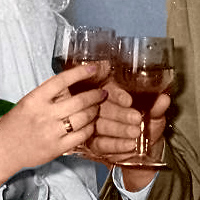
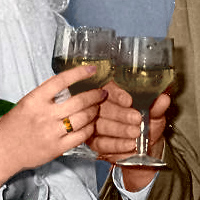
  • Step 4. Now while in the After tab, use the Recolor Brush tool to correct details in the picture - for example, by drawing a white line around the teeth, drawing around the wedding ring in yellow, etc.
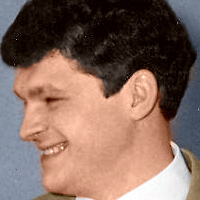
    Before Applying The Recolor Brush After Applying The Recolor Brush
    Before Applying The Recolor Brush After Applying The Recolor Brush
    Refining Image Details
  • Step 5. Press the button and save the final image.
    Result
    Result
 
How It Works How It Works
   — Workspace — Workspace
   — How To Use The Program — How To Use The Program
   — Select Colors — Select Colors
   — Colorization Tips — Colorization Tips
   — Load Strokes From File (*.strokes) — Load Strokes From File (*.strokes)
   — Preferences — Preferences
Examples Examples
   — Adding Color To An Old Postcard — Adding Color To An Old Postcard
   — Changing Color of Your Car — Changing Color of Your Car
   — Selective Desaturation — Selective Desaturation
   — Selective Colorization of B&W Photos — Selective Colorization of B&W Photos
   — Make White Whiter — Make White Whiter
   — Photo Coloring Tricks — Photo Coloring Tricks
   — Colorizing a Black and White Photo — Colorizing a Black and White Photo
   — Colorizing a Portrait of a Gentleman — Colorizing a Portrait of a Gentleman
   — Technique of Reiterative Colorization — Technique of Reiterative Colorization
   — Colorize Your Memories — Colorize Your Memories
   — A Present for the Mother's Day — A Present for the Mother's Day
   — Color Correction of a Portrait — Color Correction of a Portrait
   — Canadian Settlers — Canadian Settlers
   — Add Color to the Photo of a Child — Add Color to the Photo of a Child
   — Color Options for Interior Design — Color Options for Interior Design
   — Colorize a Family Portrait — Colorize a Family Portrait
   — Change the Color of Clothes — Change the Color of Clothes
   — Colorize a Group Photo — Colorize a Group Photo
   — Creating a Colorful Background — Creating a Colorful Background
   — Paint Your House — Paint Your House
   — Raise Spirits — Raise Spirits
   — Expressive Cat Eyes — Expressive Cat Eyes
   — A Portrait of a Geisha — A Portrait of a Geisha
   — Colorize a Bas-Relief — Colorize a Bas-Relief
   — An Old Postcard with a Geisha — An Old Postcard with a Geisha
   — Touching Up a Colorized Photo — Touching Up a Colorized Photo
   — Colorizing an Anime Girl — Colorizing an Anime Girl
   — Colorize a Photo for a Collage — Colorize a Photo for a Collage
   — A Flower Show — A Flower Show
   — A Pencil Sketch: Self-Portrait — A Pencil Sketch: Self-Portrait
   — Creating a Christmas Postcard — Creating a Christmas Postcard
   — Love Story — Love Story
   — Desktop Wallpaper with a Pet — Desktop Wallpaper with a Pet
   — Colorize a Photo in Paint Shop Pro — Colorize a Photo in Paint Shop Pro
   — How to Get a Nice Sepia Photo — How to Get a Nice Sepia Photo
   — A Castle in Scotland — A Castle in Scotland
   — How to Achieve a Natural Colorization — How to Achieve a Natural Colorization
   — Christmas Card: B&W to Color — Christmas Card: B&W to Color
   — Movie Star Ayshwarya Ray — Movie Star Ayshwarya Ray
   — Adding Detail and Color a Drawing — Adding Detail and Color a Drawing
   — Coloring Old Black-And-White Drawing — Coloring Old Black-And-White Drawing
   — Flower Meadow — Flower Meadow
   — Children’s Photo — Children’s Photo
   — Medieval Engraving — Medieval Engraving
   — Wedding Album — Wedding Album
   — Full Dress Uniform — Full Dress Uniform
   — A Lovely French Couple — A Lovely French Couple
   — Simple Approach for Coloring Pictures — Simple Approach for Coloring Pictures
   — Multicolor Painting — Multicolor Painting


back to top


   Privacy Policy | Site Map | Search at AKVIS    
   Contact Us | Twitter | Facebook | YouTube Channel    
| English  |Français  |Deutsch  |Español  |Português  |Italiano  |日本語  |Pусский  | © 2004-2012 AKVIS. All rights reserved.