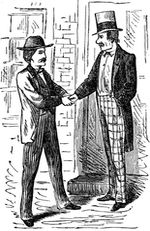
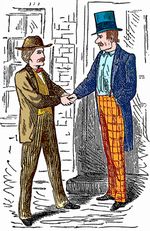
Graphic software for Windows Mac graphic software
Entrez votre e-mail pour souscrire à notre liste de diffusion.
 
  
  Produits     Télécharger     Magasin en ligne     Tutoriel     Support     Compagnie
en  fr  de  es  pt  it  jp  ru    
 

Tutoriel: AKVIS Coloriage

Coloring old black and white drawings


Désolé, à présent cette information n'est disponible qu'en anglais. La version française sera bientôt affichée.

The author of the tutorial is Gordon Sisson. His first article about Coloriage, "Love Story", about restoring the old photo of a beautiful woman, has already published on our web-site.

Now Mr. Sisson shares his experience again. He writes:

"Another interesting task easily accomplished with the help of Coloriage is coloring an ancient (or old) black and white drawing. I often find just the right illustration in my clip art collection or sometimes in an old book. But I want it in color or at least part of it in color.

Blessing: Coloriage 4.0 is silken smooth as you zoom in and out and traverse the area. The ability to set the size of the brush is marvellous, allowing much more precise marking for a finer result and less touch up.

  • Step 1. Clean up any blemishes or distracting marks in the illustration. Make it as perfect a B & W illustration as you can. Make sure the contrast, sharpness and clarity are uniform throughout.
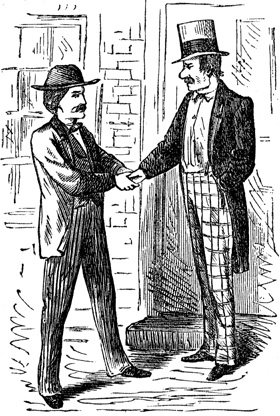
    an old black and white drawing
  • Step 2. You will have sharply clear demarcations of tone which are easy and you will have areas where the tones between parts are quite similar and therefore more difficult.

    Start by using the Keep-Color brush to preserve everything you do not wish to color.

    Carefully outline each element with your chosen color being sure there are no unwanted gaps. Where there is no demarcation between tones, you should outline each color as precisely as you can. Also, the original may have lines separating the sleeve from the jacket for example. Cover that line with the Keep-Color brush and put a line of your chosen color closely beside each side of the line.
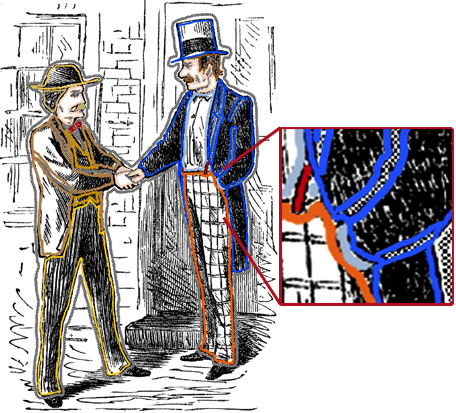
    put lines in Coloriage
  • Step 3. Press the run button (green arrow) Start and be amazed when your B & W illustration pops into color just as you ordered.

    Press the green check mark Apply, the AKVIS window closes and the changes are applied to your original graphic. Save your new image immediately."
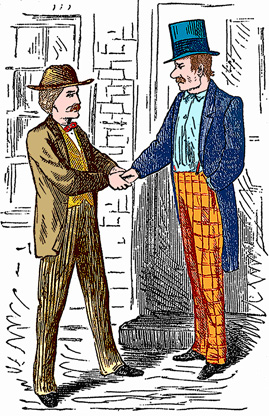
    colorized drawing
 
Comment fonctionne t-il? Comment fonctionne t-il?
   — Espace de travail — Espace de travail
   — Utiliser le logiciel — Utiliser le logiciel
   — Astuces — Astuces
   — Fichier avec les traits (*.strokes) — Fichier avec les traits (*.strokes)
Exemples Exemples
   — La Dame aux camélias — La Dame aux camélias
   — Changer la couleur d'une voiture — Changer la couleur d'une voiture
   — Coloriser une photo en noir et blanc — Coloriser une photo en noir et blanc
   — Désaturation sélective — Désaturation sélective
   — Une photo romantique — Une photo romantique
   — Correction des couleurs — Correction des couleurs
   — Monsieur à chapeau — Monsieur à chapeau
   — La technique de colorisation réitérée — La technique de colorisation réitérée
   — Un cadeau pour la Fête des mères — Un cadeau pour la Fête des mères
   — Les colons canadiens — Les colons canadiens
   — Ajoutez de la couleur à la photo — Ajoutez de la couleur à la photo
   — Les couleurs pour l'intérieur — Les couleurs pour l'intérieur
   — Colorisez une photo de famille — Colorisez une photo de famille
   — Changez la couleur des vêtements — Changez la couleur des vêtements
   — Une photo difficile à coloriser — Une photo difficile à coloriser
   — Créer un fond multicolore — Créer un fond multicolore
   — Colorisez vos mémoires — Colorisez vos mémoires
   — Peindre la façade — Peindre la façade
   — Le fond mosaïque — Le fond mosaïque
   — Colorisation partielle — Colorisation partielle
   — Les yeux expressifs d'un chat — Les yeux expressifs d'un chat
   — Un portrait d'une geicha — Un portrait d'une geicha
   — Coloriser un bas-relief — Coloriser un bas-relief
   — Une carte postale avec une geicha — Une carte postale avec une geicha
   — Retouche finale d'une photo colorisée — Retouche finale d'une photo colorisée
   — Dessin Manga — Dessin Manga
   — Coloriser une photo pour collage — Coloriser une photo pour collage
   — Défilé des fleurs — Défilé des fleurs
   — Carte postale de Noël — Carte postale de Noël
   — Histoire d'amour — Histoire d'amour
   — Faire une photo sépia — Faire une photo sépia
   — Créer une colorisation naturelle — Créer une colorisation naturelle
   — La gravure médiévale — La gravure médiévale


   Politique de Confidentialité | Plan du Site | Recherche | English  | Français  |Deutsch  |Español  |Português  |Italiano  |日本語  |Pусский  | © 2004-2009, AKVIS Software Inc. Tous droits réservés.