Graphic plugins for Windows Mac graphic plugins  
Please enter your email to be kept posted on updates and discounts:
 
  
  Products     Download     Online Store     Tutorial     Support     About Company
en  fr  de  es  pt  it  jp  ru    
 

Tutorial: AKVIS Coloriage

Selective Colorization of B&W photos


In the tutorial to the AKVIS Coloriage Plugin you can find many examples of colorization of black and white photos. But it is also possible to add color only to one object of the image in order to place special emphasis on it. In some cases partial coloring can be particularly useful.
Follow the instruction to colorize a part of the photo:

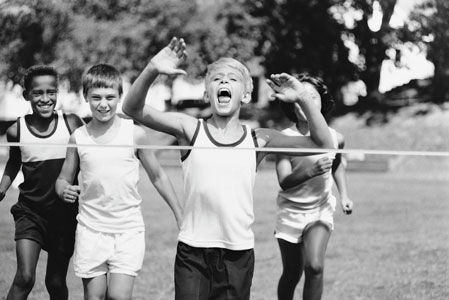
  • Step 1. Open the photo of the young sportsmen in your photo editor.
    the original black and white photo of sportsmen
  • Step 2. Call the AKVIS Coloriage Plugin.
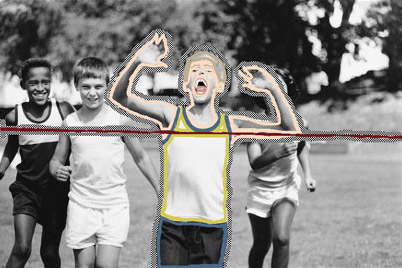
  • Step 3. Use the Pencil tool to assign colors to the key figure of the image. In our case we will colorize the boy who wins the race. We choose colors for his clothes, his hair, eyes, teeth, lips and the color of the finish ribbon.
  • Step 4. Use the Keep-color Pencil to draw a close outline around the key object. If it is not possible to draw a close outline, the keep-color line should go beyond the photo frame, so that there were no gaps between the keep-color outline and the image.
    Use the Pencil tool to assign colors to the key object; use the Keep-Color Pencil tool to draw an outline around the colorized object
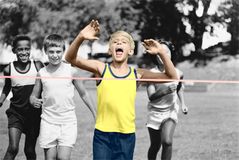
  • Step 5. Press the button Colorize to start the colorization process. In a few steps you have got a partially colorized photo.
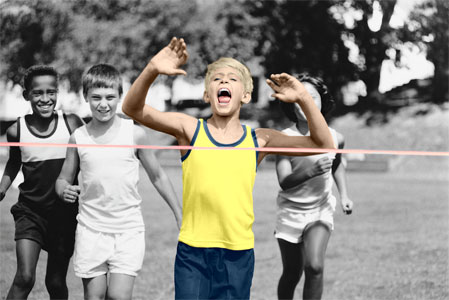
    Partial coloring:   only the race winner is colorized
  • Step 6. Apply the partial coloring to the picture by pressing the button Apply.
    Partial coloring
 
How It Works How It Works
Tips Tips
An Old Postcard An Old Postcard
Changing Color of the Car Body Changing Color of the Car Body
Colorizing a Black and White Photo Colorizing a Black and White Photo
Selective desaturation Selective desaturation
Color correction Color correction
Colorizing a portrait Colorizing a portrait
A technique of reiterative colorization A technique of reiterative colorization
A present for the Mother's Day A present for the Mother's Day
Canadian Settlers Canadian Settlers
Add color to the photo of a child Add color to the photo of a child
Interior design Interior design
Colorize a family portrait Colorize a family portrait
Change the color of clothes Change the color of clothes
Colorize a group photo Colorize a group photo
Creating a colorful background Creating a colorful background
Colorize your memories Colorize your memories
A romantic photo A romantic photo
Paint your house Paint your house
Raise spirits Raise spirits
Partial coloring of B&W photos Partial coloring of B&W photos
Expressive cat eyes Expressive cat eyes
A portrait of a geisha A portrait of a geisha
Colorize a bas-relief Colorize a bas-relief
Photo colouring tricks Photo colouring tricks
An old postcard with a Geisha An old postcard with a Geisha
Touching up a colorized photo Touching up a colorized photo
An anime girl An anime girl
Colorize a photo for a collage Colorize a photo for a collage
A Flower Show A Flower Show
A pencil sketch: self-portrait A pencil sketch: self-portrait
Creating a Christmas Postcard Creating a Christmas Postcard
Love Story Love Story
Desktop Wallpaper with a Pet Desktop Wallpaper with a Pet
Colourize a Photo in Paint Shop Pro Colourize a Photo in Paint Shop Pro
How to get a nice sepia photo How to get a nice sepia photo
A Castle in Scotland A Castle in Scotland
How to achieve a natural colorization How to achieve a natural colorization
Christmas Card: B&W to Color Christmas Card: B&W to Color
Movie Star Ayshwarya Ray Movie Star Ayshwarya Ray
Coloring old black and white drawing Coloring old black and white drawing
Flower meadow Flower meadow


   Privacy Policy | Site Map | Search | English  | Français  | Deutsch  | Español  | Português  | Italiano  | 日本語  | Pусский  | © 2004-2008, AKVIS LLC. All rights reserved.