Graphic plugins for Windows Mac graphic plugins  
Please enter your email to be kept posted on updates and discounts:
 
  
  Products     Download     Online Store     Tutorial     Support     About Company
en  fr  de  es  pt  it  jp  ru    
 

Tutorial: AKVIS Coloriage

Colorize a bas-relief


Bas-relief is a method of sculpting which entails carving the surface of a flat piece of stone. The resulting image is raised above the background flat surface. Sometimes the resulting image has been painted, and other times it has been left in the natural state of the material used.

In this example we will apply AKVIS Coloriage to paint a one-color bas-relief.

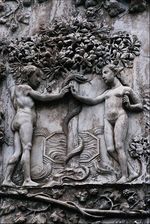
  • Step 1. Open the photo of a bas-relief in your photo editor. We have chosen a bas-relief of Adam and Eve near the Tree of Knowledge of Good and Evil.
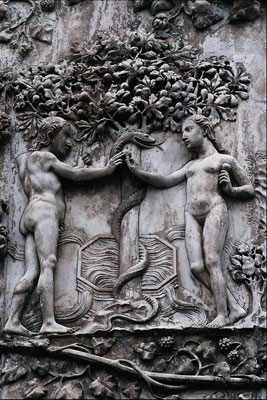
    Adam and Eve near the Tree of Knowledge of Good and Evil
  • Step 2. Call the AKVIS Coloriage plug-in. For this purpose in Adobe Photoshop select the menu item Filter – AKVIS – Coloriage; in Corel PHOTO-PAINT - select the menu item Effects – AKVIS – Coloriage.
  • Step 3. We will draw an outline within every element of the bas-relief with the chosen color. We will select a color for the skin, hair and the lips from from the People group of the Color Library, the color for the tree's leaves can be taken from the Leaves group, the color for the trunk and the branches - from the Wood - Trunks group, for the water - from the Water group.
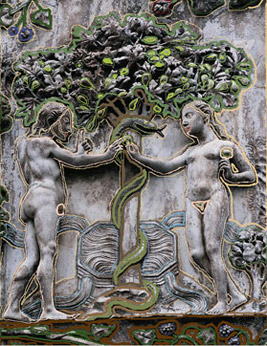
    Draw strokes to assign a color to every object
  • Step 4. Press the button Colorize the photo and you will see the colorized image in the After tab.
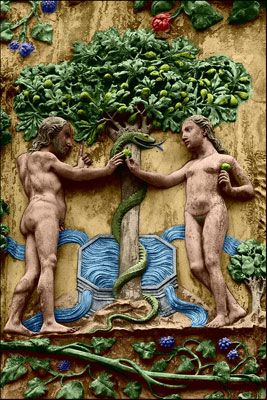
    the colorized bas-relief
  • Step 5. Press the button Apply to apply the results of the colorization to the picture of the bas-relief and close the plug-in window.
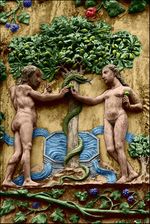
    the colorized bas-relief
 
How It Works How It Works
Tips Tips
An Old Postcard An Old Postcard
Changing Color of the Car Body Changing Color of the Car Body
Colorizing a Black and White Photo Colorizing a Black and White Photo
Selective desaturation Selective desaturation
Color correction Color correction
Colorizing a portrait Colorizing a portrait
A technique of reiterative colorization A technique of reiterative colorization
A present for the Mother's Day A present for the Mother's Day
Canadian Settlers Canadian Settlers
Add color to the photo of a child Add color to the photo of a child
Interior design Interior design
Colorize a family portrait Colorize a family portrait
Change the color of clothes Change the color of clothes
Colorize a group photo Colorize a group photo
Creating a colorful background Creating a colorful background
Colorize your memories Colorize your memories
A romantic photo A romantic photo
Paint your house Paint your house
Raise spirits Raise spirits
Partial coloring of B&W photos Partial coloring of B&W photos
Expressive cat eyes Expressive cat eyes
A portrait of a geisha A portrait of a geisha
Colorize a bas-relief Colorize a bas-relief
Photo colouring tricks Photo colouring tricks
An old postcard with a Geisha An old postcard with a Geisha
Touching up a colorized photo Touching up a colorized photo
An anime girl An anime girl
Colorize a photo for a collage Colorize a photo for a collage
A Flower Show A Flower Show
A pencil sketch: self-portrait A pencil sketch: self-portrait
Creating a Christmas Postcard Creating a Christmas Postcard
Love Story Love Story
Desktop Wallpaper with a Pet Desktop Wallpaper with a Pet
Colourize a Photo in Paint Shop Pro Colourize a Photo in Paint Shop Pro
How to get a nice sepia photo How to get a nice sepia photo
A Castle in Scotland A Castle in Scotland
How to achieve a natural colorization How to achieve a natural colorization
Christmas Card: B&W to Color Christmas Card: B&W to Color
Movie Star Ayshwarya Ray Movie Star Ayshwarya Ray
Coloring old black and white drawing Coloring old black and white drawing
Flower meadow Flower meadow


   Privacy Policy | Site Map | Search | English  | Français  | Deutsch  | Español  | Português  | Italiano  | 日本語  | Pусский  | © 2004-2008, AKVIS LLC. All rights reserved.