Colorare un bassorilievo
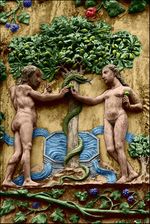
Il bassorilievo è un metodo di scultura che consiste nello scolpire la superficie piatta di una pietra. L'immagine che ne deriva è sollevata rispetto al fondo piatto, a volte è stata dipinta, in altre occasioni è lasciata allo stato naturale con il materiale grezzo.
In questo esempio viene utilizzato AKVIS Coloriage AI per dare colore al bassorilievo.
-
Passaggio 1. Aprire la foto in un editor di foto. Qui abbiamo scelto il bassorilievo di Adamo ed Eva presso l'albero della Conoscenza del Bene e del Male.
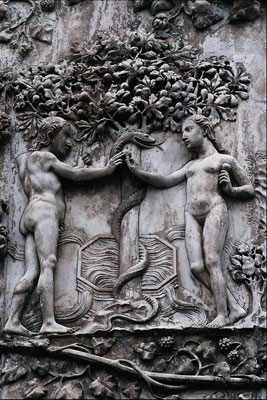
-
Passaggio 2. Lanciare il plugin AKVIS Coloriage AI. In AliveColors selezionare dal menu Effetti - AKVIS - Coloriage AI; in Adobe Photoshop selezionare Filtro - AKVIS - Coloriage AI; in Corel Photo-Paint selezionare Effetti - AKVIS - Coloriage AI.
In questo tutorial usiamo la versione plugin, ma si può utilizzare anche il programma standalone, il metodo di lavoro è analogo.
-
Passaggio 3. Nella modalità Classica disegnare il contorno interno di ogni elemento con il colore scelto. E’ possibile selezionare un colore per la pelle, i capelli e le labbra dalla Libreria colori, nella cartella Persone. La tinta per le foglie dell'albero può essere presa dalla cartella Foglie, quella del tronco e rami da Legno e per l'acqua da Acqua.
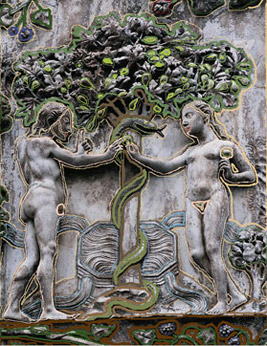
-
Passaggio 4. Premere su
 per vedere l'immagine colorata nella scheda Dopo.
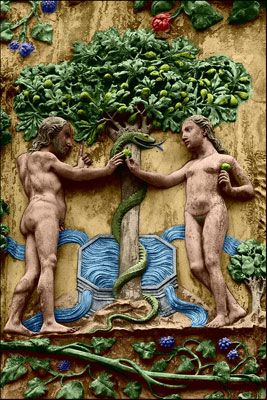
-
Passaggio 5. Premere su
 per applicare il risultato e chiudere la finestra del plugin.
Coloriage AI v. 15.7 - 10-giorni di prova gratuita
