Graphic software for Windows Mac graphic software
Inserisci la tua e-mail per essere informato delle novità:
 
  
  Prodotti     Download     Online Store     Tutorial     Supporto     Chi siamo
en  fr  de  es  pt  it  jp  ru    
 

Tutorial: AKVIS Coloriage

Colorize your memories


Siamo spiacenti, questa pagina al momento è disponibile solo in lingua inglese.
La versione italiana sarà presto disponibile.
Se desiderate ottenere la licenza per la traduzione per favore scriveteci.

You can colorize this photo yourself using the half-finished materials that we give you. Download the archive containing the original image and the strokes file (*.strokes). Read the instruction here to see how AKVIS Coloriage works.

Watch a flash movie demonstrating the technique of colorization with AKVIS Coloriage. Click here! (flash-movie, 9.4 Mb)


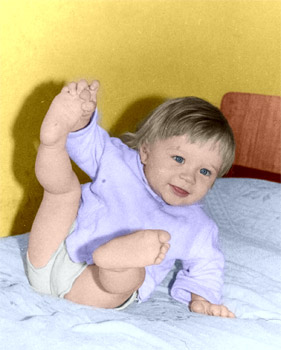
This photo was taken at a time when color photos where not so widespread, while black and white photography was available to everyone.

However, black and white photos can not convey the atmosphere of that time: the color of the wallpaper where you drew your first picture, the colors of your favourite blanket, the teddy bear that you loved so much.

Now you can take your black and white photo and use your memory to add colors to your recollections.

  • Step 1. Open the photo in your photo editing software.
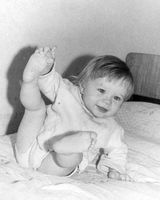
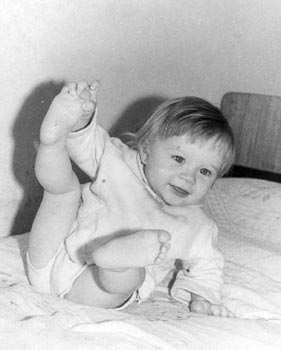
  • a black and white photo of a child
  • Step 2. Call the AKVIS Coloriage plug-in. For this purpose in Adobe Photoshop select the menu item Filter – AKVIS – Coloriage; in Jasc Paint Shop Pro select the menu item Effects – Plugins - AKVIS – Coloriage; in Corel PHOTO-PAINT - select the menu item Effects – AKVIS – Coloriage.
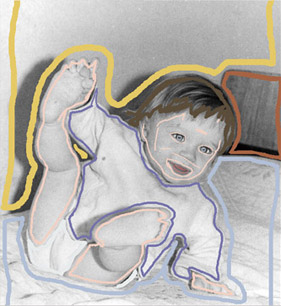
  • Step 3. Draw an outline within every object with the color you have chosen for it.
    Draw an outline within every object with the color you've chosen for it
  • Step 4. Press the button Colorize and you will see the colorized photo in the After tab.
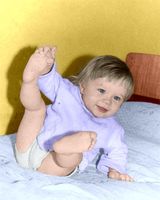
    the colorized photo of a child
  • Step 5. Apply the result to the image by pressing the button Apply the colorization to the image.
    the black and white photo of a child the colorized photo of a child
 
Come Funziona Come Funziona
   — Area di lavoro — Area di lavoro
   — Come usare il programma — Come usare il programma
   — Caricare i tratti dal file (*.strokes) — Caricare i tratti dal file (*.strokes)
Esempi Esempi
   — Una vecchia cartolina — Una vecchia cartolina
   — Cambiare il colore della carrozzeria — Cambiare il colore della carrozzeria
   — Una foto in bianco e nero — Una foto in bianco e nero
   — Colorare un ritratto — Colorare un ritratto
   — Quadretto Canadese — Quadretto Canadese
   — Una Ragazza “Anime” — Una Ragazza “Anime”
   — Una storia d'amore — Una storia d'amore
   — Cartolina di Natale — Cartolina di Natale
   — Colorare vecchi disegni in bianco e nero — Colorare vecchi disegni in bianco e nero


   Privacy Policy | Mappa del Sito | Cerca nel sito | English  |Français  |Deutsch  |Español  |Português  | Italiano  |日本語  |Pусский  | © 2004-2009, AKVIS Software Inc. Tutti i diritti riservati.