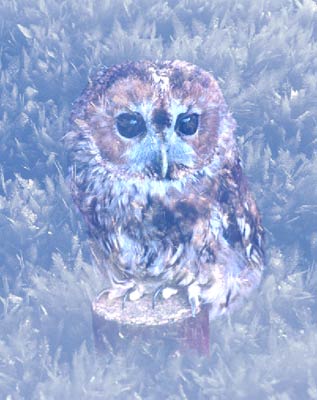
Fairy-tale Bird Created with AKVIS Chameleon


Entrar seu e-mail para subscrição em novidades.
 
 
  Produtos     Download     Online Store     Tutorial     Suporte     Quem Somos      Conta de usuário
en  fr  de  es  pt  it  jp  ru    
 

Tutorial: AKVIS Chameleon

A Fairy-tale Bird In A Fantastic Forest


Neste momento algumas páginas estão disponíveis somente em Inglês e em Espanhol.
Você pode obter uma licença para qualquer programa AKVIS, se traduzir os arquivos do nosso acervo
para o Português (do espanhol ou do inglês) para saber mais escreva para o team@akvis.com

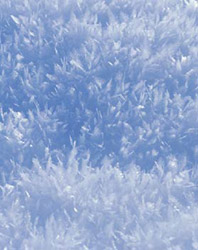
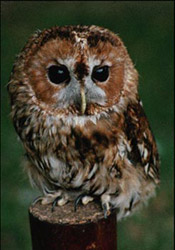
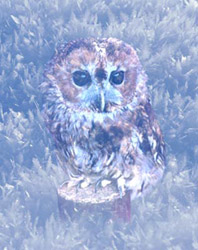
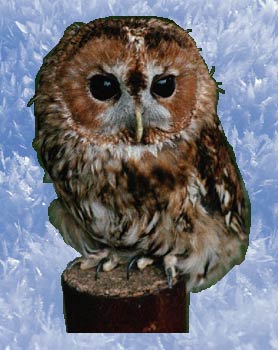
The fantastic forest on the left is just an intricate pattern drawn by heavy frost. The fairy-tale bird is for the time being no more than a little owl. But as soon as the little owl finds itself in the fantastic forest it turns into a fairy-tale bird.
Background Image (Forest) Foreground Image (Owl) Result (Photo Collage)
Source ImagesResult

  • Step 1. Open these photos in your photo editor (in our case it is Adobe Photoshop with AKVIS Chameleon plugin).

    You can use AKVIS Chameleon in its standalone edition if you wish. In this case, instead of steps 2-4, just use the pencil tools in the program to draw red and blue outlines. They are available in the plugin version too. With these tools you can draw the contours and edit them.

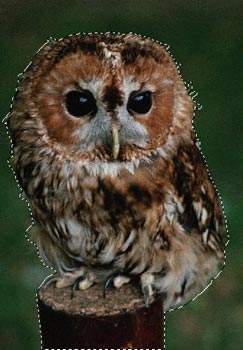
  • Step 2. Use any selection tool to select the owl. We select the owl using Quick Mask mode of Adobe Photoshop. Switch to the Quick Mask mode and paint the little owl using a hard-edged pencil.

    Switch back to the Standard mode and invert the selection by calling the command Select-Inverse or by using the key combination Ctrl+Shift+I.

    Select the owl
  • Step 3. Copy the selected image by calling AKVIS -> Chameleon -> Grab Fragment from the Filter menu.
  • Step 4. Switch back to the fairy-tale forest, which will be the background for the little owl, and call AKVIS -> Chameleon -> Make Collage from the Filter menu.

    The AKVIS Chameleon plug-in window will open and the background and fragment (owl) will be visible in the Before tab.

  • Step 5. Switch to Blend mode from the drop-down menu in the Settings Panel.
    Insert the image of the owl in the fairy tale forest
  • Step 6. Change the size and position of the fragment by using the Transform tool .
  • Step 7. Press the button to create the collage. The result will appear in the After tab. Press the button to apply the collage to the image.

    Here we have a fairy-tale illustration.

    Fairy tale illustration
 
Como funciona Como funciona
   — Área de trabalho — Área de trabalho
   — Utilizando o programa — Utilizando o programa
   — Opções — Opções
Modo Montagem Modo Montagem
   — Fotografia de caça — Fotografia de caça
   — Serenata para uma gaivota — Serenata para uma gaivota
   — Feliz páscoa! — Feliz páscoa!
Modo Camaleão Modo Camaleão
   — Velejar além do por do sol — Velejar além do por do sol
   — Mudando a aparência — Mudando a aparência
   — Experimentando uma tattoo — Experimentando uma tattoo
   — Um macaco com máscara — Um macaco com máscara
   — Um selo postal de café — Um selo postal de café
   — Rótulo de limonada — Rótulo de limonada
   — Um camaleão em fogo — Um camaleão em fogo
   — Peisagem marinho — Peisagem marinho
   — Um Elefante — Um Elefante
   — Ruinas arqueológicas — Ruinas arqueológicas
   — Um lago com cisnes — Um lago com cisnes
   — Terra e Lua — Terra e Lua
   — O cartão de parabéns — O cartão de parabéns
Modo Fusão Modo Fusão
   — Pintura em madeira — Pintura em madeira
   — Criação dum cartão — Criação dum cartão
   — Cartão de Namorados — Cartão de Namorados
   — Colagem de outono — Colagem de outono
   — Borboleta sobre a parede — Borboleta sobre a parede
   — Imagem fantástica — Imagem fantástica
   — Uma rapariga em fogo — Uma rapariga em fogo
   — Fruteira com ginjas — Fruteira com ginjas
   — Tempo passa como água — Tempo passa como água
   — Papel de parede Leopardo — Papel de parede Leopardo
   — Сães terranova do mar — Сães terranova do mar
Modo Emersão Modo Emersão
   — Para fâs de pichações — Para fâs de pichações


No começo da página


   Política de privacidade | Mapa do Site | Pesquisar na site    
   Contacte-nos | Twitter | Facebook | YouTube Channel    
| English  |Français  |Deutsch  |Español  | Português  |Italiano  |日本語  |Pусский  | © 2004-2012 AKVIS. Todos os direitos reservados.