Graphic software for Windows Mac graphic software  
Enter your email address to subscribe to the AKVIS news.
 
  
  Prodotti     Download     Online Store     Tutorial     Supporto     Chi siamo
en  fr  de  es  pt  it  jp  ru    
 

Tutorial: AKVIS Enhancer

Orange-tree


Questa pagina è disponibile soltanto in inglese. La traduzione italiana comparirà presto.
Se desiderate ottenere una licenza gratuita per la traduzione, prego di scrivere noi.

When you take a photo at a short distance, the objects brought into focus are clear while other details are washed out and dark. Apply AKVIS Enhancer to correct such photos.

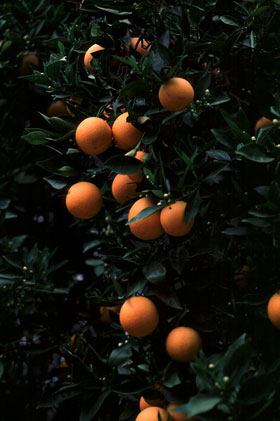
  • Step 1. Open the photo in your photo editor. We will enhance the photo of an orange-tree taken at a short distance. The photo is dark, the contrast is poor and therefore the leaves and fruits in the background are hardly visible.
    Photo of an orange-tree
  • Step 2. Call AKVIS Enhancer plugin. To this effect select the command Filter - AKVIS - Enhancer in Adobe Photoshop; the menu item Effects - Plugins- AKVIS - Enhancer if you work with Jasc Paint Shop Pro; or Effects - AKVIS - Enhancer if you use Corel PHOTO-PAINT.

    You will see the following AKVIS Enhancer window with the photo processed at default parameter values.

    AKVIS Enhancer window

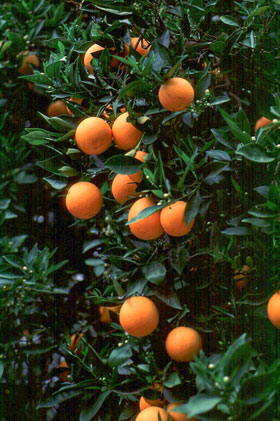
    The photo has been improved at the default parameters and we do not need to correct it further. The level of detail has increased, the image has become more contrasting, and you can see even the smallest leaves of the orange-tree.

  • Step 3. Press the button Ok in the Toolbar to apply the result of the photo correction and close the plugin window.
    The original photo Result of the image enhancement
    Before After
 
AKVIS Enhancer Plug-In AKVIS Enhancer Plug-In
   — Spazio di Lavoro — Spazio di Lavoro
   — Funzionamento — Funzionamento
   — Focus mode — Focus mode
   — Batch Processing — Batch Processing
AKVIS Enhancer - HDR program AKVIS Enhancer - HDR program
   — Spazio di Lavoro — Spazio di Lavoro
   — Enhancer mode — Enhancer mode
   — Focus mode — Focus mode
   — HDR mode — HDR mode
   — High dynamic range image — High dynamic range image
Esempi Esempi
   — Foto sottoesposte da chiesa — Foto sottoesposte da chiesa
   — Fotografia scura — Fotografia scura
   — Il bimbo in giardino — Il bimbo in giardino
   — Il camion in dettaglio — Il camion in dettaglio
   — La Roccaforte — La Roccaforte
   — Il cervo — Il cervo
   — Bambini africani — Bambini africani


   Privacy Policy | Mappa del Sito | Cerca nel sito | English  | Français  | Deutsch  | Español  | Português  | Italiano  | 日本語  | Pусский  | © 2004-2008, Sviluppato da AKVIS Software Inc. Diritti Riservati.