Graphic software for Windows Mac graphic software  
Enter your email address to subscribe to the AKVIS news.
 
  
  Prodotti     Download     Online Store     Tutorial     Supporto     Chi siamo
en  fr  de  es  pt  it  jp  ru    
 

Tutorial: AKVIS Enhancer

A Black Cat in a Dark Room


Questa pagina è disponibile soltanto in inglese. La traduzione italiana comparirà presto.
Se desiderate ottenere una licenza gratuita per la traduzione, prego di scrivere noi.

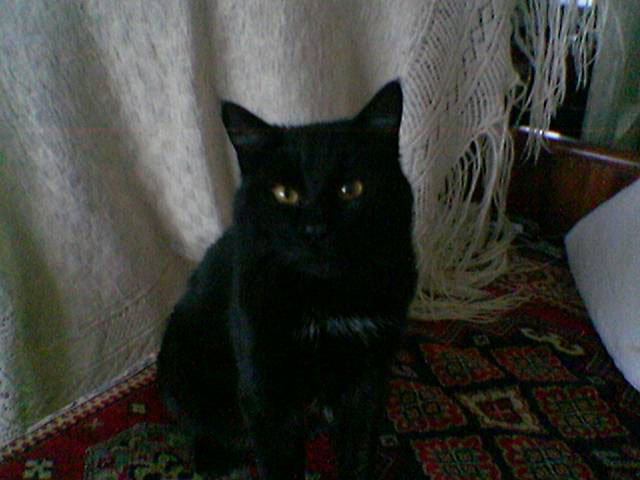
Have you ever tried searching for a black cat in a dark room? A difficult task. The author of the snapshot managed not only to find the cat but even take a photo of it with the built-in camera of his mobile phone. However, the quality of the photo is poor due to bad lighting. We will resort to the help of AKVIS Enhancer to shed light upon the black cat.

a photo taken with a mobile phone

Open the photo in your photo editor and call AKVIS Enhancer Plug-in.

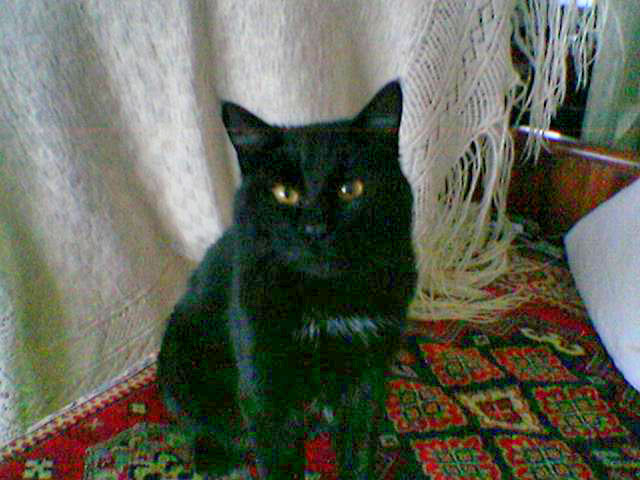
You will see the AKVIS Enhancer window with the photo processed at the default parameter values. The default value of the parameter Level of Detail is 5. As the photo is of poor quality, the increase in detail revealed color noise. To reduce the color noise, move the slider of Level of Detail to 2.

As the photo is dark we should increase the value of the parameter Shadows. We set the parameter to 80 and see the details in the shadows while the details in the light parts of the image are not affected.

Adjust the parameters

Press the button Ok to apply the results of detail enhancement and close the plug-in's window.
the original photo detail enhancement
Before After

The photo was of bad quality and the detail enhancement also revealed color noise in the dark areas. To get rid of color and luminance noise you can apply AKVIS Noise Buster. See a tutorial to learn how it works.


AKVIS Enhancer Plug-In AKVIS Enhancer Plug-In
   — Spazio di Lavoro — Spazio di Lavoro
   — Funzionamento — Funzionamento
   — Focus mode — Focus mode
   — Batch Processing — Batch Processing
AKVIS Enhancer - HDR program AKVIS Enhancer - HDR program
   — Spazio di Lavoro — Spazio di Lavoro
   — Enhancer mode — Enhancer mode
   — Focus mode — Focus mode
   — HDR mode — HDR mode
   — High dynamic range image — High dynamic range image
Esempi Esempi
   — Fotografia scura — Fotografia scura
   — Il bimbo in giardino — Il bimbo in giardino
   — Il camion in dettaglio — Il camion in dettaglio
   — La Roccaforte — La Roccaforte
   — Il cervo — Il cervo
   — Foto sottoesposte da chiesa — Foto sottoesposte da chiesa
   — Bambini africani — Bambini africani


   Privacy Policy | Mappa del Sito | Cerca nel sito | English  | Français  | Deutsch  | Español  | Português  | Italiano  | 日本語  | Pусский  | © 2004-2008, Sviluppato da AKVIS Software Inc. Diritti Riservati.