Graphic software for Windows Mac graphic software
Inserisci la tua e-mail per essere informato delle novità:
 
  
  Prodotti     Download     Online Store     Tutorial     Supporto     Chi siamo
en  fr  de  es  pt  it  jp  ru    
 

Tutorial: AKVIS Enhancer

Technical illustration


Siamo spiacenti, questa pagina al momento è disponibile solo in lingua inglese.
La versione italiana sarà presto disponibile.
Se desiderate ottenere la licenza per la traduzione per favore scriveteci.

AKVIS Enhancer is useful not only for correction of family and art photos, but can be effective as well in technical use. Publishers of technical literature can apply Enhancer to show equipment illustrations in detail; doctors can use Enhancer to increase the level of detail on roentgenograms, etc.

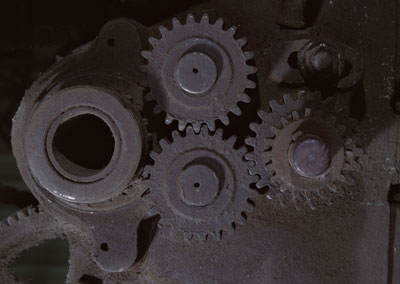
  • Step 1. Open this technical illustration in your photo editor.
    technical illustration
  • Step 2. Call AKVIS Enhancer plugin. To this effect select the command Filter - AKVIS - Enhancer in Adobe Photoshop; the menu item Effects - Plugins- AKVIS - Enhancer if you work with Jasc Paint Shop Pro; or Effects - AKVIS - Enhancer if you use Corel PHOTO-PAINT.
  • Step 3. Adjust the parameters: Level of Detail is set to 60, Highlight/Shadow priority to 30 and Intensity to 60.
    Adjust the parameters
  • Step 4. Press the button Ok in the Toolbar to apply the result of the photo correction and close the plugin window.

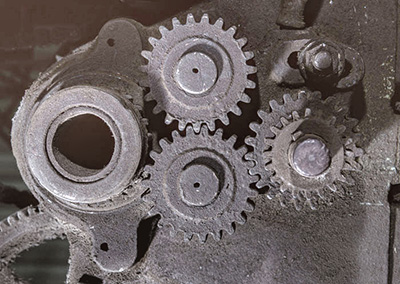
    After application of Enhancer the image has become clearer and the level of detail has increased. Now you can see every detail of the gear as well as scratches and the roughness of its surface. (You can see it more closely if you open a larger image by left-clicking on its thumbnail.)
    Technical illustration the result of correction
    Before After

 
Come funziona Come funziona
AKVIS Enhancer Plugin AKVIS Enhancer Plugin
   — Area di lavoro — Area di lavoro
   — Modalità Enhancer-Migliorare i dettagli — Modalità Enhancer-Migliorare i dettagli
   — Modalità Messa a Fuoco — Modalità Messa a Fuoco
   — Modalità Correzione Intelligente — Modalità Correzione Intelligente
   — Elaborazione batch  — Elaborazione batch
AKVIS Enhancer Standalone  (+HDR) AKVIS Enhancer Standalone (+HDR)
   — Area di lavoro — Area di lavoro
   — Modalità Enhancer-Migliorare i dettagli — Modalità Enhancer-Migliorare i dettagli
   — Modalità Messa a Fuoco — Modalità Messa a Fuoco
   — Modalità Correzione Intelligente — Modalità Correzione Intelligente
   — Modalità HDR — Modalità HDR
   — Che cosa significa HDR — Che cosa significa HDR
   — Ulteriore elaborazione — Ulteriore elaborazione
Esempi Esempi
   — Per la strada – immagine scura — Per la strada – immagine scura
   — Un bimbo in giardino — Un bimbo in giardino
   — Paesaggi montani (HDR) — Paesaggi montani (HDR)
   — Dettagli di un camion — Dettagli di un camion
   — Il castello di Neuschwanstein — Il castello di Neuschwanstein
   — La Roccaforte — La Roccaforte
   — Casali di campagna (HDR) — Casali di campagna (HDR)
   — Il cervo: eliminare la foschia — Il cervo: eliminare la foschia
   — Foto sottoesposta  di una chiesa — Foto sottoesposta di una chiesa
   — Campo da tennis — Campo da tennis
   — Tiro con l’arco — Tiro con l’arco
   — Un albero d’arance — Un albero d’arance
   — Una foto in controluce — Una foto in controluce
   — Bambini africani — Bambini africani
   — Un gatto siamese — Un gatto siamese
   — Rimozione della foschia da una foto — Rimozione della foschia da una foto
   — Un gatto nero in una stanza buia — Un gatto nero in una stanza buia
   — Correzione dell'esposizione — Correzione dell'esposizione
   — Ripristinare un’immagine scura — Ripristinare un’immagine scura
   — Khan Palace di Bakhchisarai — Khan Palace di Bakhchisarai
   — In città: correzione della luminosità — In città: correzione della luminosità
   — Visualizzare i dettagli in ombra — Visualizzare i dettagli in ombra
   — Una vecchia fabbrica di birra (HDR) — Una vecchia fabbrica di birra (HDR)
   — Il padiglione d’oro — Il padiglione d’oro
   — Un infausto passaggio: rafforzare l’effetto — Un infausto passaggio: rafforzare l’effetto


   Privacy Policy | Mappa del Sito | Cerca nel sito | English  |Français  |Deutsch  |Español  |Português  | Italiano  |日本語  |Pусский  | © 2004-2009, AKVIS Software Inc. Tutti i diritti riservati.