Graphic software for Windows Mac graphic software  
Enter your email address to subscribe to the AKVIS news.
 
  
  Prodotti     Download     Online Store     Tutorial     Supporto     Chi siamo
en  fr  de  es  pt  it  jp  ru    
 

Tutorial: AKVIS Enhancer

Remove smog from the photo


Questa pagina è disponibile soltanto in inglese. La traduzione italiana comparirà presto.
Se desiderate ottenere una licenza gratuita per la traduzione, prego di scrivere noi.

The author of the example is Catherine Schulthies.

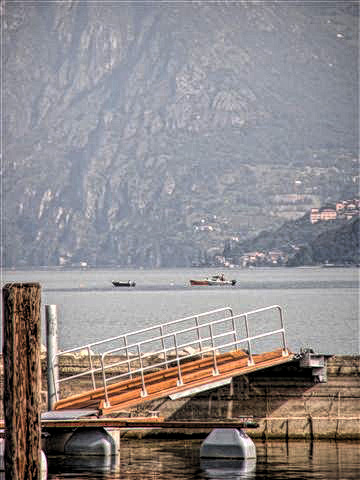
She took the photo in Italy. Unfortunately, on that day there was a smog in the air and the photo doesn't show the mountains in the background.

Catherine applied AKVIS Enhancer to retouch the photo and remove the smog. She set the following values of parameters: Level of Detail is 55; Highlight/Shadow priority is -59 and Intensity is 50.

AKVIS Enhancer did a good job - it revealed details on the pictures, and the mountains in the background became visible.
picture from Italy After the smog removal
Before After

 
AKVIS Enhancer Plug-In AKVIS Enhancer Plug-In
   — Spazio di Lavoro — Spazio di Lavoro
   — Funzionamento — Funzionamento
   — Focus mode — Focus mode
   — Batch Processing — Batch Processing
AKVIS Enhancer - HDR program AKVIS Enhancer - HDR program
   — Spazio di Lavoro — Spazio di Lavoro
   — Enhancer mode — Enhancer mode
   — Focus mode — Focus mode
   — HDR mode — HDR mode
   — High dynamic range image — High dynamic range image
Esempi Esempi
   — Foto sottoesposte da chiesa — Foto sottoesposte da chiesa
   — Fotografia scura — Fotografia scura
   — Il bimbo in giardino — Il bimbo in giardino
   — Il camion in dettaglio — Il camion in dettaglio
   — La Roccaforte — La Roccaforte
   — Il cervo — Il cervo
   — Bambini africani — Bambini africani


   Privacy Policy | Mappa del Sito | Cerca nel sito | English  | Français  | Deutsch  | Español  | Português  | Italiano  | 日本語  | Pусский  | © 2004-2008, Sviluppato da AKVIS Software Inc. Diritti Riservati.