Visualizzare i dettagli in ombra
L'autore di questo tutorial è Sanjeev Saha, Nuova Delhi, India.
AKVIS Enhancer permette di migliorare le immagini offrendo un nuovo aspetto a fotografie troppo buie o scattate senza flash. Con delle foto troppo scure sembra che l'unica decisione giusta sia quella di spostarle nel Cestino…ma non c’è fretta! Cerchiamo di correggerle.
Qui ci sono alcune foto che l'autore ha raccolto da pbase.com (sito di condivisione foto). Il risultato dopo l'utilizzo di AKVIS Enhancer è impressionante. Nessun editor di foto, anche se dotato di vari strumenti, può ottenere con semplicità e in poco tempo, lo stesso fantastico risultato.
-
Passaggio 1. Aprire l'immagine nell’editor grafico. L'autore ha usato AliveColors.
È possibile usare il plugin con qualsiasi altro editor di foto o prendere la versione standalone di Enhancer, che può essere utilizzata in modo indipendente.
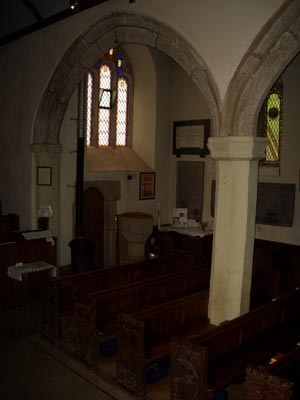
Non si vede nulla, tranne le ombre e la finestra. Quindi usare AKVIS Enhancer per vedere come questa foto può essere migliorata.
- Passaggio 2. Aprire il plugin AKVIS Enhancer dal menu principale dell'editor. In AliveColors selezionare Effetti -> AKVIS -> Enhancer.
- Passaggio 3. Regolare i parametri della modalità Migliorare i dettagli.
-
Passaggio 4. Applicare il risultato. Si può osservare la grande differenza che c’è tra queste due immagini!
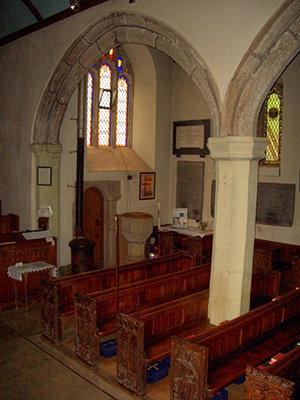
Fotografia originale scura
Risultato dopo la correzione
L'autore ha provato questo plugin su un'altra foto scattata senza flash.

Regolare i parametri per illuminare l'immagine. Il risultato è sorprendente!

E ancora questa…dopo l’applicazione del plugin AKVIS Enhancer è possibile visualizzare ogni dettaglio delle impalcature che ricoprono l'edificio.
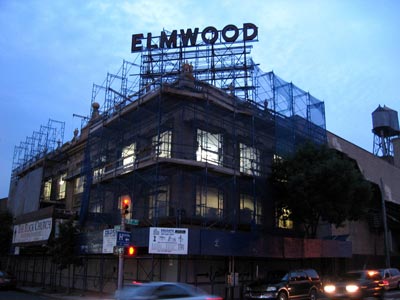
Fotografia originale scura
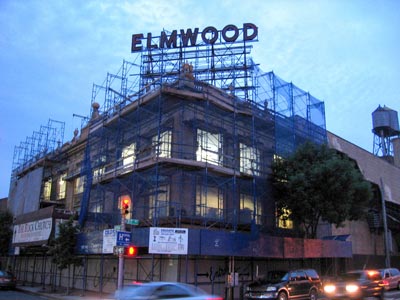
Risultato dopo la correzione
Enhancer v. 17.8 - 10-giorni di prova gratuita
