Graphic software for Windows Mac graphic software
Tragen Sie Ihre E-Mail ein, um den AKVIS-Newsletter zu abonnieren.
 
  
  Produkte     Download     Online Store     Tutorial     Support     Impressum
en  fr  de  es  pt  it  jp  ru    
 

Tutorial: AKVIS Enhancer

Show Detail in Shadows


Entschuldigung. Jetzt ist die Information nur auf Englisch vorhanden. Die deutsche Version wird bald veröffentlicht werden.

The author of the example is Sanjeev Saha, New Delhi, INDIA.

AKVIS Enhancer improves an image and gives a new look to a snap taken in the dark or without flash. It seems that the only right decision is to move your dark photos to the trash. But do not hurry! Let's try to impove them.

Here are some photos which I picked from pbase.com (photos sharing site). The result after using AKVIS Enhancer impressed me. None of the photo editor's tools can perform the same result.

    Let's open this image.

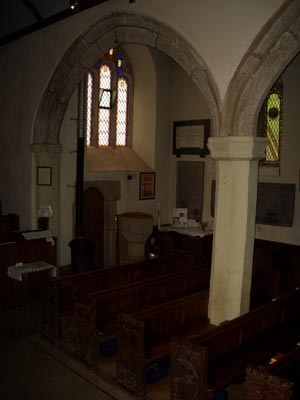
    The original image

    You see nothing except the shadows and the window. So let's use AKVIS Enhancer to see how this photo can be improved.

  • Step 1. Open this image in your photo editor. I used Jasc Paint Shop Pro 7.
    Open an image in your photo editor
  • Step 2. Now call AKVIS Enhancer from the main menu of the photo editor Effects -> Plugin -> AKVIS -> AKVIS Enhancer.
    AKVIS Enhancer window
  • Step 3. Now set the values of the parameters Shadows=25, Highlights=0, Level of Detail=6, Lightness=70 and press the button Apply to apply the result.
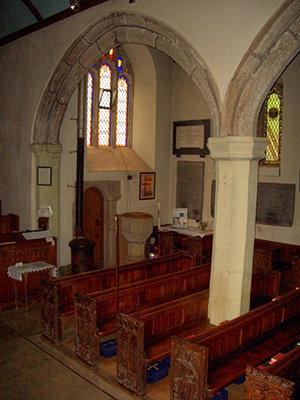
    After appying AKVIS Enhancer
  • Step 4. You can see the difference between these two images.

    The original image   Detailed enhancement
    The original dark photo The result after correction


I tried this plugin on another image taken without flash. The result is mindblowing.

Here is the image.

The original dark image

Then I set the value of the parameters Shadows=67. Highlights=0, Level of detail=2 and Lightness=67. Here is my result.

Enhancement result


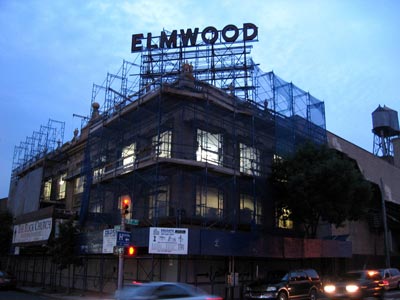
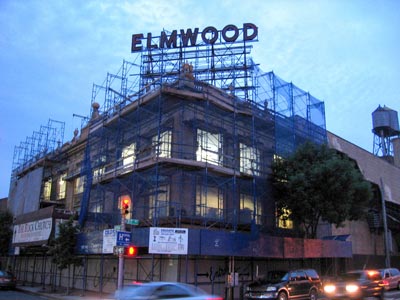
And this one. You can see the details of the screen which covers the building after using AKVIS Enhancer.

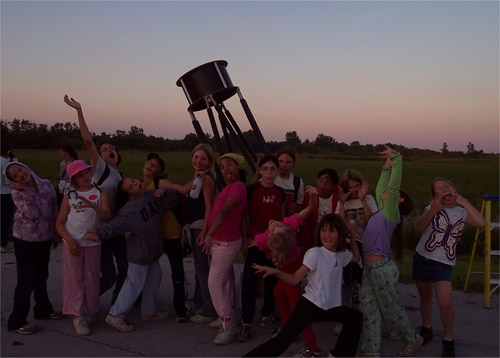
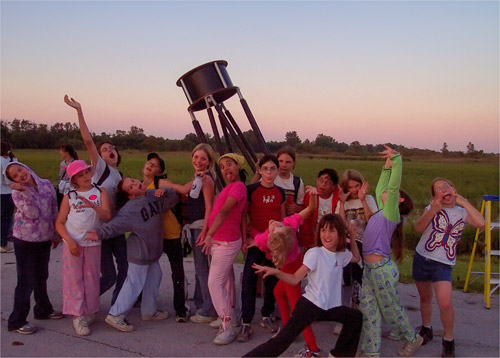
The original dark photo   The result after correction
The original dark photo The result after correction

 
Funktionsweise Funktionsweise
AKVIS Enhancer Plugin AKVIS Enhancer Plugin
   — Arbeitsbereich — Arbeitsbereich
   — Enhancer-Modus — Enhancer-Modus
   — Focus-Modus — Focus-Modus
   — Smart Correction-Modus — Smart Correction-Modus
   — Stapelverarbeitung — Stapelverarbeitung
AKVIS Enhancer - HDR Programm AKVIS Enhancer - HDR Programm
   — Arbeitsbereich — Arbeitsbereich
   — Enhancer-Modus — Enhancer-Modus
   — Focus-Modus — Focus-Modus
   — Smart Correction-Modus — Smart Correction-Modus
   — HDR Modus — HDR Modus
   — Bild mit hohem Dynamikumfang (HDR) — Bild mit hohem Dynamikumfang (HDR)
   — Nachbearbeitung — Nachbearbeitung
Beispiele Beispiele
   — Auf der Strasse — Auf der Strasse
   — Foto eines Kleinkindes — Foto eines Kleinkindes
   — Lastkraftwagen — Lastkraftwagen
   — Alte Stadt — Alte Stadt
   — Auf dem Lande (HDR) — Auf dem Lande (HDR)
   — Bildschärfe verbessern — Bildschärfe verbessern
   — Unterbelichtetes Foto einer Kirche — Unterbelichtetes Foto einer Kirche
   — Tennisplatz — Tennisplatz
   — Sportfoto — Sportfoto
   — Apfelsinenbaum — Apfelsinenbaum
   — Gegenlicht — Gegenlicht
   — Technische Illustration — Technische Illustration
   — Stadt in der Dämmerung — Stadt in der Dämmerung
   — Unterbelichtetes Foto — Unterbelichtetes Foto
   — Ein Kind mit der Rassel — Ein Kind mit der Rassel
   — Afrikanische Kinder — Afrikanische Kinder
   — Unterbelichtetes Foto einer Katze — Unterbelichtetes Foto einer Katze
   — Den Smog entfernen — Den Smog entfernen
   — Ein Dichter und Tauben — Ein Dichter und Tauben
   — Eine Katze im schwarzen Zimmer — Eine Katze im schwarzen Zimmer
   — Christkindlmarkt — Christkindlmarkt
   — Ein altes Brauhaus im neuen Glanz — Ein altes Brauhaus im neuen Glanz
   — Goldener Pavillon — Goldener Pavillon


   Datenschutzhinweis | Sitemap | Suchwort eingeben | English  |Français  | Deutsch  |Español  |Português  |Italiano  |日本語  |Pусский  | © 2004-2009, AKVIS Software Inc. Alle Rechte vorbehalten.    
inc"; ?>