Revealing details in the dark parts of the photo using AKVIS Enhancer


Ingrese su email para suscribirse a la lista de AKVIS.
 
 
  Productos     Descargar     Tienda online     Tutorial     Apoyo técnico     Compañia      Área de clientes
en  fr  de  es  pt  it  jp  ru    
 

Tutorial: AKVIS Enhancer

Show Detail in Shadows


Esta información está disponible solamente en inglés. La version en español aparecerá pronto.

The author of the example is Sanjeev Saha, New Delhi, India.

AKVIS Enhancer improves an image and gives a new look to a snap taken in the dark or without flash. It seems that the only right decision is to move your dark photos to the trash. But do not hurry! Let's try to impove them.

Here are some photos which I picked from pbase.com (photos sharing site). The result after using AKVIS Enhancer impressed me. None of the photo editor's tools can perform the same result.

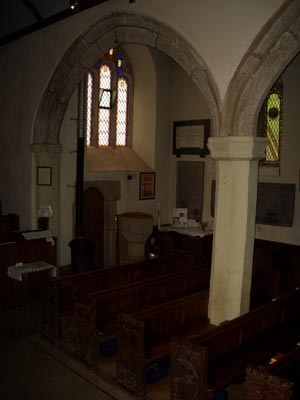
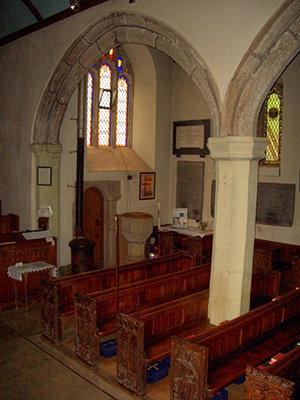
    The original image Detailed enhancement
    The original dark photo The result after correction
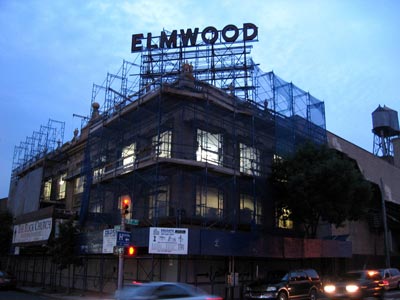
  • Step 1. Open this image in your photo editor. I used Jasc Paint Shop Pro 7.
    The original image

    You see nothing except the shadows and the window.

    So let's use AKVIS Enhancer to see how this photo can be improved.

  • Step 2. Now call AKVIS Enhancer from the main menu of the photo editor Effects -> Plugin -> AKVIS -> Enhancer and select Improve Detail mode.
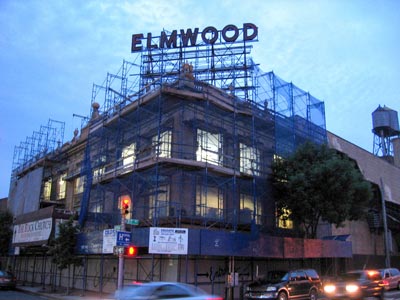
  • Step 3. Now set the values of the parameters Shadows = 25, Highlights = 0, Level of Detail = 6, Lightness = 70 and press the button to apply the result.
  • Step 4. You can see the difference between these two images.
    Detailed enhancement


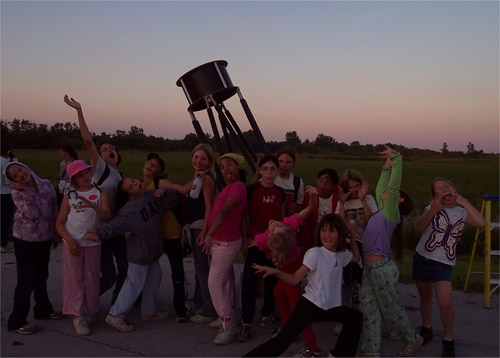
I tried this plugin on another image taken without flash. The result is mindblowing.

Here is the image.

The original dark image
The original dark photo

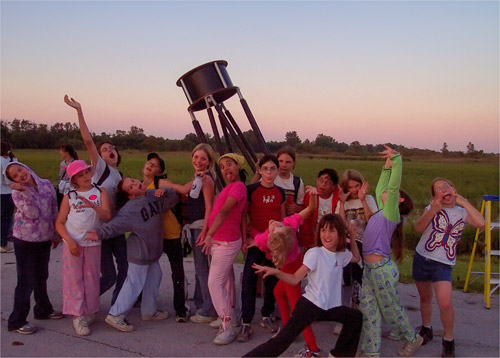
Then I set the value of the parameters Shadows = 67. Highlights = 0, Level of detail = 2 and Lightness = 67. Here is my result.

Enhancement result
The result after correction


And this one. You can see the details of the screen which covers the building after using AKVIS Enhancer.

The original dark photo   The result after correction
The original dark photo The result after correction

 
Cómo funciona Cómo funciona
   — Área de trabajo — Área de trabajo
   — Utilizar el programa — Utilizar el programa
   — Realzar detalles — Realzar detalles
   — Preimpresión — Preimpresión
   — Corrección de tonos — Corrección de tonos
   — Comparación de los modos — Comparación de los modos
   — Tratamiento posterior — Tratamiento posterior
   — Procesamiento por lotes — Procesamiento por lotes
   — Opciones — Opciones
Ejemplos Ejemplos
   — En la calle — En la calle
   — Foto de un niño — Foto de un niño
   — Camión — Camión
   — Ciudad antigua — Ciudad antigua
   — Mejorar la nitidez — Mejorar la nitidez
   — Foto oscura de una iglesia — Foto oscura de una iglesia
   — Pista de tenis — Pista de tenis
   — Foto a contraluz — Foto a contraluz
   — Tiro con el arco — Tiro con el arco
   — Naranjo — Naranjo
   — Ilustración técnica — Ilustración técnica
   — Quitar el smog — Quitar el smog
   — Ciudad en crepúsculo — Ciudad en crepúsculo
   — Foto subexpuesta — Foto subexpuesta
   — Un niño con el sonajero — Un niño con el sonajero
   — El poeta y las palomas — El poeta y las palomas
   — Gato negro en una habitación oscura — Gato negro en una habitación oscura
   — Niños africanos — Niños africanos
   — Mercado navideño — Mercado navideño


volver arriba


   Política de privacidad | Mapa Web | Buscar    
   Contáctenos | Twitter | Facebook | YouTube Channel    
| English  |Français  |Deutsch  | Español  |Português  |Italiano  |日本語  |Pусский  | © 2004-2012 AKVIS. Todos los derechos reservados.