Graphic software for Windows Mac graphic software
Ingrese su email para suscribirse a la lista de AKVIS.
 
  
  Productos     Descargar     Tienda     Tutorial     Apoyo técnico     Compañia
en  fr  de  es  pt  it  jp  ru    
 

Tutorial: AKVIS Enhancer

Photo correction


Esta información está disponible solamente en inglés. La version en español aparecerá pronto.


My name is Muhammad Faroooq Khan and I am a student of the University of Lahore where I study Electrical Engineering. My Registration No. is EE-304-056. I am also interested in Graphics Designing. So I found this useful AKVIS Enhancer Filter on web and this is something very different and extraordinary. AKVIS Enhancer filter is one of the most powerful and helpful tools to fix dark photos.

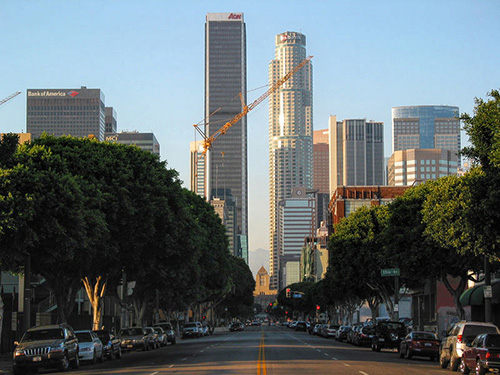
I used a dark photo of a street to show how the tool works.

a dark photo

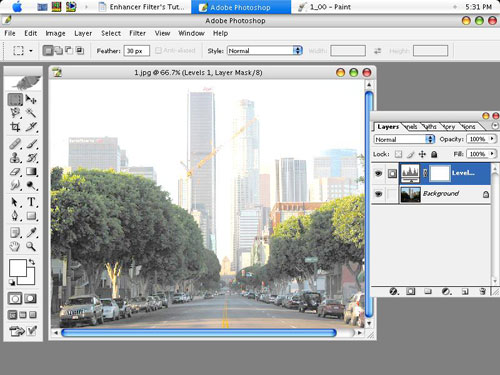
It was not easy to correct this underexposed picture in Adobe Photoshop. I tried to use LEVEL/CURVE commands but it didn't work perfectly.

As you can see the trees color is faded out and buildings look lighter than original.

After Levels command

So I decided to apply the AKVIS Enhancer filter.

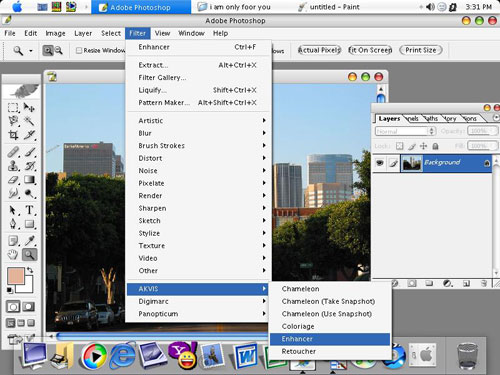
  • Step 1. I called the command Filter Menu -> AKVIS -> Enhancer and I applied the filter to my image.
    AKVIS Enhancer: default settings

    As you call the plugin it processes the original image at default parametres. Here we have Shadows=0, Highlights=0, Level of Detail=5, Lightness=50.

    Image processed at default parameters
  • Step 2. At default values the details in shadows are still hardly visible. So I increased the Shadows value to 100 and Lightness to 100 as well. Now the image looks much clearer than before.
    Adjust the parameters
  • Step 3. Then I pressed Apply and Enhancer processed the photo with new values of the parameters.
    Processing image

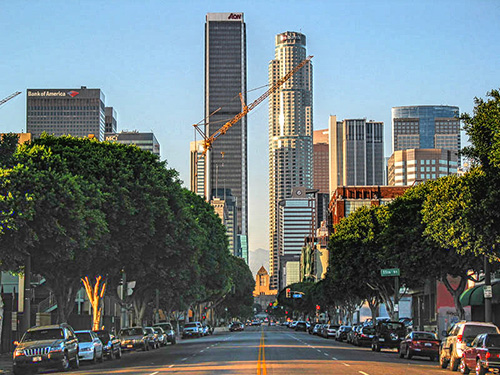
    As a result we get the following image.

    The processed photo
  • Step 4. In this step I apply the AKVIS Enhancer filter again to see more details. But now the Shadows value is 25 and Lightness is 7. On your image these values can be different. It all depends on the image.
    Photo processed with AKVIS Enhancer
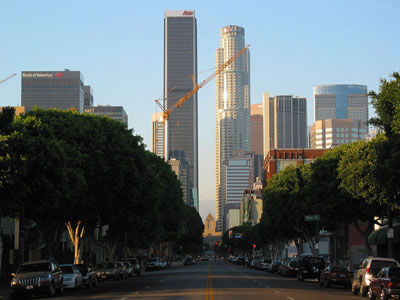
  • Step 5. So here is the final image of my tutorial.
    Ôîňîăđŕôč˙ äî č ďîńëĺ ęîđđĺęöčč
    Click on the picture to open the photo in a larger window

 
By Muhammad Farooq Khan
Electrical Engineering
Regd.No# EE-304-056
The University of Lahore, Pakistan
Muhammad Farooq Khan

 
Cómo funciona Cómo funciona
AKVIS Enhancer Plug-In AKVIS Enhancer Plug-In
   — Área de trabajo — Área de trabajo
   — Modo Enhancer — Modo Enhancer
   — Modo Focus — Modo Focus
AKVIS Enhancer Stand-alone  (+HDR) AKVIS Enhancer Stand-alone (+HDR)
   — Área de trabajo — Área de trabajo
   — Modo Enhancer — Modo Enhancer
   — Modo Focus — Modo Focus
   — Modo HDR — Modo HDR
Ejemplos Ejemplos
   — En la calle — En la calle
   — Foto de un niño — Foto de un niño
   — Camión — Camión
   — Ciudad antigua — Ciudad antigua
   — Mejorar la nitidez — Mejorar la nitidez
   — Foto oscura de una iglesia — Foto oscura de una iglesia
   — Pista de tenis — Pista de tenis
   — Tiro con el arco — Tiro con el arco
   — Capilla ortodoxa — Capilla ortodoxa
   — Naranjo — Naranjo
   — Foto a contraluz — Foto a contraluz
   — Ilustración técnica — Ilustración técnica
   — Ciudad en crepúsculo — Ciudad en crepúsculo
   — Foto subexpuesta — Foto subexpuesta
   — Un niño con el sonajero — Un niño con el sonajero
   — Niños africanos — Niños africanos
   — Un gato de Siam — Un gato de Siam
   — Quitar el smog — Quitar el smog
   — El poeta y las palomas — El poeta y las palomas
   — Gato negro en una habitación oscura — Gato negro en una habitación oscura
   — Mercado navideño — Mercado navideño


   Política de privacidad | Mapa Web | Buscar | English  | Français  | Deutsch  | Español  | Português  | Italiano  | 日本語  | Pусский  | © 2004-2008, AKVIS Software Inc. Todos los derechos reservados.