Graphic software for Windows Mac graphic software
Entrar seu e-mail para subscrição em novidades.
 
  
  Produtos     Download     Online Store     Tutorial     Suporte     Quem Somos
en  fr  de  es  pt  it  jp  ru    
 

Tutorial: AKVIS Enhancer

Show Detail in Shadows


Neste momento algumas páginas estão disponíveis somente em Inglês e em Espanhol.
Você pode obter uma licença para qualquer programa AKVIS, se traduzir os arquivos do nosso acervo
para o Português (do espanhol ou do inglês) para saber mais escreva para o team@akvis.com

The author of the example is Sanjeev Saha, New Delhi, INDIA.

AKVIS Enhancer improves an image and gives a new look to a snap taken in the dark or without flash. It seems that the only right decision is to move your dark photos to the trash. But do not hurry! Let's try to impove them.

Here are some photos which I picked from pbase.com (photos sharing site). The result after using AKVIS Enhancer impressed me. None of the photo editor's tools can perform the same result.

    Let's open this image.

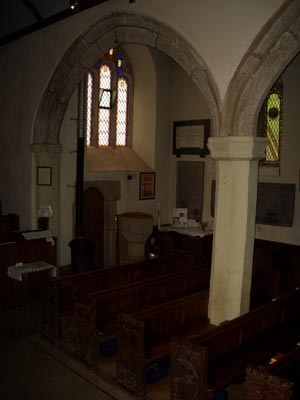
    The original image

    You see nothing except the shadows and the window. So let's use AKVIS Enhancer to see how this photo can be improved.

  • Step 1. Open this image in your photo editor. I used Jasc Paint Shop Pro 7.
    Open an image in your photo editor
  • Step 2. Now call AKVIS Enhancer from the main menu of the photo editor Effects -> Plugin -> AKVIS -> AKVIS Enhancer.
    AKVIS Enhancer window
  • Step 3. Now set the values of the parameters Shadows=25, Highlights=0, Level of Detail=6, Lightness=70 and press the button Apply to apply the result.
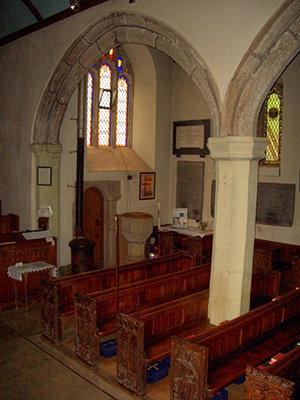
    After appying AKVIS Enhancer
  • Step 4. You can see the difference between these two images.

    The original image   Detailed enhancement
    The original dark photo The result after correction


I tried this plugin on another image taken without flash. The result is mindblowing.

Here is the image.

The original dark image

Then I set the value of the parameters Shadows=67. Highlights=0, Level of detail=2 and Lightness=67. Here is my result.

Enhancement result


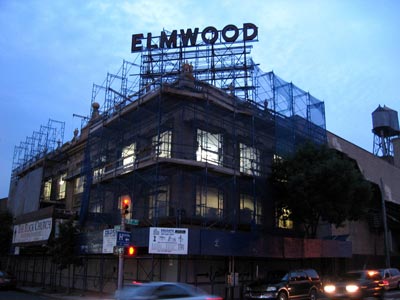
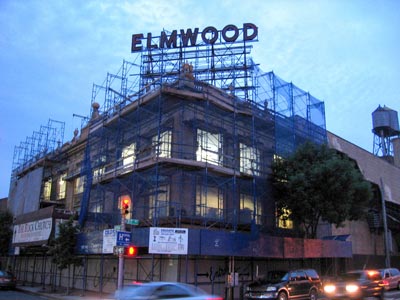
And this one. You can see the details of the screen which covers the building after using AKVIS Enhancer.

The original dark photo   The result after correction
The original dark photo The result after correction

 
Como funciona Como funciona
AKVIS Enhancer Plug-In AKVIS Enhancer Plug-In
   — Área de Trabalho — Área de Trabalho
   — Como trabalha — Como trabalha
   — Focus mode — Focus mode
AKVIS Enhancer Stand-alone  (+HDR) AKVIS Enhancer Stand-alone (+HDR)
   — Área de Trabalho — Área de Trabalho
   — Enhancer mode — Enhancer mode
   — Focus mode — Focus mode
   — HDR mode — HDR mode
Exemplos Exemplos
   — Peisagem urbano — Peisagem urbano
   — Uma criança no jardim — Uma criança no jardim
   — Um camião — Um camião
   — Uma cidade artiga — Uma cidade artiga
   — Uma fotografia do veado — Uma fotografia do veado
   — Um templo — Um templo
   — Em campo de jogo — Em campo de jogo
   — Aqueiros — Aqueiros
   — Um templo ortodoxo — Um templo ortodoxo
   — Laranjeira — Laranjeira
   — Uma imagen em frente de Sol — Uma imagen em frente de Sol
   — Uma ilustração técnica — Uma ilustração técnica
   — Em cidade de tarde — Em cidade de tarde
   — Uma fotografia escura — Uma fotografia escura
   — Pequenito com chocalho — Pequenito com chocalho
   — Um olhar através da neblina — Um olhar através da neblina


   Política de privacidade | Mapa do Site | Pesquisar na site | English  | Français  | Deutsch  | Español  | Português  | Italiano  | 日本語  | Pусский  | © 2004-2008, AKVIS Software Inc. Todos os direitos reservados.