Graphic software for Windows Mac graphic software
Entrar seu e-mail para subscrição em novidades.
 
  
  Produtos     Download     Online Store     Tutorial     Suporte     Quem Somos
en  fr  de  es  pt  it  jp  ru    
 

Tutorial: AKVIS Enhancer

A Black Cat in a Dark Room


Neste momento algumas páginas estão disponíveis somente em Inglês e em Espanhol.
Você pode obter uma licença para qualquer programa AKVIS, se traduzir os arquivos do nosso acervo
para o Português (do espanhol ou do inglês) para saber mais escreva para o team@akvis.com

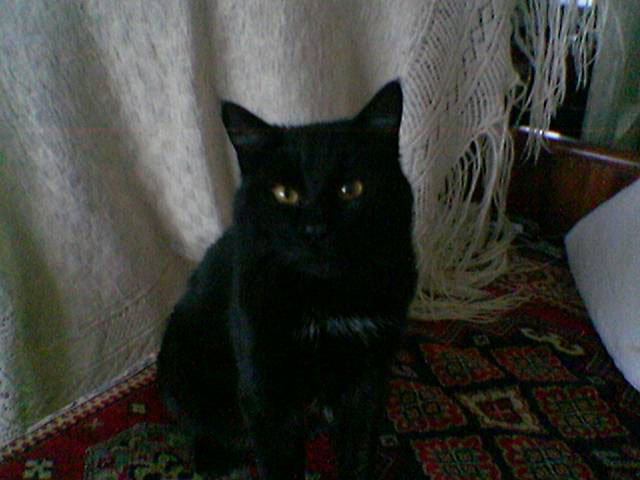
Have you ever tried searching for a black cat in a dark room? A difficult task. The author of the snapshot managed not only to find the cat but even take a photo of it with the built-in camera of his mobile phone. However, the quality of the photo is poor due to bad lighting. We will resort to the help of AKVIS Enhancer to shed light upon the black cat.

a photo taken with a mobile phone

Open the photo in your photo editor and call AKVIS Enhancer Plug-in.

You will see the AKVIS Enhancer window with the photo processed at the default parameter values. The default value of the parameter Level of Detail is 5. As the photo is of poor quality, the increase in detail revealed color noise. To reduce the color noise, move the slider of Level of Detail to 2.

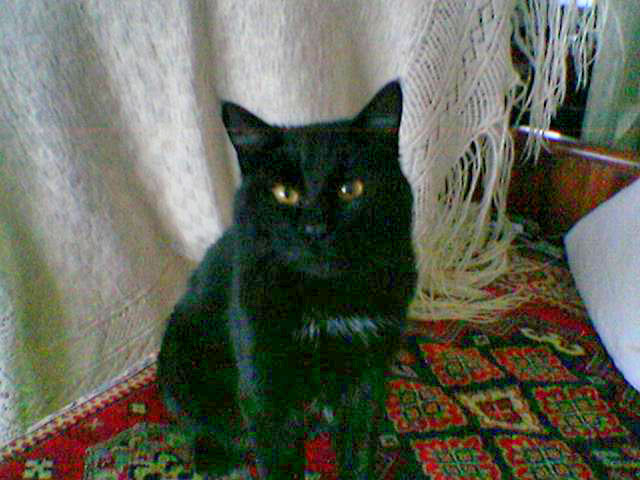
As the photo is dark we should increase the value of the parameter Shadows. We set the parameter to 80 and see the details in the shadows while the details in the light parts of the image are not affected.

Adjust the parameters

Press the button Ok to apply the results of detail enhancement and close the plug-in's window.
the original photo detail enhancement
Before After

The photo was of bad quality and the detail enhancement also revealed color noise in the dark areas. To get rid of color and luminance noise you can apply AKVIS Noise Buster. See a tutorial to learn how it works.


Como funciona Como funciona
AKVIS Enhancer Plugin AKVIS Enhancer Plugin
   — Área de Trabalho — Área de Trabalho
   — Modo Enhancer-Realçar Detalhes — Modo Enhancer-Realçar Detalhes
   — Modo Foco — Modo Foco
   — Modo Correção Inteligente — Modo Correção Inteligente
   — Procesamento em lote — Procesamento em lote
AKVIS Enhancer Standalone  (+HDR) AKVIS Enhancer Standalone (+HDR)
   — Área de Trabalho — Área de Trabalho
   — Modo Enhancer-Realçar Detalhes — Modo Enhancer-Realçar Detalhes
   — Modo Foco — Modo Foco
   — Modo Correção Inteligente — Modo Correção Inteligente
   — Modo HDR — Modo HDR
   — Imagem de Alto Rendimento Dinâmico — Imagem de Alto Rendimento Dinâmico
   — Pós processamento — Pós processamento
Exemplos Exemplos
   — Fotografia urbana — Fotografia urbana
   — Uma criança no jardim — Uma criança no jardim
   — Cenário das montanhas (HDR) — Cenário das montanhas (HDR)
   — Veja os detalhes do caminhão — Veja os detalhes do caminhão
   — Uma cidade antiga — Uma cidade antiga
   — Uma fotografia do veado — Uma fotografia do veado
   — Um templo — Um templo
   — Em campo de jogo — Em campo de jogo
   — Arqueiros — Arqueiros
   — Laranjeira — Laranjeira
   — Uma imagen em frente de Sol — Uma imagen em frente de Sol
   — Uma ilustração técnica — Uma ilustração técnica
   — Pequenito com chocalho — Pequenito com chocalho
   — Um poeta e pombas — Um poeta e pombas
   — Ume velha cervejaria sob uma nova luz — Ume velha cervejaria sob uma nova luz


   Política de privacidade | Mapa do Site | Pesquisar na site | English  |Français  |Deutsch  |Español  | Português  |Italiano  |日本語  |Pусский  | © 2004-2009, AKVIS Software Inc. Todos os direitos reservados.