Graphic software for Windows Mac graphic software  
Tragen Sie Ihre E-Mail ein, um auf AKVIS-Newsletter zu abonnieren.
 
  
  Produkte     Download     Online Store     Tutorial     Support     Impressum
en  fr  de  es  pt  it  jp  ru    
 

Tutorial: AKVIS Enhancer

Khan Palace photo


Entschuldigung. Jetzt ist die Information nur auf Englisch vorhanden. Die deutsche Version wird bald veröffentlicht werden.

The author of the example is Alexey Pasko. The example is done in Adobe Photoshop CS.


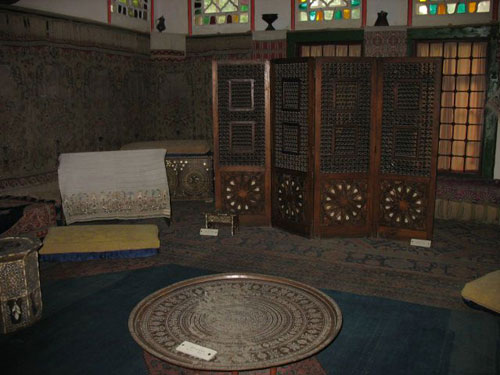
Using AKVIS Enhancer plug-in and the tools of the graphic editor Alexey corrected a photo of one of the Khan Palace rooms in Bakhchisarai. Because of the stained glass in the windows the light was week and flash could only light the nearest objects. That's why most of the image came out too dark.

Dark photo of one of the Khan Palace rooms in Bakhchisarai
  • Step 1. Open the photo in Adobe Photoshop.
  • Step 2. Create a copy of the background layer by pressing Ctrl+J.
  • Step 3. In the background copy layer call AKVIS Enhancer plug-in.

    Set parameters for revealing details. But as the carpets on the floor and the walls are ancient, the pattern can not be clear and the colors can not be saturated.

    To reveal details in the dark part of the photo increase Shadows parameter up to 75, and as the room should stay dark decrease Lightness to 15.

    AKVIS Enhancer parameters

    Apply correction results by pressing the button Apply results on the upper plug-in bar.

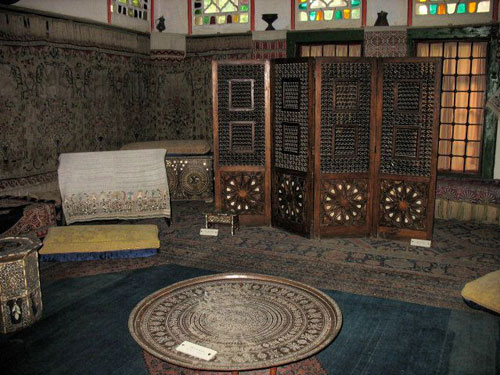
    AKVIS Enhancer correction result
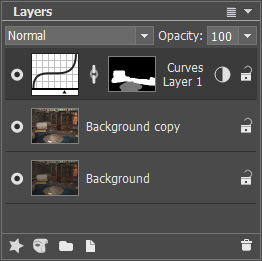
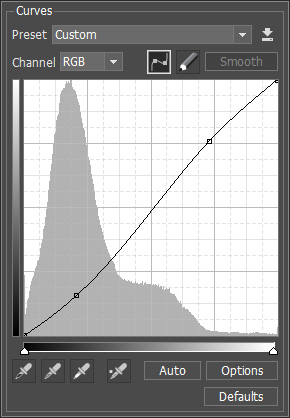
  • Step 4. Increase contrast of some details by using Curves Adjustment layer with a mask.
    Layers palette with the layers Curves dialogue window
  • Step 5. In the end increase sharpness with Unsharp Mask filter.
    Unsharp Mask parameters

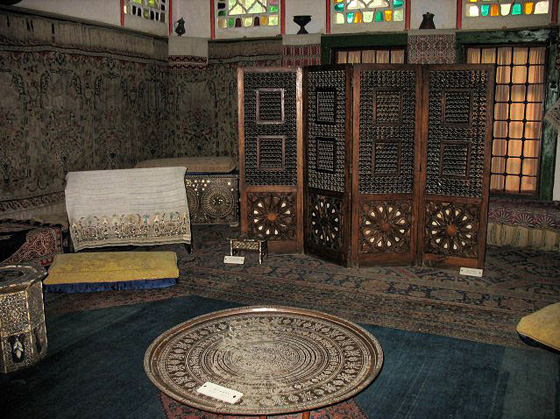
    As a result the image has become more detailed (especially in the dark part of the photo), carpet patterns and the screen trellis are better visible now and at the same time they preserved their colors.

    Photo after correction
 
AKVIS Enhancer Plug-In AKVIS Enhancer Plug-In
   — Arbeitsbereich — Arbeitsbereich
   — Enhancer-Modus — Enhancer-Modus
   — Focus-Modus — Focus-Modus
   — Stapelverarbeitung — Stapelverarbeitung
AKVIS Enhancer - HDR Programm AKVIS Enhancer - HDR Programm
   — Arbeitsbereich — Arbeitsbereich
   — Enhancer-Modus — Enhancer-Modus
   — Focus-Modus — Focus-Modus
   — HDR Modus — HDR Modus
   — Bild mit hohem Dynamikumfang (HDR) — Bild mit hohem Dynamikumfang (HDR)
Beispiele Beispiele
   — Unterbelichtetes Foto einer Kirche — Unterbelichtetes Foto einer Kirche
   — Tennisplatz — Tennisplatz
   — Auf der Strasse — Auf der Strasse
   — Foto eines Kleinkindes — Foto eines Kleinkindes
   — Sportfoto — Sportfoto
   — Lastkraftwagen — Lastkraftwagen
   — Orthodoxe Kapelle — Orthodoxe Kapelle
   — Alte Stadt — Alte Stadt
   — Bildschärfe verbessern — Bildschärfe verbessern
   — Apfelsinenbaum — Apfelsinenbaum
   — Gegenlicht — Gegenlicht
   — Technische Illustration — Technische Illustration
   — Stadt in der Dämmerung — Stadt in der Dämmerung
   — Unterbelichtetes Foto — Unterbelichtetes Foto
   — Ein Kind mit der Rassel — Ein Kind mit der Rassel
   — Afrikanische Kinder — Afrikanische Kinder
   — Unterbelichtetes Foto einer Katze — Unterbelichtetes Foto einer Katze
   — Den Smog entfernen — Den Smog entfernen
   — Ein Dichter und Tauben — Ein Dichter und Tauben
   — Eine Katze im schwarzen Zimmer — Eine Katze im schwarzen Zimmer
   — Christkindlmarkt — Christkindlmarkt
   — Auf dem Lande (HDR) — Auf dem Lande (HDR)
   — Ein altes Brauhaus im neuen Glanz (HDR) — Ein altes Brauhaus im neuen Glanz (HDR)


   Datenschutzhinweis | Sitemap | Suchwort eingeben | English  | Français  | Deutsch  | Español  | Português  | Italiano  | 日本語  | Pусский  | © 2004-2008, AKVIS Software Inc. Alle Rechte vorbehalten.