Graphic software for Windows Mac graphic software
Entrez votre e-mail pour souscrire à notre liste de diffusion.
 
  
  Produits     Télécharger     Magasin en ligne     Tutoriel     Support     Compagnie
en  fr  de  es  pt  it  jp  ru    
 

Tutoriel: AKVIS Enhancer

Khan Palace photo


Désolé, à présent cette information n'est disponible qu'en anglais. La version française sera bientôt affichée.

The author of the example is Alexey Pasko. The example is done in Adobe Photoshop CS.


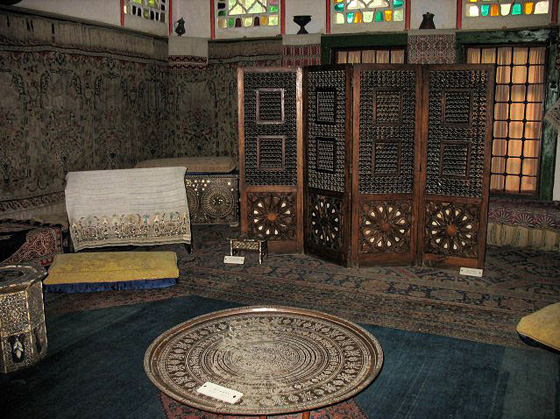
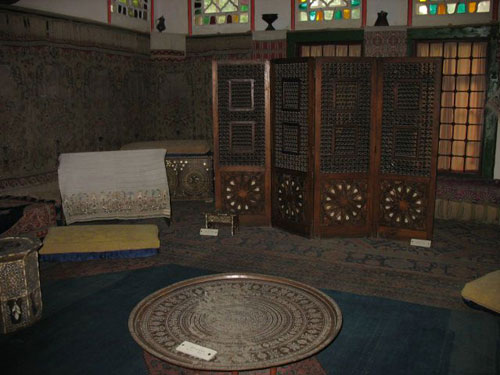
Using AKVIS Enhancer plug-in and the tools of the graphic editor Alexey corrected a photo of one of the Khan Palace rooms in Bakhchisarai. Because of the stained glass in the windows the light was week and flash could only light the nearest objects. That's why most of the image came out too dark.

Dark photo of one of the Khan Palace rooms in Bakhchisarai
  • Step 1. Open the photo in Adobe Photoshop.
  • Step 2. Create a copy of the background layer by pressing Ctrl+J.
  • Step 3. In the background copy layer call AKVIS Enhancer plug-in.

    Set parameters for revealing details. But as the carpets on the floor and the walls are ancient, the pattern can not be clear and the colors can not be saturated.

    To reveal details in the dark part of the photo increase Shadows parameter up to 75, and as the room should stay dark decrease Lightness to 15.

    AKVIS Enhancer parameters

    Apply correction results by pressing the button Apply results on the upper plug-in bar.

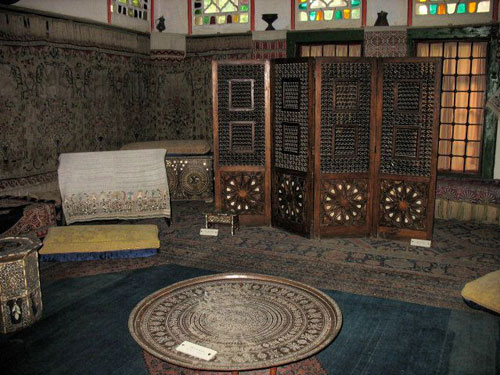
    AKVIS Enhancer correction result
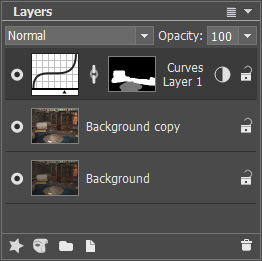
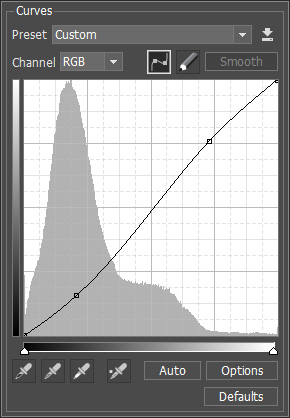
  • Step 4. Increase contrast of some details by using Curves Adjustment layer with a mask.
    Layers palette with the layers Curves dialogue window
  • Step 5. In the end increase sharpness with Unsharp Mask filter.
    Unsharp Mask parameters

    As a result the image has become more detailed (especially in the dark part of the photo), carpet patterns and the screen trellis are better visible now and at the same time they preserved their colors.

    Photo after correction
 
Comment fonctionne-t-il? Comment fonctionne-t-il?
AKVIS Enhancer Plugin AKVIS Enhancer Plugin
   — Zone de travail — Zone de travail
   — Mode Enhancer — Mode Enhancer
   — Mode Focus — Mode Focus
   — Mode Smart Correction — Mode Smart Correction
   — Traitement par lots (Batch) — Traitement par lots (Batch)
AKVIS Enhancer Standalone  (+HDR) AKVIS Enhancer Standalone (+HDR)
   — Zone de travail — Zone de travail
   — Mode Enhancer — Mode Enhancer
   — Mode Focus — Mode Focus
   — Mode Smart Correction — Mode Smart Correction
   — HDR mode — HDR mode
   — Image à grande gamme dynamique(HDR) — Image à grande gamme dynamique(HDR)
   — Traitement postérieur — Traitement postérieur
Exemples Exemples
   — Dans la rue — Dans la rue
   — Enfant dans le jardin — Enfant dans le jardin
   — Camion — Camion
   — Ville ancienne — Ville ancienne
   — À la campagne (HDR) — À la campagne (HDR)
   — Améliorer la netteté — Améliorer la netteté
   — Photo sombre d'une église — Photo sombre d'une église
   — Court de tennis — Court de tennis
   — Tir à l'arc — Tir à l'arc
   — Oranger — Oranger
   — Photo prise contre le soleil — Photo prise contre le soleil
   — Illustration technique — Illustration technique
   — La ville au crépuscule  — La ville au crépuscule
   — Photo sous-exposée — Photo sous-exposée
   — Un bébé avec un hochet — Un bébé avec un hochet
   — Les enfants de l'Afrique — Les enfants de l'Afrique
   — Raviver photos sans flash — Raviver photos sans flash
   — Enlever le brouillard — Enlever le brouillard
   — Le poète et les pigeons — Le poète et les pigeons
   — Le chat noir — Le chat noir
   — Sauver une photo sombre — Sauver une photo sombre
   — Voir l'obscurité — Voir l'obscurité


   Politique de Confidentialité | Plan du Site | Recherche | English  | Français  |Deutsch  |Español  |Português  |Italiano  |日本語  |Pусский  | © 2004-2009, AKVIS Software Inc. Tous droits réservés.