Graphic software for Windows Mac graphic software  
AKVIS ニュースの購読を申し込むには, 電子メールアドレスを入力してください。
 
  
  プログラム     ダウンロード     サイバーショップ     チュートリアル     サポート     会社情報
en  fr  de  es  pt  it  jp  ru    
 

チュートリアル: AKVIS Enhancer

Remove smog from the photo


あいにく, このページは英語にだけ使用可能です。日本語のバージョンは遠からず出ります。

The author of the example is Catherine Schulthies.

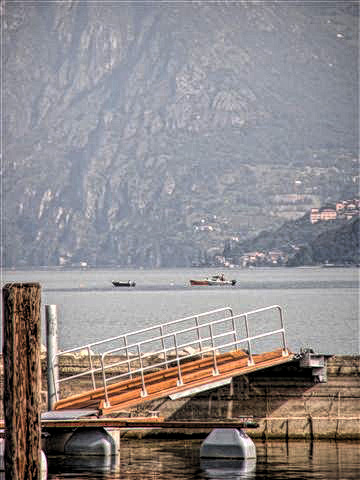
She took the photo in Italy. Unfortunately, on that day there was a smog in the air and the photo doesn't show the mountains in the background.

Catherine applied AKVIS Enhancer to retouch the photo and remove the smog. She set the following values of parameters: Level of Detail is 55; Highlight/Shadow priority is -59 and Intensity is 50.

AKVIS Enhancer did a good job - it revealed details on the pictures, and the mountains in the background became visible.
picture from Italy After the smog removal
Before After

 
AKVIS Enhancer プラグイン AKVIS Enhancer プラグイン
   — ワークスペース — ワークスペース
   — Enhancerモード
 — Enhancerモード
   — フォーカス モード
 — フォーカス モード
   — バッチ処理 — バッチ処理
AKVIS Enhancer - HDR AKVIS Enhancer - HDR
   — ワークスペース — ワークスペース
   — Enhancerモード
 — Enhancerモード
   — フォーカス モード — フォーカス モード
   — 連続した写真の処理(HDRモード) — 連続した写真の処理(HDRモード)
   — HDRIとは? — HDRIとは?
操作例 操作例
   — 教会 — 教会
   — 街路 — 街路
   — 庭で遊ぶ子供 — 庭で遊ぶ子供
   — 大型トラック — 大型トラック
   — 古代都市 — 古代都市
   — シカ — シカ
   — 高地の風景(HDR) — 高地の風景(HDR)


   プライバシー | サイトマップ | Web サイトの検索 | English  | Français  | Deutsch  | Español  | Português  | Italiano  | 日本語  | Pусский  | © 2004-2008, AKVIS Software Inc. All rights reserved.